
HDMI terminology is often confusing because HDMI cable type, HDMI connector type, and HDMI port type are not the same thing. Standard, Mini, and Micro HDMI mainly describe the physical connector form factor, while actual cable performance also depends on the HDMI cable category, certification, construction, length, and the capabilities of the connected devices.
Same HDMI connector ≠ same cable performance. Two cables can use the same HDMI connector shape but support different bandwidth, resolution, refresh-rate, or feature levels. Likewise, a smaller Micro HDMI connector does not automatically mean lower video quality than Standard HDMI.
This blog will explains the main HDMI connector types, HDMI port types, and current HDMI cable types used in 2026. It also shows how to identify Standard, Mini, and Micro HDMI, how cable categories differ from connector sizes, and how to check compatibility, performance requirements, and common connection problems before choosing a cable.
HDMI Cable Type vs Connector Type vs HDMI Version: What Is the Difference?
HDMI cable type, HDMI connector type, and HDMI version are three different concepts. They are often used interchangeably, but they describe different parts of an HDMI connection.
| Term | Example | Describes |
|---|---|---|
| HDMI Connector Type | Type A, Type C, Type D, Type E | Physical connector and port format |
| HDMI Cable Type / Category | High Speed, Premium High Speed, Ultra High Speed, Ultra96 | Cable performance category and certification |
| HDMI Specification | HDMI 2.0, HDMI 2.1, HDMI 2.2 | Features and system capabilities |
For example, Micro HDMI is a connector type, specifically HDMI Type D. It does not automatically define a fixed bandwidth, resolution, or refresh rate.
Likewise, HDMI 2.1 is not a connector type. It refers to a generation of the HDMI specification and the features supported by compatible equipment.
This distinction matters because two cables may use the same HDMI connector shape but belong to different performance categories.

What Are the Different HDMI Connector Types?
There are several HDMI connector types, identified as Type A through Type E. For most consumer and commercial equipment, the three most commonly recognized formats are Type A (Standard HDMI), Type C (Mini HDMI), and Type D (Micro HDMI). Type B is a historical dual-link design, while Type E is designed for automotive applications.
| HDMI Type | Common Name | Typical Application |
|---|---|---|
| Type A | Standard HDMI | TVs, monitors, PCs, game consoles and AV equipment |
| Type B | Dual-Link HDMI | Historical design; rarely encountered in typical equipment |
| Type C | Mini HDMI | Cameras and compact equipment |
| Type D | Micro HDMI | Small cameras, embedded and space-constrained equipment |
| Type E | Automotive HDMI | Vehicle and automotive multimedia applications |
The three most important types to recognize are:
HDMI Type A = Standard HDMI
HDMI Type C = Mini HDMI
HDMI Type D = Micro HDMI
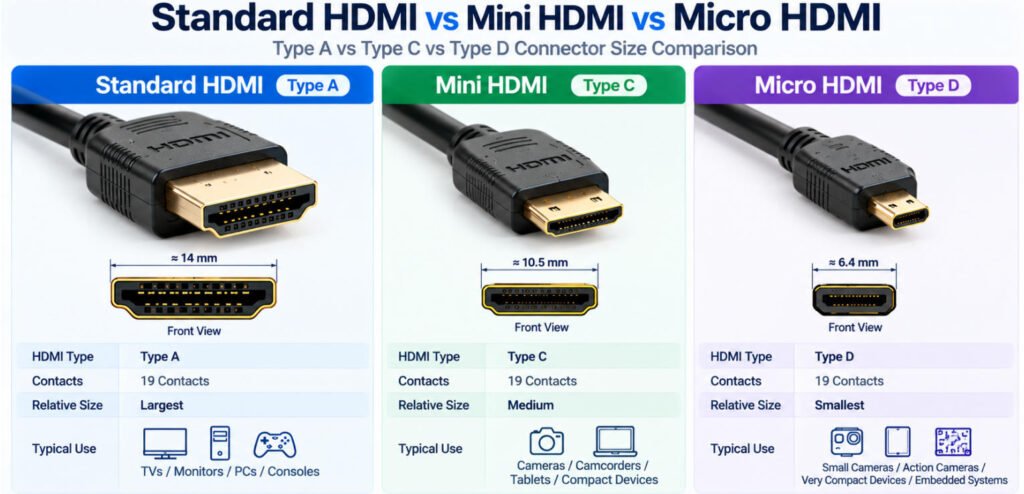
Standard HDMI Type A is the full-size connector commonly found on televisions, monitors, PCs, and consoles. Mini HDMI Type C uses a smaller form factor for compact equipment, while Micro HDMI Type D is smaller again for applications where connector space is limited.
Type E is designed for automotive applications rather than typical consumer electronics. Automotive connector suppliers such as TE Connectivity still offer HDMI Type E connectors and cable assemblies with features intended for vehicle environments, including locking, shielding, vibration, and shock considerations.
In our experience, when identifying different HDMI connectors, connector size alone is only the first step. The device documentation should still be checked because the physical HDMI type does not by itself determine cable bandwidth or supported video features.
How Do You Identify an HDMI Port Type?
To identify an HDMI port, use this workflow:
Port Shape → Port Size → Label → Device Type → Connector Specification
Check the following details:
- Port width and physical size
- Connector profile
- Contact arrangement
- Device label
- Device manual or specification
A quick identification guide is:
Standard HDMI / Type A — the largest and most common HDMI port, widely used on TVs, monitors, PCs, and game consoles.
Mini HDMI / Type C — smaller than Type A, but still noticeably larger than Micro HDMI.
Micro HDMI / Type D — smaller and thinner, commonly used where device space is limited.
If you are asking what HDMI port do I have, do not rely on size alone when ordering a replacement cable. Check the device specification whenever possible, especially when distinguishing Mini HDMI from Micro HDMI.
Standard HDMI vs Mini HDMI vs Micro HDMI: What Is the Difference?
The main difference between Standard HDMI, Mini HDMI, and Micro HDMI is the connector size and mechanical form factor. All three use 19 contacts, but they are designed for devices with different space requirements.
| Feature | Standard HDMI | Mini HDMI | Micro HDMI |
|---|---|---|---|
| HDMI Type | Type A | Type C | Type D |
| Contacts | 19 | 19 | 19 |
| Relative Size | Largest | Medium | Smallest |
| Common Use | TVs, monitors, PCs | Cameras and compact equipment | Very compact and space-limited devices |
| Main Difference | Full-size connector format | Smaller connector format | Smallest common HDMI connector format |
Standard HDMI / Type A
Standard HDMI Type A is the largest and most widely used connector. It is common on TVs, monitors, desktop PCs, game consoles, and AV equipment.
Mini HDMI / Type C
Mini HDMI Type C provides the same basic HDMI interface in a smaller mechanical format. It is often used where a full-size connector would take up too much space, especially in cameras and compact electronics.
Micro HDMI / Type D
Micro HDMI Type D is the smallest of these three common HDMI connector formats. It is intended for devices with very limited PCB and enclosure space.
The key point is:
The primary difference is connector size and mechanical format—not automatically picture quality.
A smaller HDMI connector does not inherently mean lower resolution, lower bandwidth, or poorer image quality. Actual performance depends on the source device, display, cable category, implementation, and supported HDMI features.
For connector identification, remember:
Type A = Standard HDMI
Type C = Mini HDMI
Type D = Micro HDMI
Micro HDMI vs Mini HDMI: How Can You Tell the Difference?
The easiest way to distinguish Micro HDMI vs Mini HDMI is by the connector size and HDMI type designation.
Mini HDMI = HDMI Type C
Micro HDMI = HDMI Type D
Micro HDMI is smaller and thinner than Mini HDMI
Both use 19-contact HDMI connector formats
They are not physically interchangeable
The core difference is:
Micro HDMI and Mini HDMI perform the same general HDMI interface function, but they use different physical connector formats.
Because both connectors are smaller than Standard HDMI, they are sometimes confused when viewed in photos. A Mini HDMI connector is larger than a Micro HDMI connector, while Type D is designed for more space-constrained devices.
If you are comparing HDMI Type C vs Type D, the most reliable method is to check the device manual, port specification, or connector drawing rather than relying only on appearance.
In our experience, incorrect cable purchases often happen because users identify a small HDMI port as “Mini HDMI” without confirming whether the device actually uses Type C or Type D.
Micro HDMI vs Micro USB: What Is the Difference?
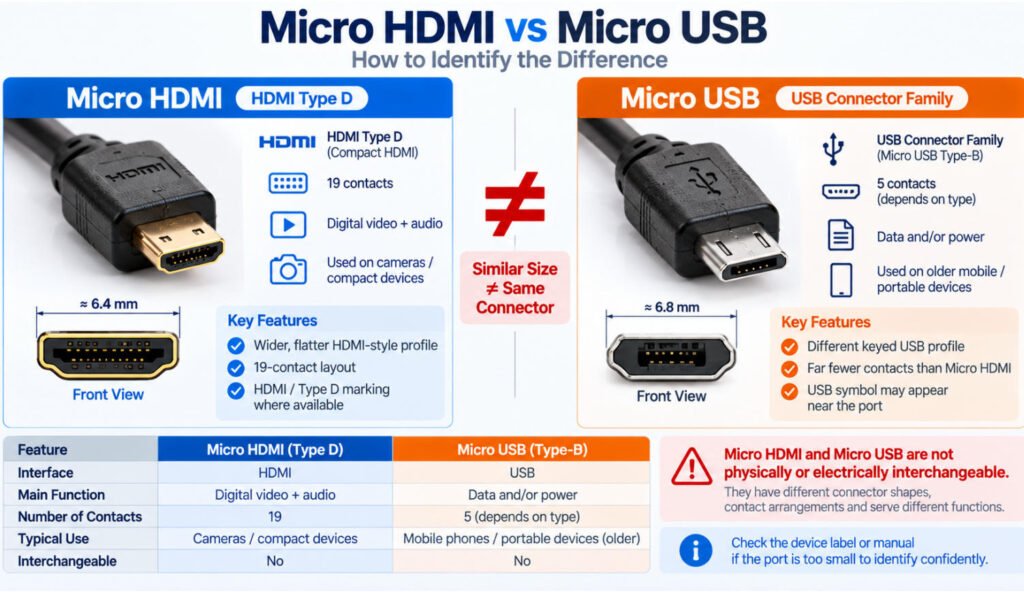
Micro HDMI and Micro USB may look similar because both are compact connectors, but they belong to completely different interface families and are not compatible.
A Micro HDMI connector is HDMI Type D. It uses 19 contacts and is designed to carry HDMI digital video and audio signals between compatible devices.
Micro USB, by contrast, belongs to the USB interface family. Depending on the device and implementation, it may be used for data communication, power, charging, or other USB functions.
| Feature | Micro HDMI | Micro USB |
|---|---|---|
| Interface Family | HDMI | USB |
| Common Connector Name | HDMI Type D | Micro-USB |
| Contacts | 19 | Depends on Micro-USB type |
| Main Function | Digital video and audio | Data and/or power |
| Physically Compatible | No | No |
Although a Micro HDMI port and a Micro USB port may appear similar in size, their connector profiles, contact arrangements, electrical interfaces, and intended functions are different.
The key rule is:
Similar size does not mean the connectors or electrical interfaces are compatible.
When identifying Micro HDMI vs Micro USB, do not rely only on the overall connector size. Check the port shape, device label, manual, and connector specification before selecting a cable.
A Micro USB plug should never be forced into a Micro HDMI connector, or vice versa.
Does Micro HDMI Have 19 Pins?
Yes. HDMI Type D, commonly called Micro HDMI, uses 19 contacts despite its much smaller connector size.
Standard HDMI Type A, Mini HDMI Type C, and Micro HDMI Type D are all 19-contact designs. However, this does not mean their connectors are physically interchangeable. The contact pitch, connector dimensions, and mechanical layout are different for each form factor.
This is how Micro HDMI can provide the HDMI interface within a much smaller connector footprint while still using 19 contacts.
For cable identification, remember:
Type A = Standard HDMI — 19 contacts
Type C = Mini HDMI — 19 contacts
Type D = Micro HDMI — 19 contacts
If you need the detailed Micro HDMI pinout or contact assignments for cable design, refer to the connector specification or the pinout information in our Micro HDMI Cable guide.
Does a Smaller HDMI Connector Mean Lower Video Quality?
No. Connector size by itself does not determine HDMI video quality or bandwidth.
Standard HDMI, Mini HDMI, and Micro HDMI mainly describe different physical connector formats. A smaller connector does not automatically mean lower resolution, lower refresh rate, or poorer picture quality.
Actual HDMI performance depends on the complete signal path, including:
- Source device capability
- Display capability
- Cable construction
- HDMI cable category
- Cable length
- Signal integrity
- Connector termination quality
- Applicable HDMI system capabilities
For example, a Micro HDMI connection can be part of a system that supports high-resolution video, but only if the source, cable, and display all support the required performance.
The same principle applies to Mini HDMI.
Connector size ≠ video performance.
A large Standard HDMI Type A connector is not automatically “better” than a smaller Type C or Type D connector. The connector mainly defines the mechanical interface; the electrical and system design determines the actual performance.
Manufacturer Insight: In a custom HDMI cable project, we do not judge expected performance by connector size. We review the required bandwidth, cable length, construction, shielding, termination, and connected equipment because these factors have a much greater effect on signal reliability than whether the connector is Standard, Mini, or Micro HDMI.
Does Micro HDMI Support 4K?
A Micro HDMI connection can support 4K when the source device, receiving device, cable assembly, and required HDMI capabilities all support the intended video mode.
Micro HDMI is HDMI Type D, which defines the physical connector format. It does not define one fixed resolution, refresh rate, or bandwidth.
For example, when evaluating a Micro HDMI 4K 60Hz application, we check more than whether both devices have HDMI ports. The complete system requirements may include:
- Resolution — such as 3840 × 2160
- Refresh rate — such as 30Hz, 60Hz, or another required mode
- Color format and color depth
- HDR requirements
- Source device capability
- Receiving display/device capability
- Cable performance and length
- Required HDMI features and bandwidth
This is why we do not specify a custom Micro HDMI cable simply as “4K” from the connector type alone. The intended video mode and system requirements should be defined first, then the appropriate cable assembly can be selected or engineered around them.
Micro HDMI connector type ≠ guaranteed 4K capability.
Does HDMI Connector Type Determine Bandwidth?
No. HDMI connector type identifies the physical interface, while bandwidth capability depends on the complete HDMI system and cable performance.
HDMI Type A, Type C, and Type D should not be mapped directly to fixed bandwidth values such as 10.2Gbps, 18Gbps, or 48Gbps. The same connector form factor can appear in cable assemblies designed for different performance requirements.
For example:
Type A = Standard HDMI connector
Type C = Mini HDMI connector
Type D = Micro HDMI connector
These labels describe connector format—not a guaranteed bandwidth level.
HDMI’s current Ultra cable specifications cover Type A, Type C, and Type D connector formats. However, the official certification program scope can be more specific; HDMI notes that the initial Ultra High Speed HDMI Cable Certification Program was for Type A connectors.
For bandwidth, the cable category matters much more. HDMI currently distinguishes Ultra High Speed HDMI Cable for systems up to 48Gbps and Ultra96 HDMI Cable for up to 96Gbps.
The practical rule is:
Connector type tells you what fits. Cable category and system capability determine how much bandwidth the connection can actually support.
What Are the HDMI Cable Types in 2026?
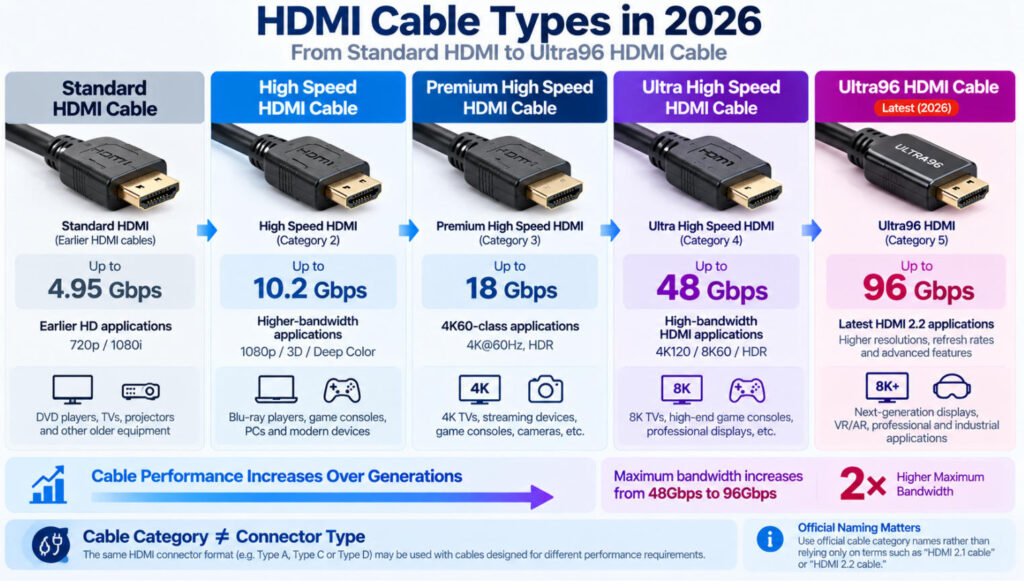
In 2026, HDMI cable types should be identified by their official cable names rather than informal labels such as “HDMI 2.0 cable” or “HDMI 2.1 cable.” The official naming system helps distinguish cables by their intended performance level and applicable testing or certification requirements.
The main HDMI cable types users are likely to encounter include:
| Official Cable Type | Performance Context |
|---|---|
| Standard HDMI Cable | Designed for earlier HD applications such as 720p and 1080i |
| High Speed HDMI Cable | Supports higher-bandwidth applications, with performance up to 10.2Gbps |
| Premium High Speed HDMI Cable | Certified for performance up to 18Gbps |
| Ultra High Speed HDMI Cable | Applicable to system configurations supporting up to 48Gbps |
| Ultra96 HDMI Cable | Latest HDMI cable type; supports up to 96Gbps and all HDMI 2.2 applications |
Standard HDMI Cable
Standard HDMI Cable was designed for earlier consumer HDMI applications and is tested for video formats such as 720p and 1080i.
Although these cables may still be encountered, many modern applications require higher cable performance.
High Speed HDMI Cable
High Speed HDMI Cable was designed and tested for higher-performance video applications than Standard HDMI Cable. Its specified performance extends up to 10.2Gbps, supporting applications beyond basic HD.
Variants such as High Speed HDMI Cable with Ethernet also exist, adding the HDMI Ethernet Channel where supported by the connected equipment.
Premium High Speed HDMI Cable
Premium High Speed HDMI Cable is associated with HDMI’s Premium Cable Certification Program. These cables are tested to support the full 18Gbps bandwidth and include additional requirements such as EMI testing.
They are intended for applications that may include 4K/Ultra HD, 4K60, HDR, and expanded color spaces, subject to the capabilities of the connected equipment.
Ultra High Speed HDMI Cable
Ultra High Speed HDMI Cable is applicable to system configurations supporting up to 48Gbps maximum bandwidth.
It was introduced with the HDMI 2.1 Specification and is designed for high-bandwidth applications including video modes such as 4K120 and 8K60.
Official Ultra High Speed HDMI Cables are covered by the HDMI cable certification program and can be identified by the appropriate certification label.
Ultra96 HDMI Cable
Ultra96 HDMI Cable is the latest HDMI cable type in 2026. It supports bandwidth up to 96Gbps and is designed to support all HDMI 2.2 applications.
Ultra96 effectively creates a new performance level above Ultra High Speed:
Ultra High Speed HDMI Cable → up to 48Gbps
Ultra96 HDMI Cable → up to 96Gbps
The HDMI Forum identifies Ultra High Speed HDMI Cable as Category 3 and Ultra96 HDMI Cable as Category 4.
Should You Call a Cable an “HDMI 2.1 Cable” or “HDMI 2.2 Cable”?
For clear cable identification, use the official HDMI cable type name rather than relying only on an HDMI specification number.
For example:
“Ultra High Speed HDMI Cable” is more precise than simply saying “HDMI 2.1 cable.”
Similarly:
“Ultra96 HDMI Cable” identifies the cable type designed to support up to 96Gbps and all HDMI 2.2 applications.
This distinction matters because:
HDMI Specification Version ≠ HDMI Cable Type
When choosing between different HDMI cable types, first determine the bandwidth and video requirements of the complete system, then select the appropriate official cable type and verify the applicable certification.
High Speed vs Premium High Speed vs Ultra High Speed vs Ultra96 HDMI
The difference between High Speed, Premium High Speed, Ultra High Speed, and Ultra96 HDMI cables is mainly their official cable designation, tested performance level, certification context, and the HDMI system requirements they are intended to support.
A practical way to view the progression is:
High Speed → Premium High Speed → Ultra High Speed → Ultra96
| HDMI Cable Type | Performance Context | Certification Context |
|---|---|---|
| High Speed HDMI Cable | Up to 10.2Gbps | Earlier High Speed cable designation |
| Premium High Speed HDMI Cable | Certified up to 18Gbps | Premium HDMI Cable Certification Program |
| Ultra High Speed HDMI Cable | Up to 48Gbps | Ultra HDMI Cable Certification Program |
| Ultra96 HDMI Cable | Up to 96Gbps | Latest Ultra certification program for HDMI 2.2 applications |
What Is an Ultra96 HDMI Cable?
Ultra96 HDMI Cable is the latest official HDMI cable type and supports bandwidth up to 96Gbps.
It was introduced as part of the HDMI 2.2 ecosystem and is designed for the highest-bandwidth HDMI applications. According to HDMI Licensing Administrator, Ultra96 HDMI Cable supports all HDMI 2.2 applications and is included in the official Ultra HDMI Cable Certification Program.
Compared with an Ultra High Speed HDMI Cable, which is intended for system configurations up to 48Gbps, an Ultra96 HDMI Cable supports up to 96Gbps.
Ultra96 cables also use official certification labels, and certified models and lengths are subject to testing and verification requirements.
However, using a 96Gbps HDMI cable does not mean every connected device will automatically operate at 96Gbps. Actual performance still depends on the source, display, supported HDMI features, required video mode, and complete system configuration.
Ultra96 HDMI Cable can also be used with existing HDMI devices, providing backward compatibility while supporting newer HDMI 2.2 applications where required.
The key point is:
Ultra96 defines the cable’s maximum supported performance not the bandwidth every HDMI device will automatically use.
Is “HDMI 2.1 Cable” or “HDMI 2.2 Cable” the Correct Name?
Terms such as “HDMI 2.1 cable” and “HDMI 2.2 cable” are commonly used in the market, but they are not the most precise way to identify an HDMI cable.
A better approach is to use the official HDMI cable designation, such as:
- Ultra High Speed HDMI Cable
- Ultra96 HDMI Cable
The reason is simple:
HDMI specification version ≠ official cable name.
For example, HDMI 2.1 refers to a generation of the HDMI specification and its supported system features, while Ultra High Speed HDMI Cable is the formal cable category associated with system configurations up to 48Gbps.
Likewise, HDMI 2.2 is the current specification generation, while Ultra96 HDMI Cable is the official cable type designed for bandwidth up to 96Gbps.
In our experience, engineering drawings and purchasing specifications are clearer when they define the required bandwidth, cable category, length, and certification requirement instead of relying only on labels such as “HDMI 2.1 cable.”
Why Does HDMI Work at 1080p but Fail at 4K or Higher Refresh Rates?
An HDMI connection that works at 1080p may fail at 4K or a higher refresh rate because the required signal data rate increases. A connection can remain stable at a lower-bandwidth video mode but become unreliable when resolution, refresh rate, color depth, or other video requirements increase.
This is why an HDMI connection may work normally at 1080p but show problems when switched to 4K, 4K60, HDR, or another higher-bandwidth mode.
Common symptoms include:
- Black screen or no signal
- Intermittent video
- Screen flickering
- Signal dropouts
- Picture appearing and disappearing
- Lower resolution works while the higher mode fails
Why Is My Micro HDMI Connection Not Working?
If a Micro HDMI connection is not working, the problem may come from the device settings, cable performance, adapter compatibility, connector condition, or the Micro HDMI port itself.
Use this table as a quick troubleshooting guide:
| Problem | Possible Cause |
|---|---|
| No Signal | Wrong input/output setting, device configuration, damaged connector |
| Works at Lower Resolution Only | Cable or system performance limitation |
| Intermittent Video | Connector movement, cable damage, signal integrity issue |
| Adapter Setup Fails | Adapter or converter incompatibility |
| Port Fits but No Video | Device port or function issue |
Check the Signal Path First
Start with the complete connection:
Source Device → Micro HDMI Cable / Adapter → Display or Capture Device
Confirm that the source is actually outputting video, the receiving device is set to the correct input, and any adapter or converter in the path supports the required signal.
Check Whether Lower Video Modes Work
If 1080p works but 4K or a higher refresh rate fails, the connection may be reaching its practical signal-performance limit.
This can point to:
- Cable loss
- Excessive length
- Adapter or coupler loss
- Connector degradation
- Higher bandwidth requirements
- Source or display limitations
Inspect the Micro HDMI Connector Carefully
Micro HDMI connectors are physically small, so mechanical strain and connector protection are especially important.
Repeated cable movement, side loading, pulling, or insufficient strain relief can damage the connector, cable termination, or device port.
From a cable engineering perspective, an intermittent Micro HDMI problem is not always purely electrical. Mechanical movement at the connector interface can also create unstable video or repeated signal dropouts.
Do Not Assume the Cable Is Always the Cause
For effective Micro HDMI troubleshooting, check:
Device Settings → Connector Condition → Cable / Adapter → Video Mode → Source Capability → Display Capability
A Micro HDMI plug fitting correctly into the port does not guarantee that the complete connection is electrically, mechanically, or functionally reliable.
How Do You Choose the Right HDMI Cable and Connector?
How Do You Choose the Right HDMI Cable and Connector?
The best way to choose an HDMI cable is to start with the required function, then select the connector and cable construction.
A practical selection workflow is:
Device A → Device B → Port Type → Required Video / Audio Function → Bandwidth Requirement → Cable Category → Length → Installation Environment
Before selecting the cable, check:
- HDMI Type A, Type C, Type D, or Type E
- Source port
- Destination port
- Required resolution
- Refresh rate
- HDR and color requirements where relevant
- Cable length
- HDMI cable category
- Passive or active cable requirement
- Repeated flexing
- Installation space
- Straight or right-angle connector
- Operating environment
For example, identifying a device as having a Micro HDMI Type D port is only the first step. You still need to confirm the required video mode, bandwidth, cable length, and mechanical installation conditions.
In our experience, many HDMI selection problems begin with choosing a cable only because the connector appears to fit.
Choose the required function first, then select the HDMI connector and cable construction.
Conclusion
The right HDMI connection should be selected by device → port → required function → performance requirement → cable category → installation environment, not by connector appearance alone.
A connector that physically fits does not automatically confirm the required bandwidth, resolution, refresh rate, or mechanical suitability. For OEM projects, these electrical and mechanical requirements should be confirmed before production.
If you are developing a custom Micro HDMI or compact HDMI cable assembly, send Yihetai your drawing, connector part numbers, required video performance, cable length, mechanical requirements, or existing sample for engineering review and quotation.
Related Wire Harness Articles:
- Computer Cable Types: A Complete Guide to PC Cables, Connectors, Ports and Uses
- AV Cable Guide: Types, AV In/Out, Connectors, Adapters & Custom Design
- Wire Strain Relief Methods: Types, Design, Testing and How to Choose the Right Solution
- What Is Overmolding Cable Assemblies and How to Know When to Use It Effectively?