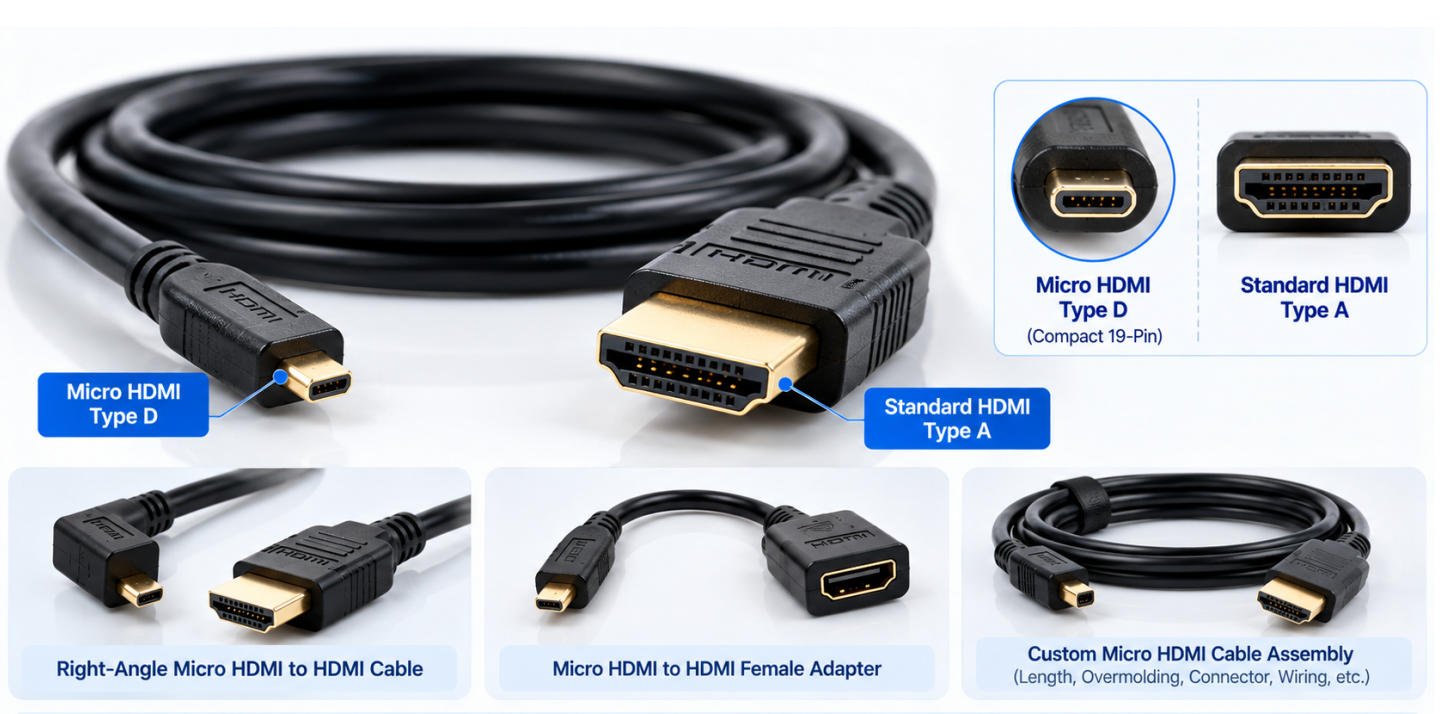
Yihetai manufactures custom Micro HDMI to HDMI cable assemblies, Micro HDMI Type D to standard HDMI cables, Micro HDMI adapters and HDMI interface cable assemblies for cameras, tablets, monitors, drones, video equipment and OEM electronics. Custom length, connector type, overmolding, shielding and electrical testing available.
A Micro HDMI cable is a compact HDMI cable that uses a Micro HDMI connector, also known as HDMI Type D, on one side. Compared with a standard HDMI Type A connector, Micro HDMI is much smaller and is designed for devices where space is limited.
Like other HDMI cable assemblies, a Micro HDMI cable is used to transmit digital audio and video signals between compatible devices. A common cable structure is Micro HDMI Type D to standard HDMI Type A, allowing a small device with a Micro HDMI output to connect to a TV, monitor, display or recorder with a standard HDMI input.
It is important not to confuse Micro HDMI with Micro USB. Although both connectors are small, they are different connector types with different interface functions. Micro HDMI is mainly used for HDMI digital audio/video transmission, while Micro USB is commonly used for USB data transfer, charging or device connection.
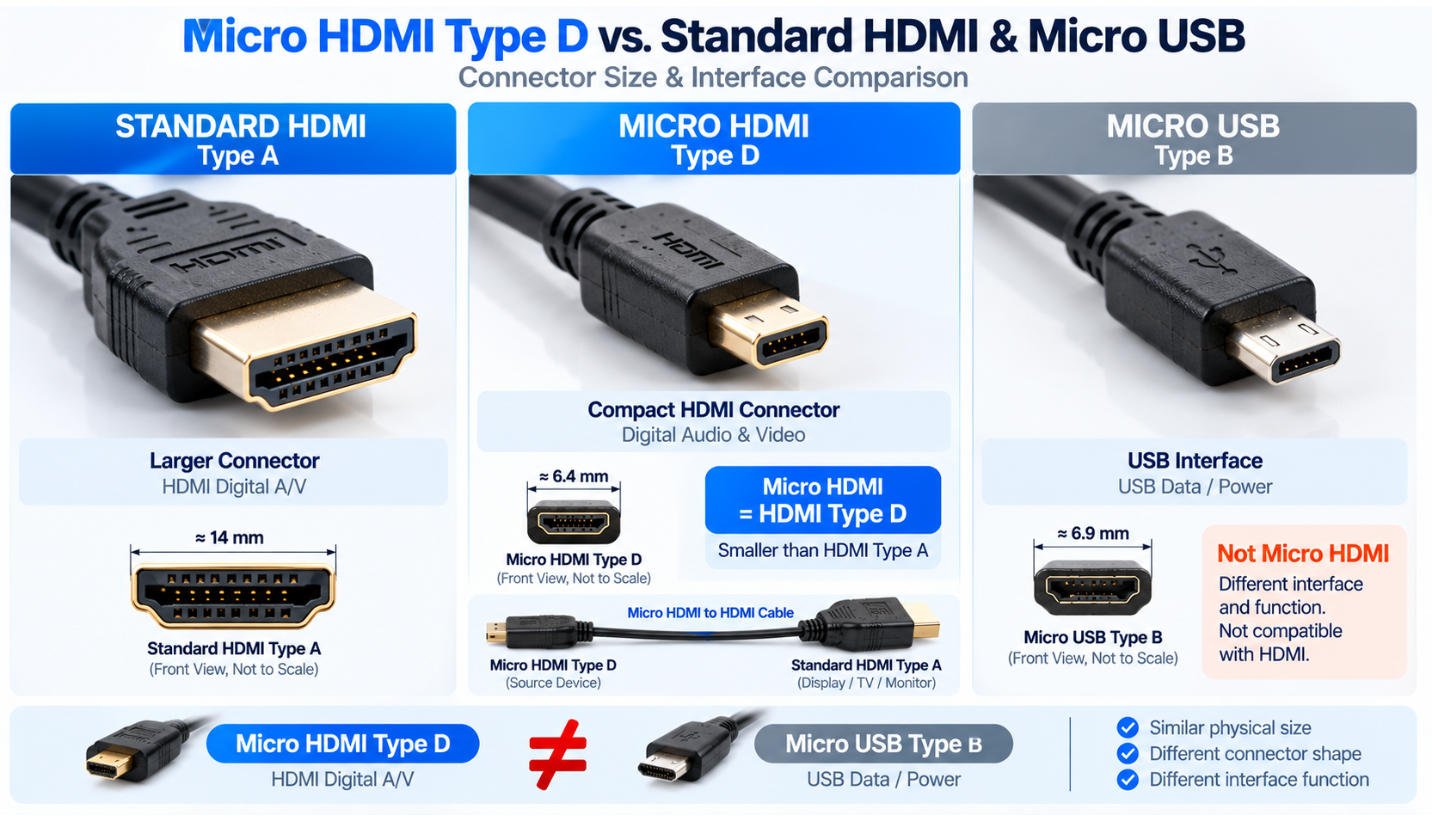
A Micro HDMI connector is the compact HDMI Type D connector designed for electronic devices where space is limited. It provides an HDMI interface in a significantly smaller connector format than the standard HDMI Type A connector.
For custom cable assemblies, a Micro HDMI connector can be combined with standard HDMI or other customer-specified connector configurations according to the equipment interface and application requirements.
A common configuration is:
Micro HDMI Type D → Cable → Standard HDMI Type A
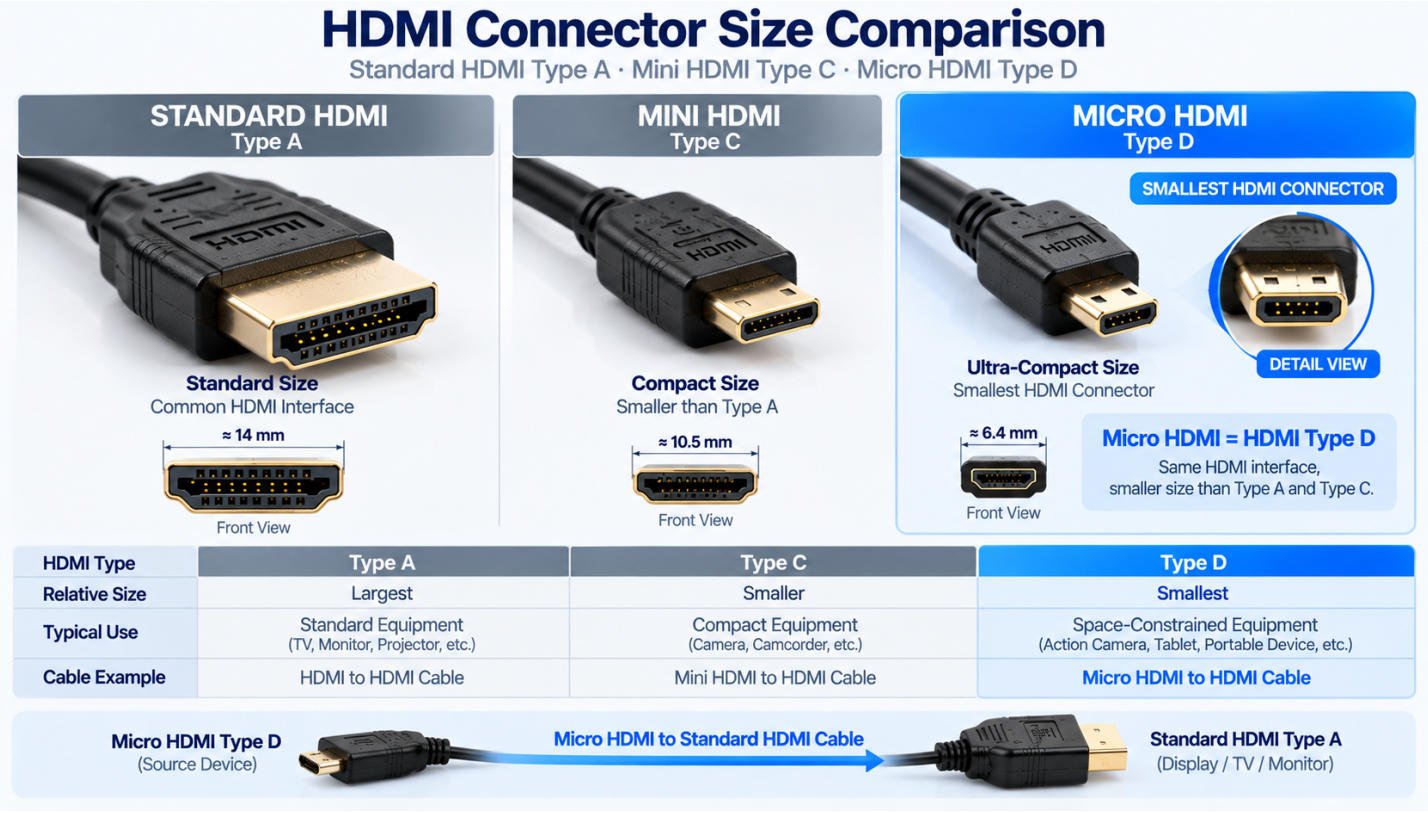
Micro HDMI is officially known as HDMI Type D. It is the smallest of the commonly used HDMI Type A, Type C and Type D connector formats.
Despite its compact physical size, the Micro HDMI Type D connector retains the 19-pin HDMI interface configuration. This makes it useful for compact devices that require an HDMI connection but have limited space available for a larger connector.
Typical Micro HDMI Type D cable configurations can include:
For OEM projects, the connector direction, mating interface, cable construction and mechanical requirements should be confirmed before production.
Connector Identification:
Micro HDMI = HDMI Type D
Mini HDMI = HDMI Type C
Standard HDMI = HDMI Type A
The main difference between Micro HDMI, Mini HDMI and Standard HDMI is the physical connector format and size.
Standard HDMI Type A is the largest and most widely recognized HDMI connector. Mini HDMI Type C provides a smaller connector format, while Micro HDMI Type D is even more compact and is commonly selected for space-constrained equipment.
Although all three belong to the HDMI connector family, Type A, Type C and Type D are physically different connectors and are not directly interchangeable. The correct cable or adapter configuration therefore depends on the interfaces used by the connected equipment.
At Yihetai, Micro HDMI cable assemblies can be customized according to the required connector configuration, cable length, connector orientation, overmolding, identification and other project specifications.
Depending on the equipment and installation environment, the cable assembly can be customized with different cable lengths, connector orientations, overmold designs, strain relief structures and identification options.
Yihetai can manufacture Micro HDMI to HDMI cables according to customer drawings, samples and project-specific mechanical requirements rather than limiting customers to standard off-the-shelf cable configurations.
One of the most common configurations is a Micro HDMI male to HDMI male cable, with a Micro HDMI Type D male connector at the device end and a standard HDMI Type A male connector at the other end.
For OEM applications, the cable assembly can be customized according to the installation space, routing requirements and equipment design.
Available customization options can include:
Yihetai can manufacture custom Micro HDMI cable assemblies according to the mechanical and installation requirements of your application.
For compact equipment, a shorter cable assembly can help reduce unnecessary cable routing. Other applications may require a longer cable, increased flexibility or a specific connector orientation to fit within the available installation space.
Custom options can include:
Yihetai provides custom Micro HDMI cable assembly solutions for OEM equipment manufacturers and electronic device companies that require specific cable lengths, connector orientations, cable constructions, and mechanical designs.
Custom Micro HDMI cables can be developed according to the installation space, bend direction, flexibility, shielding, connector molding, and appearance requirements of the final equipment.
| Custom Option | Typical Choices |
|---|---|
| Cable Length | 0.3m / 0.5m / 1m / 1.5m / 2m / Custom Length |
| Micro HDMI Connector | Straight / Right Angle / Custom Orientation |
| Cable Exit Direction | Straight / Up / Down / Left / Right* |
| Jacket | PVC / TPE / Application-Specific |
| Outer Construction | Standard / Braided Option |
| Cable OD | Customer-Specified / Application-Specific |
| Cable Color | Black / Customer-Specified |
| Connector Molding | Standard / Custom Overmold |
| Strain Relief | Application-Specific |
| Shielding | According to Project Requirements |
| Identification | Label / Printing / Part Number |
| Packaging | Standard / Custom OEM Packaging |
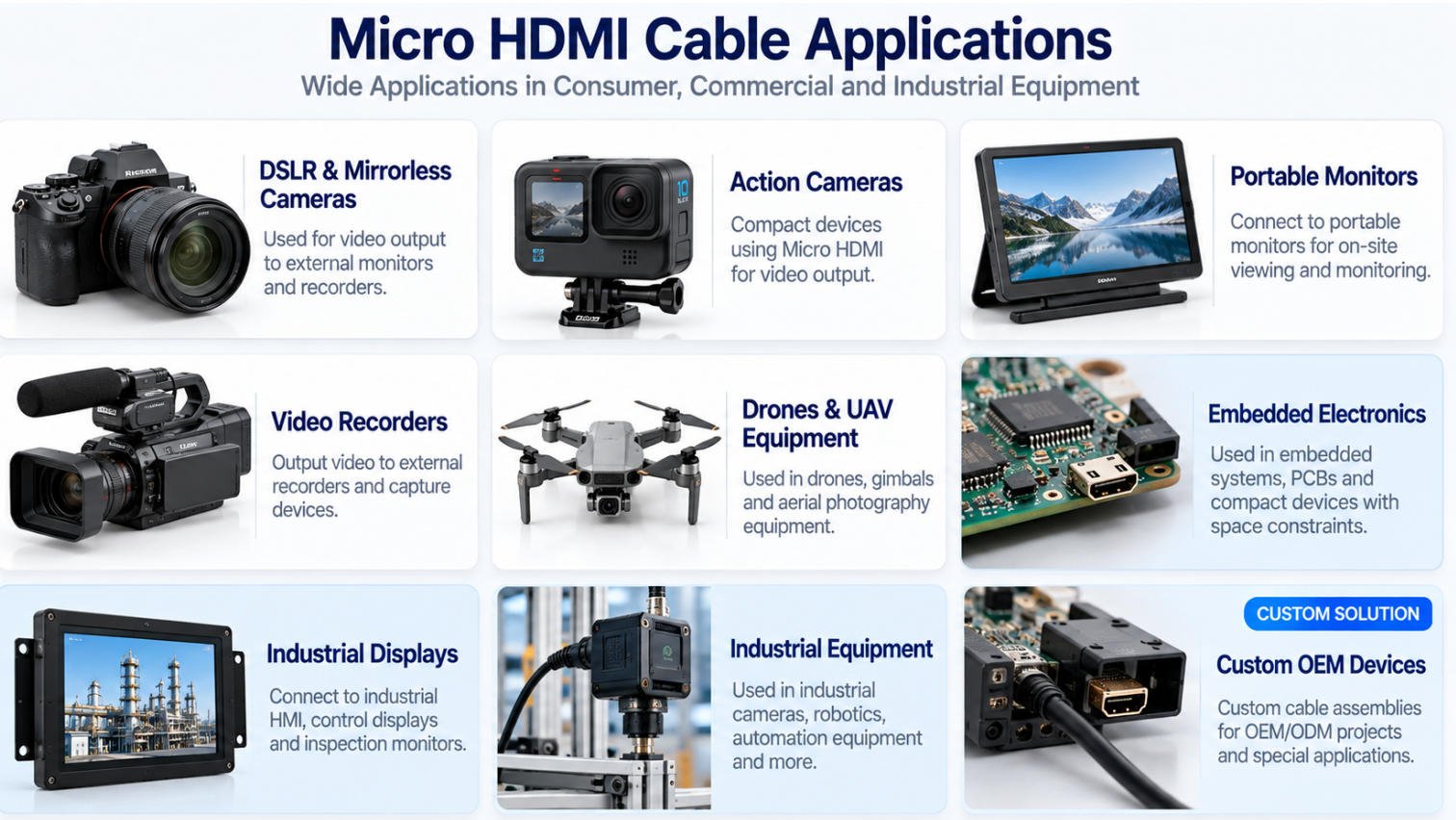
Micro HDMI connections for compatible cameras, external monitors and video equipment.
Compact Micro HDMI cable solutions for portable imaging and recording equipment.
Micro HDMI Type D to HDMI connections for compact and portable display systems.
Custom cable lengths and connector configurations for compatible recording and monitoring equipment.
Compact cable assemblies for space-conscious video and imaging applications.
Short cables, custom lengths and specific connector orientations for embedded electronic systems.
Custom Micro HDMI assemblies for industrial displays, monitoring and HMI-related equipment.
Equipment-specific cable routing, connector orientation and mechanical configurations.
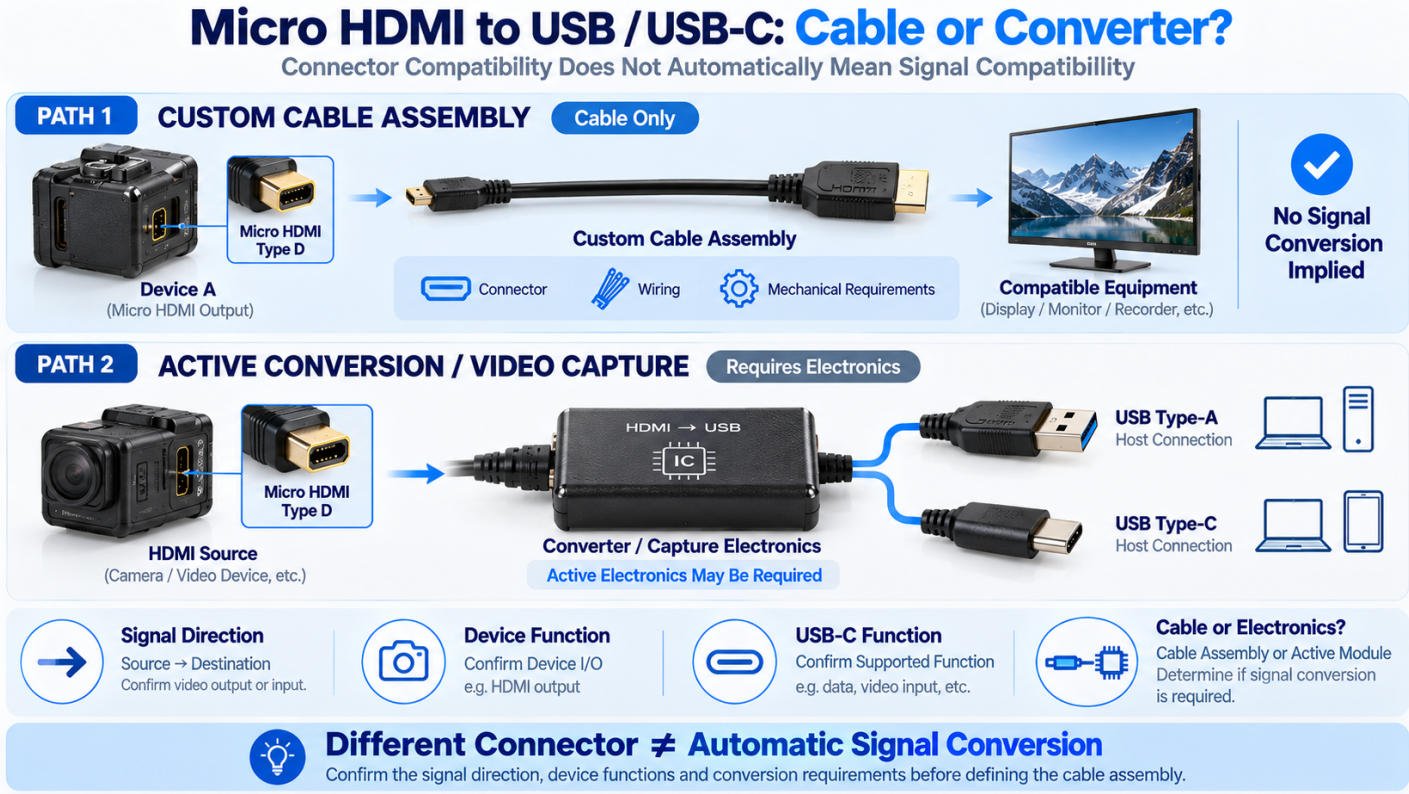
A Micro HDMI cable to USB or USB-C is not always a simple passive cable. Micro HDMI and USB are different interfaces, and changing the connector at each end does not automatically make their signals compatible.
Micro HDMI Type D is primarily used as an HDMI digital audio and video interface. USB and USB-C, however, can be used for different functions depending on the connected equipment, including data communication, power delivery, video-related functions or connection to a video capture device.
Therefore, before specifying a Micro HDMI to USB or USB-C cable assembly, it is important to determine the signal direction, function of each interface and whether active conversion or capture electronics are required.
A Micro HDMI cable to USB application may involve more than connecting a Micro HDMI connector to a USB connector with passive wiring.
For example, a Micro HDMI-to-USB-related connection may be part of:
A common camera or video-capture system may follow a structure such as:
Camera Micro HDMI Output → HDMI Connection → Capture / Conversion Electronics → USB → Computer or Host Device
In this type of application, the capture or conversion electronics perform the required interface conversion. The cable itself should not be assumed to convert an HDMI signal directly into USB data.
A Micro HDMI cable to USB-C also requires careful consideration of the functions supported by the connected devices.
USB-C describes the physical connector format, but a USB-C connector can be used for different functions depending on the device and system design. The presence of a USB-C port alone does not mean that it can directly accept or output an HDMI signal.
Before developing a Micro HDMI to USB-C connection, the following should be confirmed:
| Design Requirement | What to Confirm |
|---|---|
| Signal Direction | Which device is the source and which is the destination? |
| Micro HDMI Function | Is the Micro HDMI interface providing HDMI audio/video output? |
| USB-C Function | What functions and video capabilities does the USB-C port actually support? |
| Conversion Requirement | Is active signal conversion required between the two interfaces? |
| Capture Requirement | Is the application intended to capture HDMI video through a USB-connected device? |
| Cable or Module | Is the requirement a passive cable assembly, an active converter, or a cable connected to an electronic module? |
For example, these are fundamentally different requirements:
Micro HDMI → USB-C Connector
and
Micro HDMI Output → Active Conversion / Capture Electronics → USB-C
They may look similar from the outside, but the internal system design and electrical requirements can be very different.
For this reason, Yihetai recommends confirming the complete interface requirements before defining a custom Micro HDMI cable to USB-C assembly.
Many customers search for a Micro HDMI cable to USB when they want to connect a camera, video device, embedded board or portable electronic product to a computer, USB capture device or USB-based system.
However, Micro HDMI and USB are different interfaces. Micro HDMI is normally used for HDMI digital audio and video output, while USB may be used for data transfer, power supply, device communication or video capture depending on the equipment design.
One of the most common requirements is sending video from a device with a Micro HDMI output to equipment connected through USB.
For example, a camera capture system may use the following connection:
Camera Micro HDMI OUT → Capture Electronics → USB → Computer / Host
In this configuration, the capture electronics are an important part of the system. They receive the HDMI audio/video signal and provide the appropriate USB-side interface for the computer or host equipment.
A simple passive cable does not automatically convert an HDMI video output into USB data.
If your application requires HDMI video to be received by a computer through USB, the system may therefore require a video capture device, converter or other active electronics, rather than only a passive Micro HDMI-to-USB cable.
Cameras are a common application for Micro HDMI connections. A DSLR, mirrorless camera, action camera or other imaging device may provide a Micro HDMI output for external video equipment.
When the destination is a computer or another USB host, a typical system can be:
Camera → Micro HDMI Cable → Video Capture Device → USB → Computer
In this case, the Micro HDMI cable carries the HDMI signal to the capture equipment, while the capture device handles the required interface processing before connecting to the USB host.
Yes. Micro HDMI is HDMI Type D, a compact 19-pin HDMI connector designed for cameras, portable electronics and other space-constrained devices.
The main difference is connector size. Micro HDMI Type D is much smaller than standard HDMI Type A, and a Micro HDMI to standard HDMI cable connects compatible devices using these two connector types.
Mini HDMI is HDMI Type C, while Micro HDMI is HDMI Type D. Micro HDMI is smaller, and the two connector types are physically different and not directly interchangeable.
Not directly through a simple passive cable. A Micro HDMI cable to USB application, such as video capture, may require capture or conversion electronics between the HDMI source and USB host.
It depends on the equipment and USB-C function. A Micro HDMI cable to USB-C should not be assumed to convert signals directly; active conversion or capture electronics may be required.
An HDMI adapter connects HDMI to another connector format or configuration. Some adapters only change the physical connection, while others require active signal conversion.
Yes, compatible digital DVI and HDMI equipment can be connected using a DVI to HDMI cable or adapter. The DVI type, connector configuration and equipment compatibility should be confirmed first.
Not always. Audio support depends on the source device, DVI implementation and connected equipment, so a DVI to HDMI adapter with audio should not be assumed to carry audio in every application.
Generally, HDMI to VGA requires active conversion because HDMI is digital while VGA is analog. A passive cable alone normally cannot perform this signal conversion.
Not necessarily. HDMI and DisplayPort are different interfaces, and an HDMI-to-DisplayPort connection may require active conversion depending on the equipment and signal direction.
Send us your drawing, connector orientation, required cable length, cable specification or existing sample. Yihetai can manufacture Micro HDMI cable assemblies according to your equipment and project requirements.
We will contact you within 24 hours, please pay attention to the email with the suffix “info@yihetai-cable.com”.