Yihetai manufactures high-quality custom S-Video cables and 4-pin Mini-DIN cable assemblies for analog video equipment, legacy displays, retro gaming systems and OEM electronic applications.
An S-Video cable is an analog video cable designed to transmit standard-definition video by separating the picture signal into two components: luminance (Y) and chrominance (C). This Y/C structure helps reduce the signal interference that can occur when brightness and color information are combined into a single composite video path.
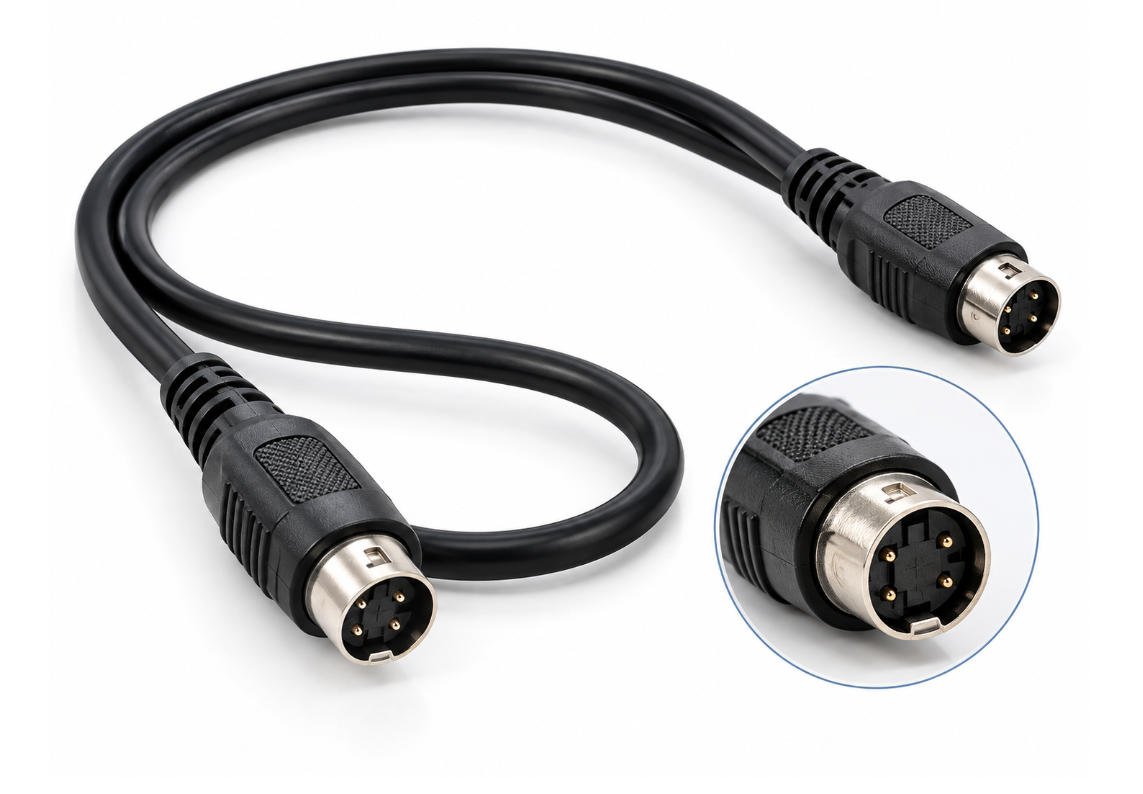
Most standard S-Video connections use a 4-pin Mini-DIN connector.
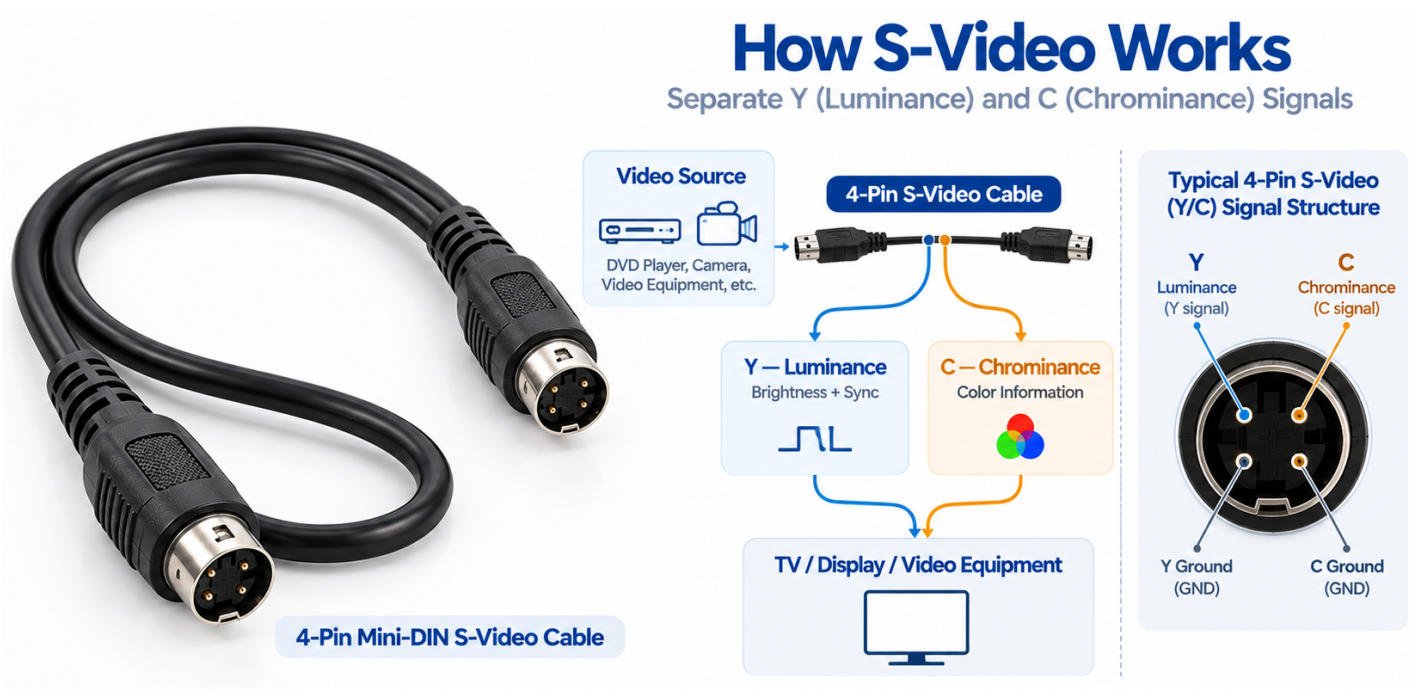
S-Video, also called Y/C video, separates the video signal into:
Because these signals travel on separate paths, an s-video y c cable can generally provide cleaner analog video transmission than composite video under compatible equipment conditions.
A typical 4-pin S-Video cable carries the Y and C signals together with their corresponding ground connections between a source device and a display, recorder, or other compatible video equipment.
S-Video itself carries video only. Audio must be connected separately, commonly through RCA audio cables or another dedicated audio interface.
Composite video combines brightness, color, and synchronization information into one signal path, usually through a single RCA video connector.
S-Video keeps Y and C separate, reducing signal mixing and helping preserve image detail. However, both are analog video formats, and compatibility depends on the actual source and display interfaces.
Yihetai manufactures custom S-Video cable assemblies with different connector configurations, cable lengths and shielding structures for analog video equipment manufacturers, industrial electronics suppliers and OEM applications.
Our product options include:
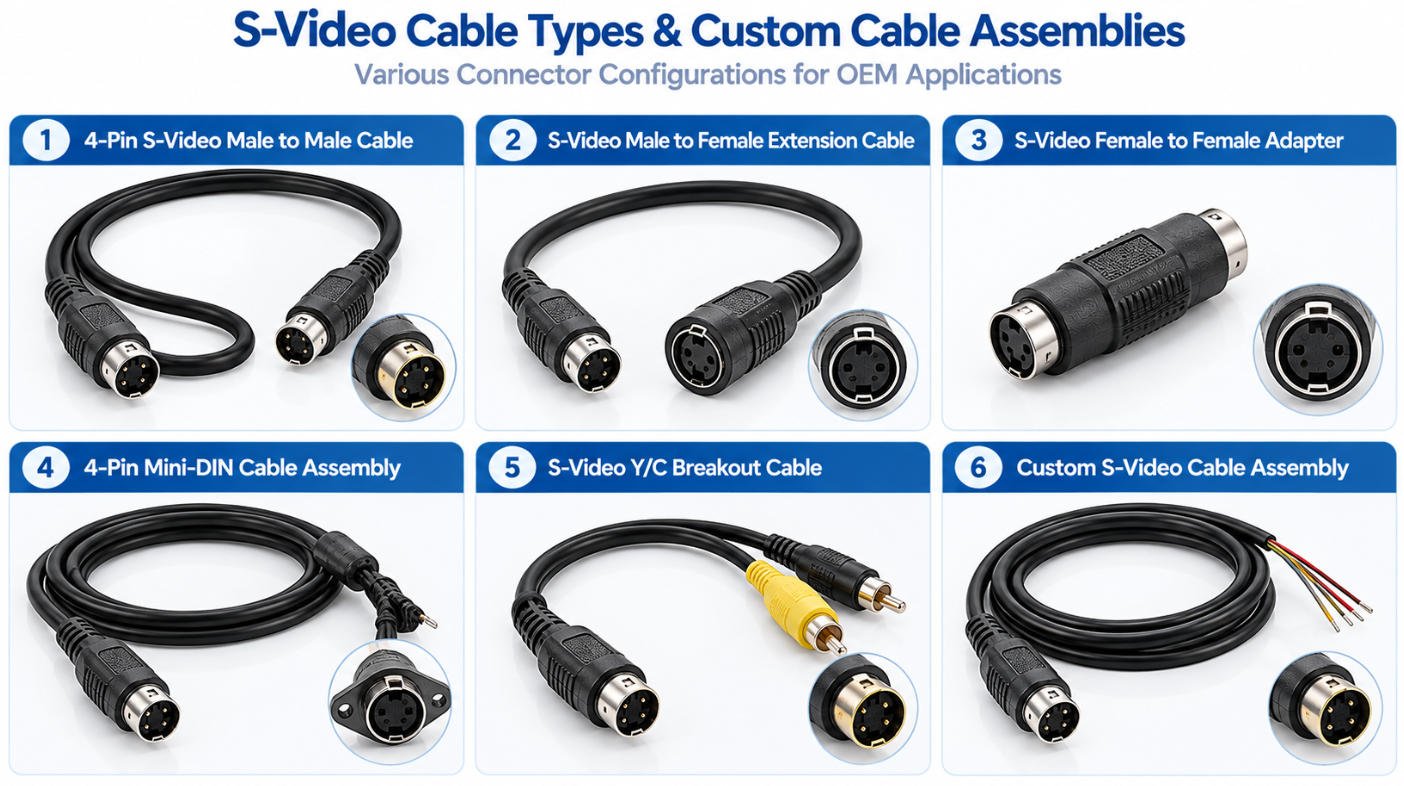
| Cable Type | Connector Configuration | Typical Application |
|---|---|---|
| 4-Pin S-Video Cable | 4-Pin Mini-DIN | Analog Y/C video connections |
| S-Video Male-to-Male Cable | Male to Male | Connecting compatible video equipment |
| S-Video Extension Cable | Male to Female | Extending an existing S-Video connection |
| Custom Mini-DIN Cable Assembly | Customer-Specified | OEM equipment and specialized applications |
For projects requiring custom 4-pin connectors, shielding, or molded strain relief, explore our custom Mini DIN molded cable assemblies.
Yihetai manufactures custom S-Video cable assemblies for legacy televisions, analog video equipment, retro gaming systems, video capture devices and industrial OEM applications. Our cables can be tailored to specific connector configurations, cable lengths, shielding requirements and approved signal specifications.
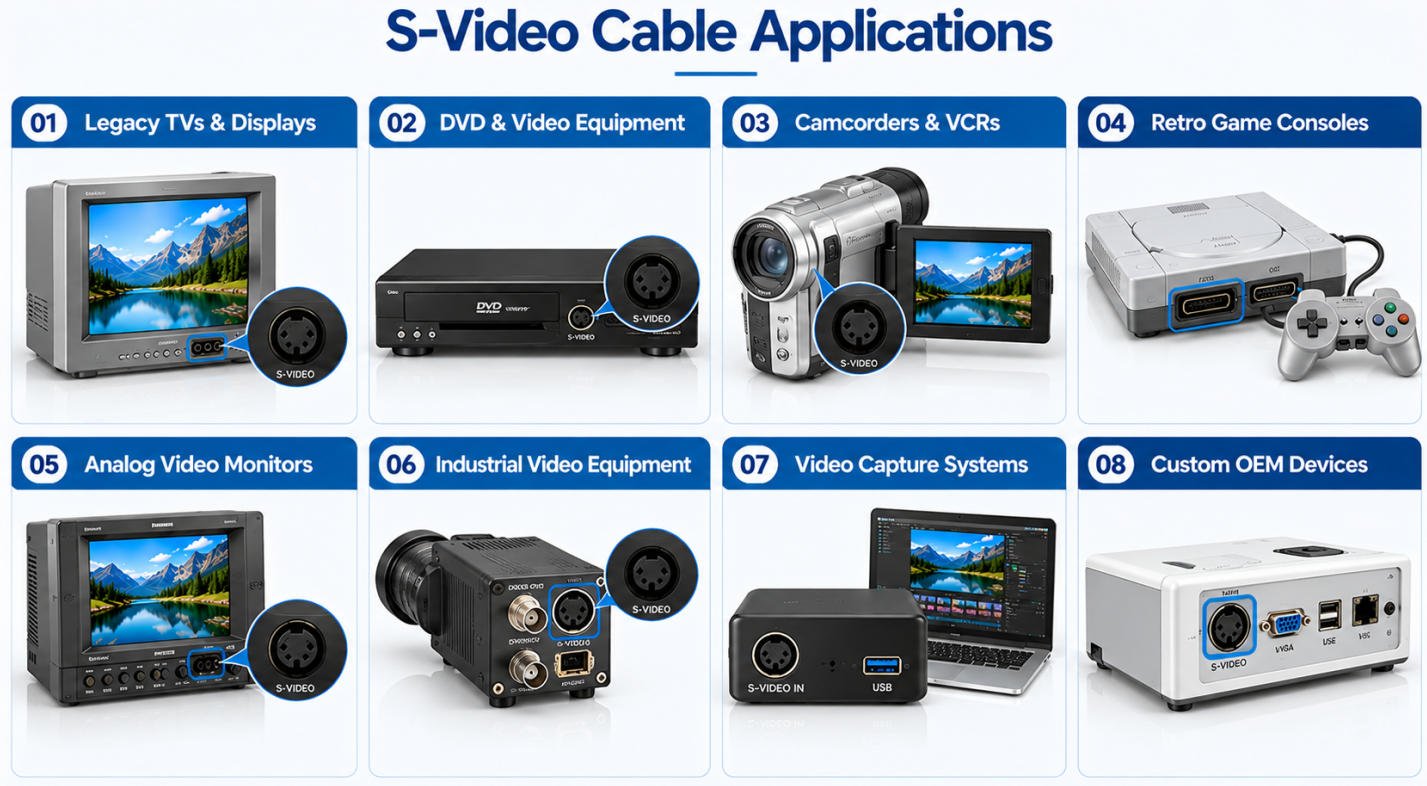
Understanding the correct S-Video cable pinout is essential for manufacturing reliable analog video cable assemblies. A standard 4-pin Mini-DIN S-Video connector carries separate luminance (Y) and chrominance (C) signals, each with its corresponding ground connection.
The standard S-Video interface commonly uses a 4-pin Mini-DIN connector with four electrical contacts and a keyed housing to help prevent incorrect insertion.
These contacts support separate Y/C analog video transmission. Although other equipment may also use 4-pin Mini-DIN connectors, identical connector shapes do not always indicate identical signal assignments.
The standard S-Video 4 pin pinout assigns two contacts to video signals and two to their corresponding grounds.
| Pin | Standard Signal | Function |
|---|---|---|
| 1 | Ground (Y) | Luminance signal return |
| 2 | Ground (C) | Chrominance signal return |
| 3 | Luminance (Y) | Brightness and picture detail |
| 4 | Chrominance (C) | Color information |
A correct Mini DIN 4 pin wiring diagram should clearly identify each signal path, ground connection, and connector terminal.
Connector viewing direction is critical when interpreting an S-Video wiring diagram.
The pin arrangement viewed from the front of a male plug differs from the arrangement viewed from the front of a mating female socket. The solder or termination side may also present a mirrored view.
Yihetai manufactures custom S-Video cable assemblies according to customer-approved drawings, connector specifications, and wiring requirements.
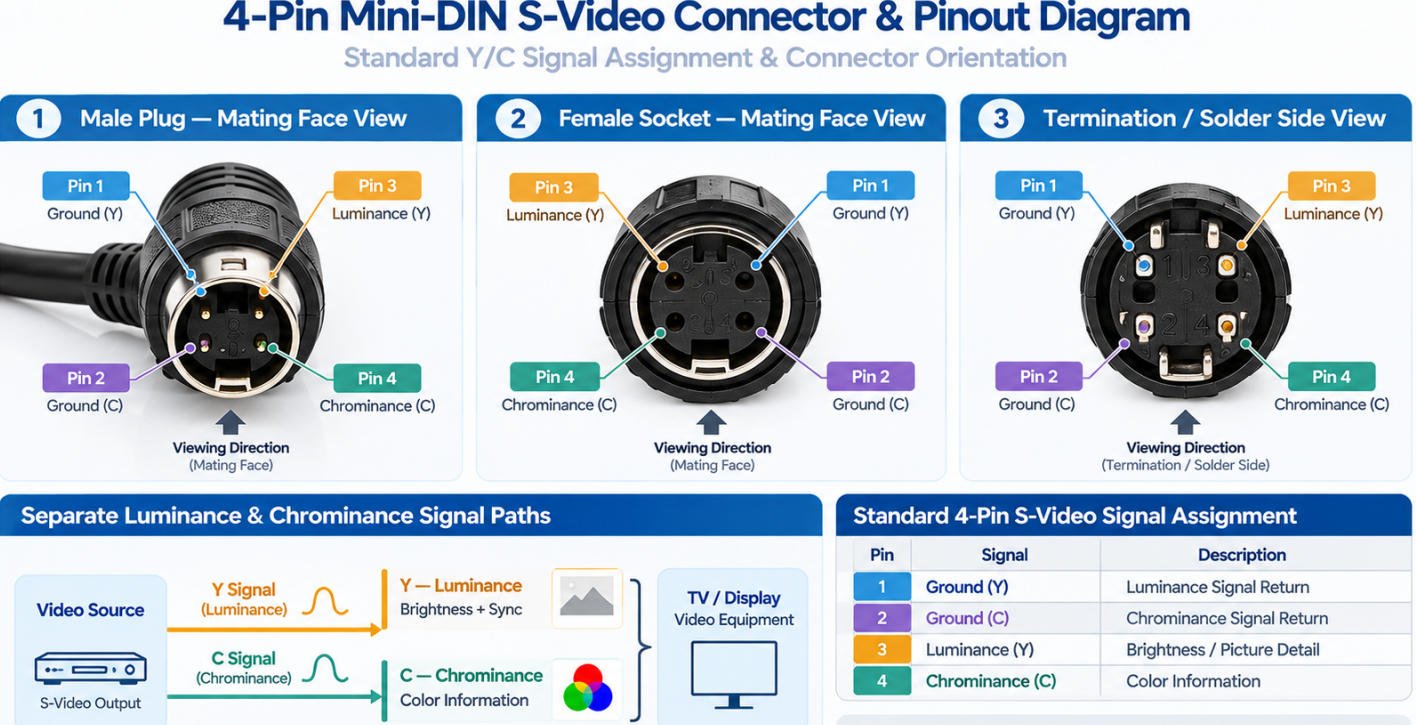
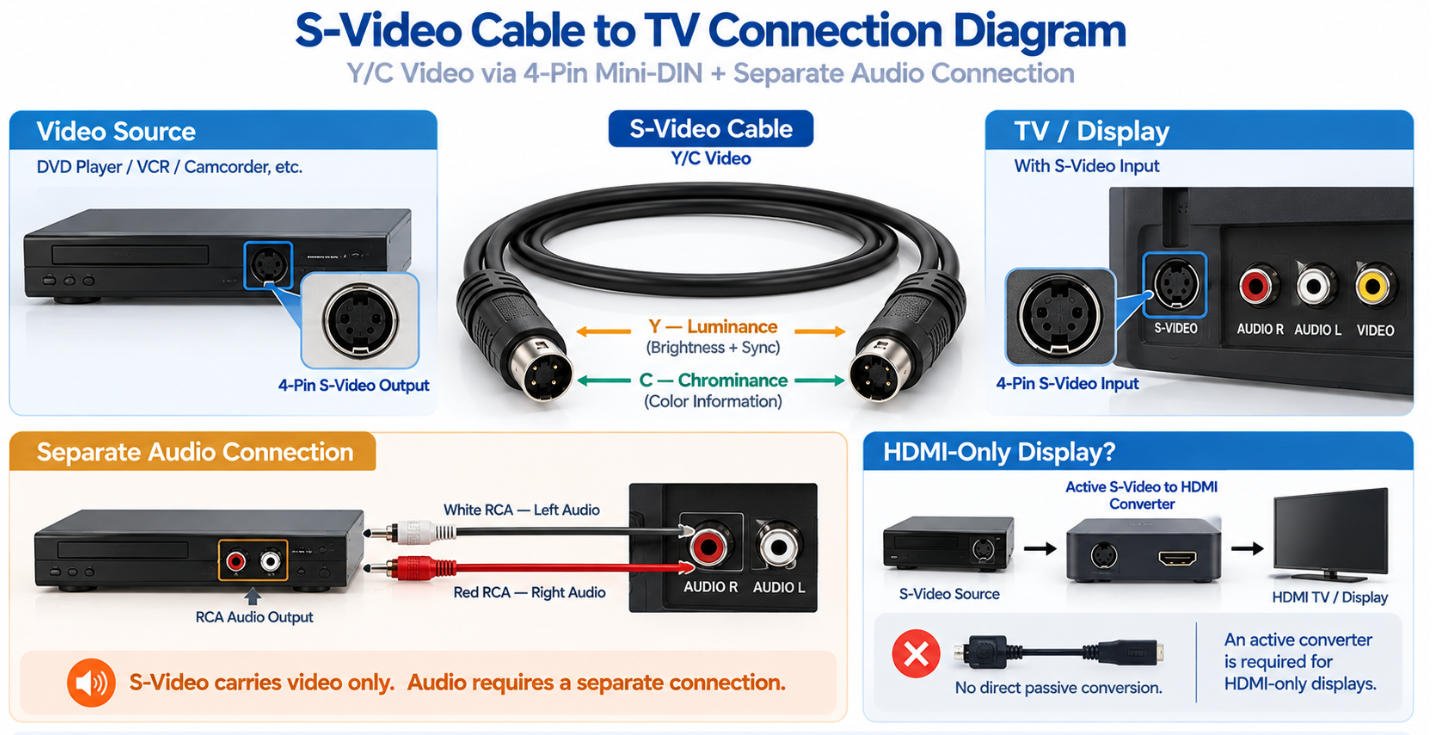
An S-Video cable to TV connection is used when both the video source and display provide compatible S-Video interfaces. Because S-Video carries analog Y/C video only, the display connection and any required audio connection should be considered separately.
When both devices have standard S-Video ports, the connection is straightforward:
S-Video Source → 4-Pin S-Video Cable → TV / Display
Typical source equipment may include VCRs, DVD players, camcorders, legacy game consoles and other analog video devices.
Before connecting, verify that both ports use the expected S-Video interface and connector pinout.
Many older televisions, monitors and AV receivers were equipped with a 4-pin Mini-DIN S-Video input.
For these applications, an S-Video TV cable can provide a direct analog video connection without converting the Y/C signal to another video format.
Cable length, shielding and connector quality should be selected according to the installation and required video performance.
Standard S-Video carries video only. It does not normally carry left and right audio channels.
A complete AV connection may therefore use:
S-Video → Video
RCA Left / Right → Audio
If a modern TV provides HDMI but no S-Video input, a standard passive 4-pin cable cannot directly convert the analog S-Video signal to HDMI. An appropriate active video converter is required.
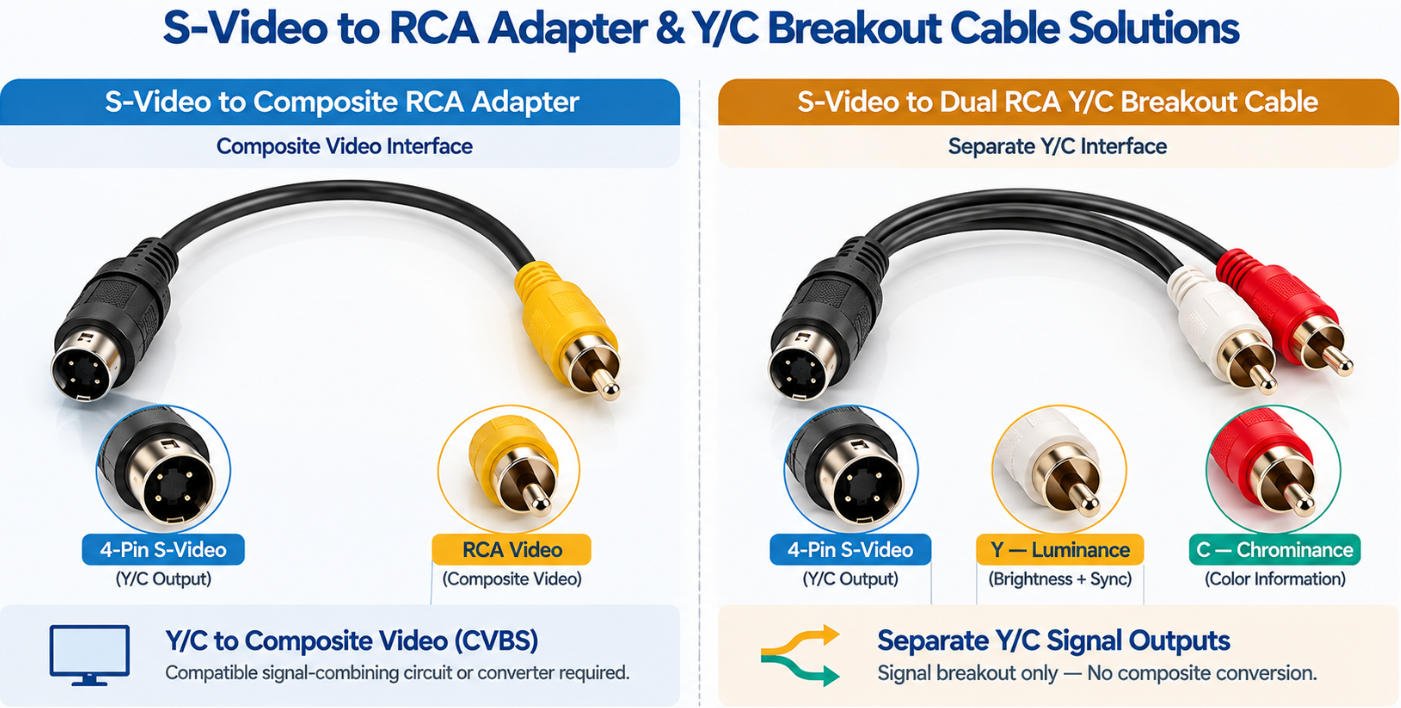
Yihetai manufactures custom S-Video to RCA cable assemblies and adapter solutions for analog video equipment, industrial electronics, legacy AV systems, and OEM applications.
Depending on the equipment design, an S-Video to RCA connection may require either a composite video adapter or a dual RCA Y/C breakout cable. These configurations serve different purposes and are not interchangeable.
We support customer-specified connectors, wiring diagrams, shielding, cable lengths, and assembly designs.
An S-Video to RCA adapter is designed to interface separate S-Video luminance (Y) and chrominance (C) signals with a composite video (CVBS) connection.
Certain application-specific designs can use passive signal-combining circuitry, while other systems may require active video conversion equipment.
A direct pin-to-pin connection between an S-Video connector and a single RCA plug does not guarantee proper color reproduction or universal compatibility.
An S-Video to dual RCA Y/C breakout cable separates the luminance and chrominance connections into two individual RCA connectors.
One RCA connector carries the Y signal, while the other carries the C signal, with their corresponding signal returns.
This configuration is intended for equipment that supports separate Y/C video connections through RCA interfaces.
Important: A dual RCA Y/C breakout cable does not convert S-Video into a single composite video signal. It also does not carry audio.
S-Video and composite RCA video use different signal structures.
S-Video carries brightness and color information separately, while composite video combines both into one CVBS signal.
A typical three-RCA audio/video cable carries one composite video connection and two analog audio channels. It is not equivalent to a standard 4-pin S-Video cable.
For applications requiring composite video connections, RCA audio outputs, or Y/C breakout configurations, Yihetai also manufactures custom RCA cable assemblies according to OEM specifications.
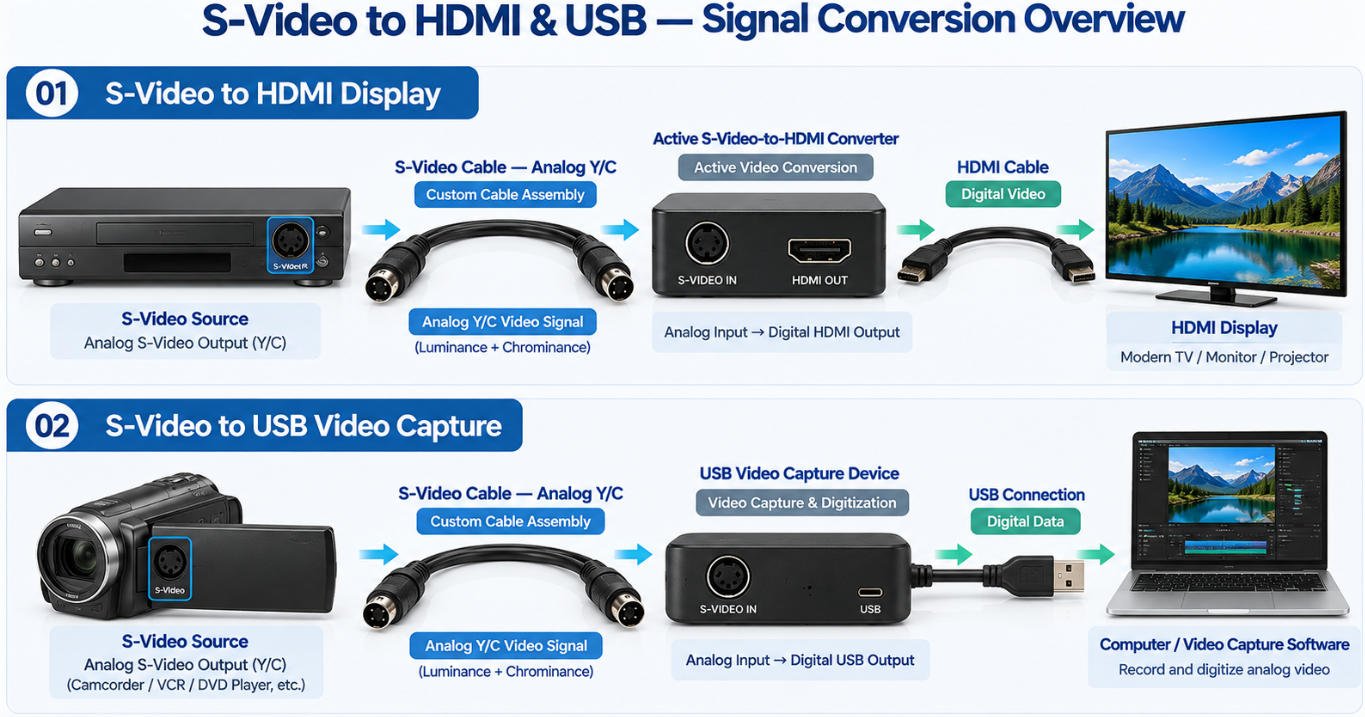
Connecting legacy S-Video equipment to modern HDMI displays or USB-enabled computers requires more than a standard cable. S-Video carries analog Y/C video signals, while HDMI and USB video capture systems use digital interfaces that require electronic signal conversion or capture hardware.
An S-Video to HDMI converter uses active electronic circuitry to process analog S-Video signals and produce a compatible digital HDMI output.
A typical connection includes an S-Video source, a suitable active converter, and an HDMI display.
Signal Conversion Overview:
S-Video Source → Active S-Video-to-HDMI Converter → HDMI Display
An ordinary S-Video cable to HDMI connection cannot perform this conversion without compatible active hardware.
For converter manufacturers, Yihetai can supply custom 4-pin Mini-DIN cable assemblies, shielded analog video leads, and application-specific internal wiring harnesses according to approved specifications.
An S-Video USB capture device enables compatible analog video sources to be captured by a computer through dedicated video capture hardware.
The capture device receives the analog S-Video signal, processes it electronically, and transfers digital video data to the computer through USB.
Signal Capture Overview:
S-Video Source → USB Video Capture Device → Computer
A passive S-Video cable to USB does not provide video capture or analog-to-digital conversion by itself.
Yihetai supports OEM manufacturers with custom S-Video input cables, Mini-DIN assemblies, and internal cable harnesses for compatible capture equipment.
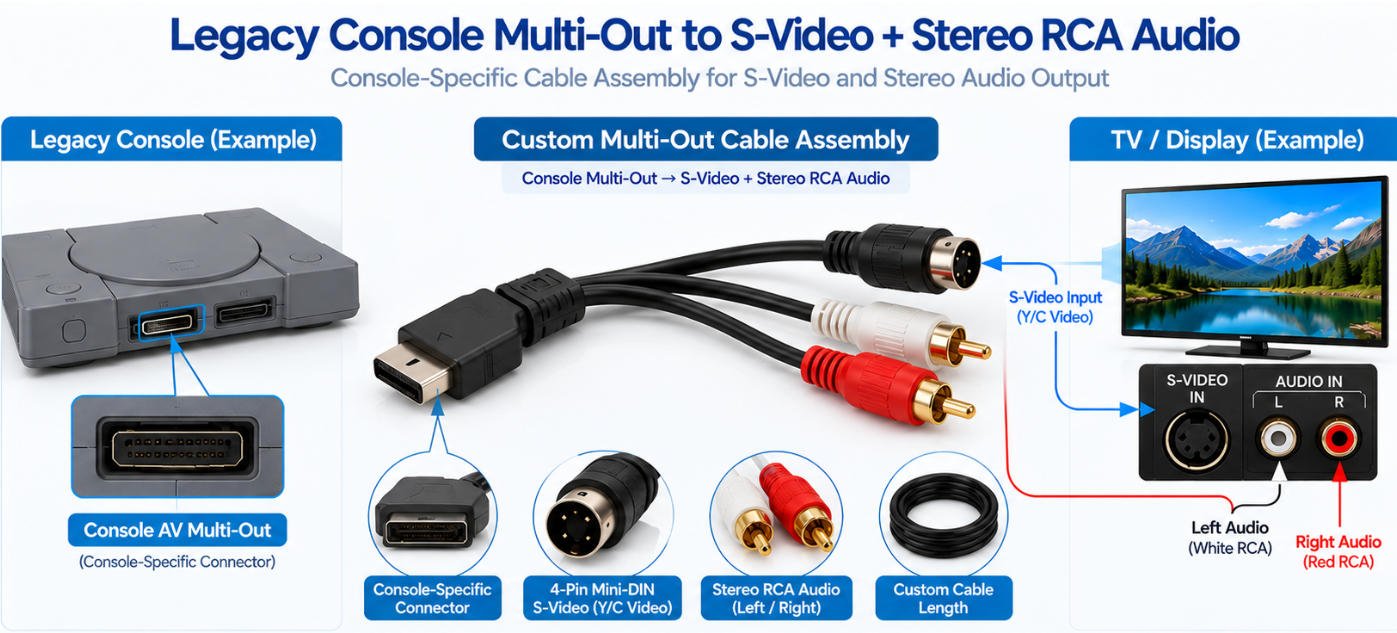
Yihetai can manufacture custom PlayStation S-Video cable assemblies for compatible legacy console applications. Unlike a standard 4-pin S-Video male-to-male cable, these assemblies typically use a console-specific AV Multi-Out connector on one end and separate S-Video and audio connectors on the other.
A PS1 S-Video cable can route the console’s analog Y/C video signals to a standard S-Video display input.
A typical cable assembly may include:
The exact pinout and compatibility should be confirmed for the target console model and region before production.
An S-Video cable for PS2 can provide separate Y/C video output to a compatible television or monitor while stereo audio is carried through separate RCA connectors.
Typical connection:
Console Multi-Out → S-Video Video + Left / Right RCA Audio
This configuration keeps the S-Video signal separate from the audio channels.
The console-side connector is not a standard 4-pin S-Video plug. It is a dedicated multi-pin AV interface carrying multiple video and audio signals.
For custom cable manufacturing, the approved pinout should define:
Legacy console compatibility can vary by hardware revision, region and display configuration.
Before production, customers should provide the exact console model, target market, connector drawing or existing cable sample so the required wiring and interface can be verified.
For console-specific AV Multi-Out connectors and combined video/audio cable designs, explore our custom AV cable assemblies for legacy gaming and multimedia equipment.
Yihetai can manufacture custom Nintendo S-Video cable assemblies for compatible legacy console applications. These cables typically use a console-specific AV Multi-Out connector on the source side and a 4-pin S-Video connector together with separate RCA audio outputs on the display side.
Compatibility must be verified by console model, hardware revision, region and video-output capability before production.
An N64 S-Video cable can provide separate Y/C video output from compatible Nintendo 64 consoles to a television, monitor or capture device with an S-Video input.
A typical assembly may include:
Not all N64 regional variants should be assumed to provide identical S-Video output, so the target console specification should be confirmed.
A SNES S-Video cable may be used with compatible Super Nintendo / Super Famicom hardware that provides the required Y/C video signals through the console AV interface.
The cable can combine S-Video for picture transmission with separate RCA connectors for stereo audio.
A GameCube S-Video cable can be manufactured for compatible console models using the appropriate analog AV output.
Regional compatibility is especially important. NTSC GameCube consoles support S-Video output through the analog AV interface, while PAL GameCube systems do not provide the same S-Video output capability.
The target console region should therefore be confirmed before cable production.
A Wii S-Video cable can connect compatible Wii consoles to televisions or AV equipment with an S-Video input while separate RCA connectors carry left and right audio.
A typical configuration is:
Wii AV Multi-Out → S-Video + Left / Right RCA Audio
| Console | S-Video Application | Compatibility Note |
|---|---|---|
| Nintendo 64 | S-Video + Stereo Audio | Verify region and hardware revision |
| SNES / Super Famicom | S-Video + Stereo Audio | Verify console model, region and AV pinout |
| GameCube | S-Video + Stereo Audio | NTSC models support S-Video; PAL models differ |
| Wii | S-Video + Stereo Audio | Verify console model; Wii mini does not support S-Video |
Because legacy console video capabilities can vary by region and hardware revision, Yihetai recommends confirming the exact console model, target market, AV connector and approved pinout before production.
Yihetai can manufacture custom retro gaming S-Video cable assemblies for compatible Sega Dreamcast and Saturn applications. Although both consoles may be used with S-Video equipment, their console-side A/V connectors and wiring requirements are different and should be verified separately.
A Dreamcast S-Video cable can route the console’s Y/C analog video output to a compatible television, monitor or capture device.
A typical custom assembly may include:
The target console, region and approved pinout should be confirmed before production.
A Sega Saturn S-Video cable may be manufactured for compatible Saturn models that provide the required S-Video output.
The Saturn uses its own console-side A/V interface, so a Dreamcast cable should not be assumed to be electrically or mechanically compatible.
S-Video carries video only; stereo audio normally requires separate left and right audio connections.
| Item | Dreamcast | Sega Saturn |
|---|---|---|
| Console-Side Interface | Dreamcast-specific A/V connector | Saturn-specific A/V connector |
| Video Output | Y/C S-Video where supported | Y/C S-Video on compatible models |
| Audio | Separate L/R audio outputs | Separate L/R audio outputs |
| Display Connector | Typically 4-pin Mini-DIN S-Video | Typically 4-pin Mini-DIN S-Video |
| Production Requirement | Verify model, region and pinout | Verify model, region and pinout |
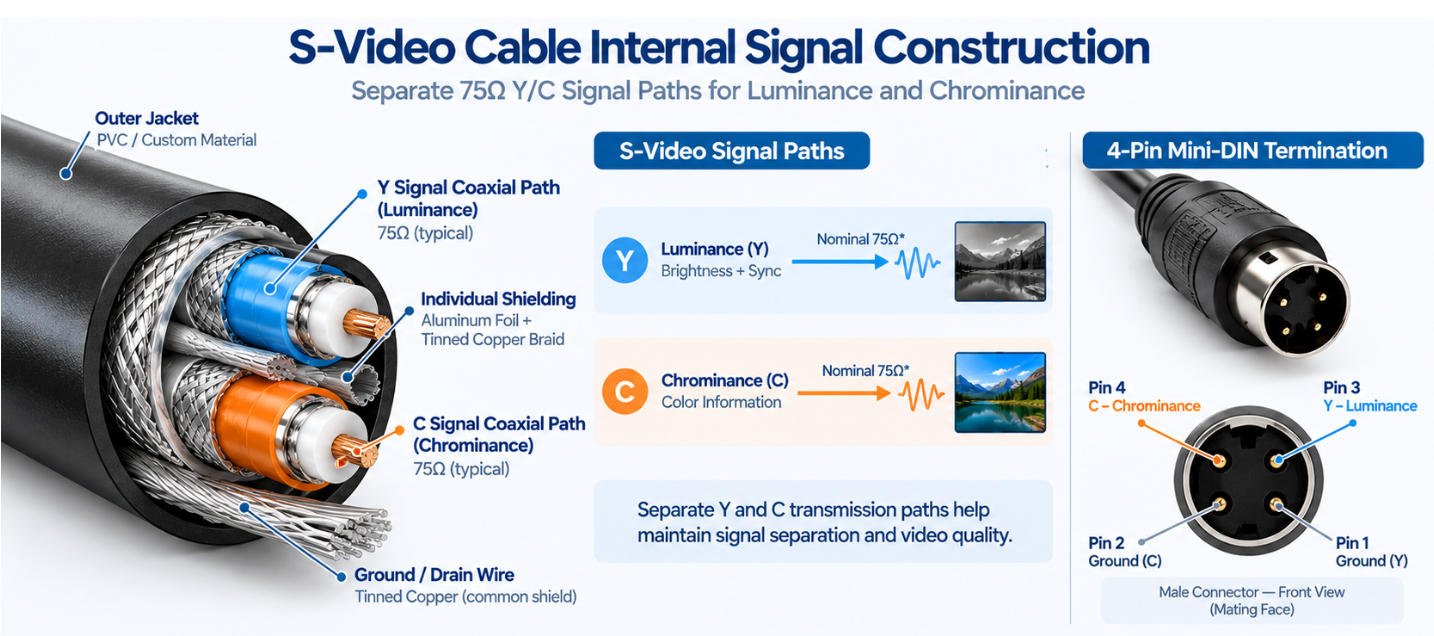
A 75 ohm S-Video cable is typically designed with nominal 75Ω video transmission paths for the luminance and chrominance signals.
Maintaining the specified impedance helps reduce reflections and signal degradation, especially as cable length increases.
S-Video carries brightness and color information on separate signal paths:
Keeping these paths separated helps reduce interaction between brightness and color information compared with composite video.
A shielded S-Video cable may use individually shielded or coaxial-style signal paths together with an overall protective jacket.
Custom options can include:
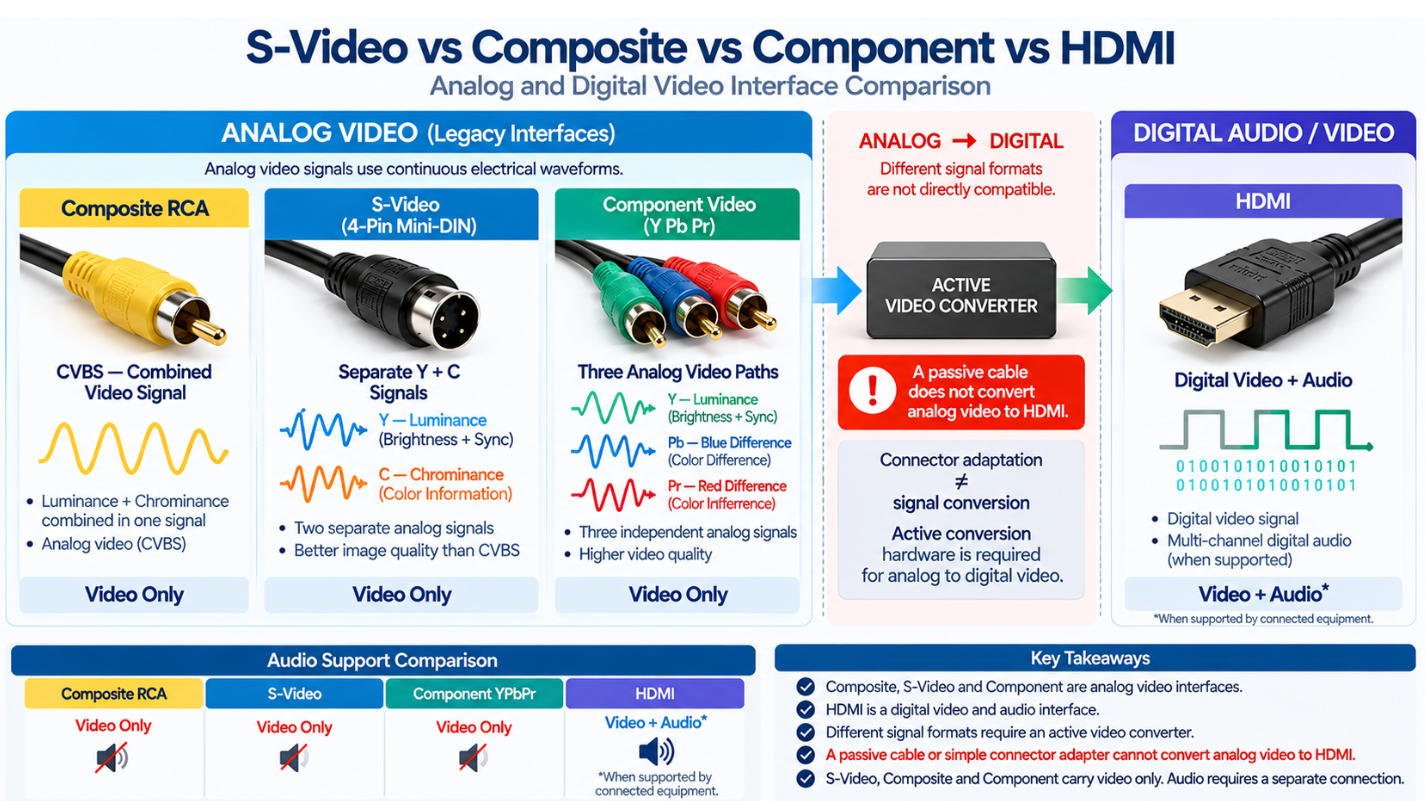
S-Video, Composite RCA, Component Video (YPbPr) and HDMI are different video interface systems with different signal structures, connector arrangements and audio capabilities. Selecting the correct cable therefore requires more than matching connector shapes. When two devices use different video formats, an appropriate adapter circuit or active converter may be required to achieve compatibility.
| Feature | S-Video | Composite RCA | Component YPbPr | HDMI |
|---|---|---|---|---|
| Signal Type | Analog video | Analog video | Analog video | Digital audio/video |
| Video Structure | Separate Y and C | Combined CVBS signal | Separate Y, Pb and Pr | Digital video data |
| Typical Connector | 4-Pin Mini-DIN | Single RCA for video | 3 RCA connectors | HDMI connector |
| Video Conductors | Separate luminance and chrominance paths | Single composite video path | Three component video paths | Digital differential signal pairs |
| Carries Audio? | No | Video RCA itself does not; separate L/R audio is typically required | Component video itself does not; separate audio is typically required | Yes, when supported by the connected equipment |
| Typical Application | Legacy TVs, VCRs, consoles and AV equipment | Legacy TVs and AV equipment | TVs, DVD players and AV equipment | Modern TVs, monitors and digital AV equipment |
| Directly Interchangeable? | No | No | No | No |
| Conversion Requirement | Depends on destination signal | Depends on destination signal | Depends on destination signal | Analog-to-digital conversion required from analog sources |
Important: Connector adapters do not automatically convert video signal formats. For example, an S-Video vs HDMI connection requires active analog-to-digital conversion, while S-Video vs Composite RCA may require an appropriate Y/C-to-CVBS combining or conversion circuit depending on the equipment and signal direction.
As an experienced S-Video cable manufacturer, Yihetai provides custom S-Video cable and Mini-DIN cable assembly solutions tailored to your OEM requirements. From connector configurations and cable lengths to 75Ω video signal paths, shielding, overmolding and packaging, we manufacture each OEM video cable assembly according to your approved drawings and technical specifications.
Standard / Custom Length
75Ω Video Signal Paths
Coaxial / Foil / Braid
Conductor / Jacket / OD
Housing / Strain Relief
Label / Printing / Part Number
Bulk / Individual / Custom
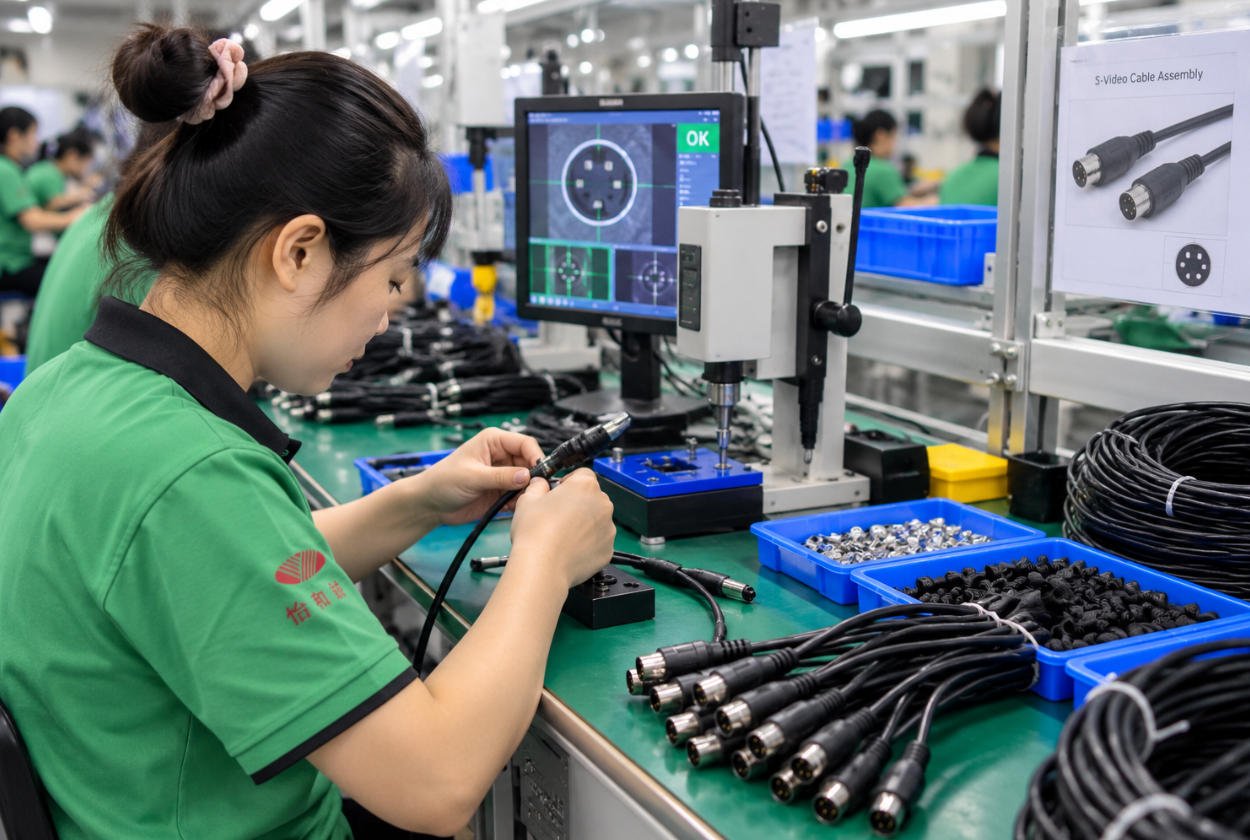
An S-Video cable is used to transmit analog video between compatible devices such as legacy TVs, VCRs, DVD players, camcorders, game consoles and video equipment. It carries luminance (Y) and chrominance (C) on separate signal paths to help reduce color interference compared with composite video.
A 4-pin S-Video cable typically uses a 4-pin Mini-DIN connector for analog Y/C video transmission. The four connections are normally used for luminance, chrominance and their corresponding grounds.
Yihetai can manufacture standard and custom 4-pin Mini-DIN cable assemblies according to customer drawings and pinout requirements.
No. Standard S-Video carries video only and does not normally carry audio.
For applications requiring sound, separate left and right audio connections commonly RCA audio connectors are typically used alongside the S-Video connection.
The main difference between S-Video vs composite is the way video information is transmitted. S-Video keeps luminance (Y) and chrominance (C) separate, while composite RCA combines the video information into a single CVBS signal.
Due to the signal formats are different, an S-Video connector and a composite RCA connector should not be assumed to be directly interchangeable simply by changing the connector.
An ordinary passive S-Video cable to HDMI cannot directly convert an analog S-Video signal into digital HDMI. An active S-Video to HDMI converter is required to process and convert the analog video signal before it can be displayed through an HDMI input. Yihetai can manufacture custom interconnect cables and cable assemblies for converter and AV equipment applications.
S-Video can be connected to a computer through a compatible S-Video USB capture device, but a passive cable alone cannot convert analog video into USB digital data.
A video capture device must perform the required analog-to-digital conversion before the computer can receive or record the video.
A common 4-pin Mini-DIN S-Video cable pinout is:
·Pin 1 — Ground (Y)
·Pin 2 — Ground (C)
·Pin 3 — Luminance (Y)
·Pin 4 — Chrominance (C)
Connector drawings should always specify whether the pinout is viewed from the mating face, solder side or wire-entry side because the orientation may appear mirrored.
Yes, if the TV has a compatible S-Video input and supports the source video format.
If the modern TV only provides HDMI or other digital inputs, an active video converter will normally be required. A passive S-Video-to-HDMI cable does not perform analog-to-digital conversion.
They should not be assumed to be universally interchangeable.
Although some Nintendo consoles use related A/V connector systems, S-Video support can vary by console model, hardware revision and region. The exact console, region and pinout should therefore be verified before manufacturing or selecting a cable.
Some PS1 and PS2 applications use similar console A/V interface arrangements, but compatibility should not be assumed solely from connector appearance.The console model, region, required pinout and video-output capability should be confirmed before producing a PlayStation S-Video cable for a specific application.
Yes. Yihetai can customize S-Video cable length, shielding, cable construction, jacket material, connector configuration, overmolding and identification according to the approved specification.
Yes. Yihetai provides custom S-Video cable and OEM video cable assembly manufacturing for prototype, small-batch and volume production requirements.
Custom options can include 4-pin Mini-DIN connectors, RCA branches, customer-specified pinouts, 75Ω video signal paths, shielding, overmolding, labels, part numbers and OEM packaging. Finished assemblies can be tested for pinout, continuity, shorts/opens and other customer-specified requirements.
From 4-pin Mini-DIN connectors and custom pinouts to shielding, overmolding, and cable lengths, Yihetai manufactures S-Video cable assemblies to your OEM specifications.
We will contact you within 24 hours, please pay attention to the email with the suffix “info@yihetai-cable.com”.