
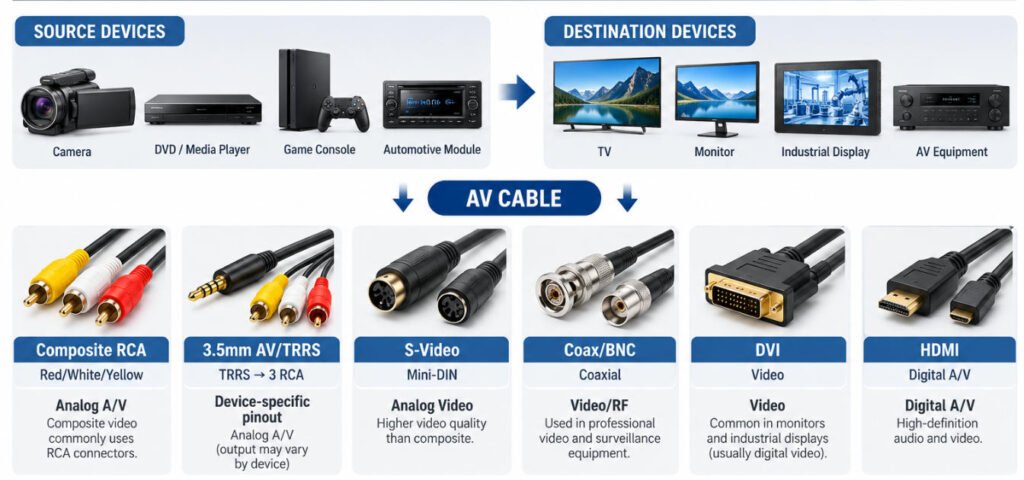
An AV cable is a broad term for cables used to carry audio and/or video signals, but in many consumer applications, “AV cable” specifically refers to the familiar red, white, and yellow composite RCA cable. Depending on the interface, an AV cord, A/V cable, or audio video cable may connect a TV, monitor, camera, DVD or media player, game console, automotive display, or industrial display.
Different AV cable types use different signal formats, connector designs, pinouts, shielding, and transmission methods. This blog we will explains AV cable meaning, red/white/yellow RCA functions, AV IN and AV OUT, common AV ports and connectors, 3.5 mm AV pinouts, adapters vs converters, AV-to-HDMI connections, signal-quality factors, and how a custom AV cable is designed, manufactured, terminated, and tested for OEM applications.Hero Image:AV Cable Types and Connections.
What Is an AV Cable?
An AV cable is an audio/video interconnect cable used to carry audio signals, video signals, or both between electronic devices. “AV” stands for Audio / Video.
In the broad sense, an A/V cable, audio video cable, or audiovisual cable can refer to many interface types used with TVs, cameras, monitors, media players, and other equipment.
In common consumer use, however, the term AV cord often refers specifically to the familiar composite RCA cable:
- Yellow = Composite Video
- White = Left Audio
- Red = Right Audio
It is important not to define every AV cable by connector appearance alone. The same connector family can sometimes carry different signal types, so connector shape, pinout, impedance, and the actual electrical interface should all be confirmed.
How Does an AV Cable Work?
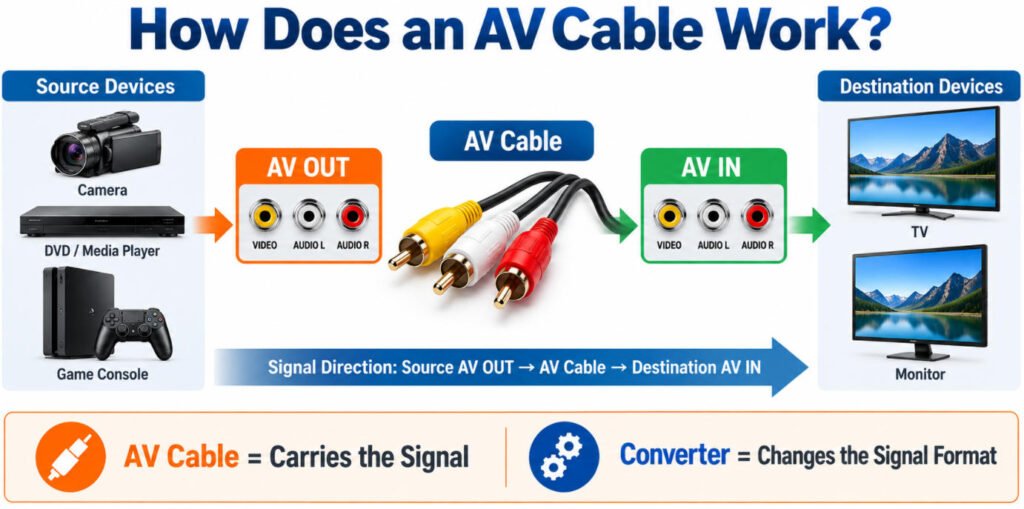
An AV cable works by carrying audio and/or video signals from a source device to a receiving device through compatible AV ports.
A typical AV connection works like this:
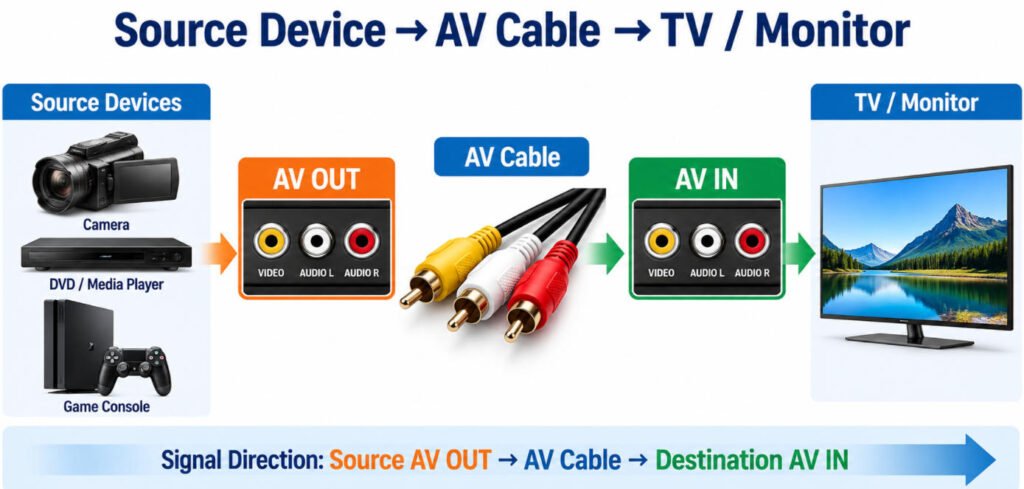
Source Device → AV OUT → AV Cable → AV IN → Display / Audio Device
The source device, such as a DVD player, camera, game console, or media player, sends the audio or video signal through its AV OUT port. The audio video cable then carries that signal to the AV IN port on a TV, monitor, automotive display, amplifier, or other receiving device.
In most cases, the AV cable itself does not convert the signal format. It simply provides the electrical path between compatible interfaces.
For example, an analog composite AV output cable cannot normally convert its signal directly into digital HDMI. When the source and destination use different signal standards, an active converter may be required rather than a simple cable or passive adapter.
What Do the Red, White and Yellow AV Cable Colors Mean?
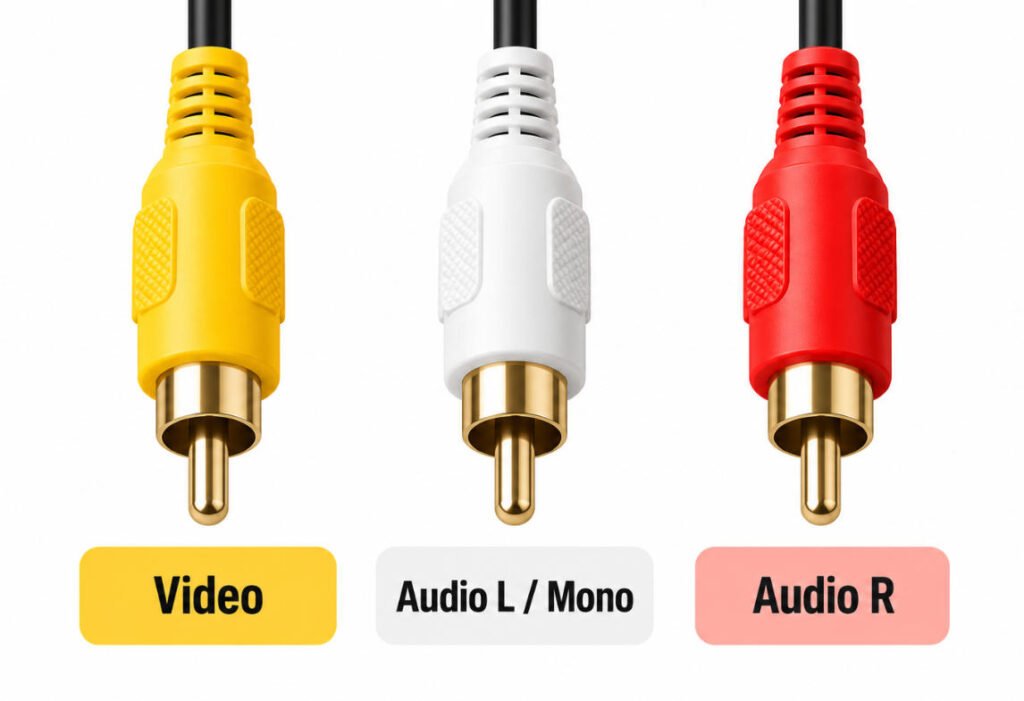
In a traditional composite AV cable, yellow carries composite video, white carries the left or mono audio channel, and red carries the right audio channel.
This color coding makes it easier to connect matching RCA ports correctly on TVs, DVD players, game consoles, cameras, and other audio/video equipment.
| AV Cable Color | Signal | Typical Function |
|---|---|---|
| Yellow | Composite Video | Carries analog video |
| White | Left / Mono Audio | Carries left-channel or mono audio |
| Red | Right Audio | Carries right-channel audio |
The red and white connectors are used for audio, while the yellow AV cable carries the video signal.
On stereo equipment, white normally carries the left audio channel and red carries the right channel. On mono equipment, only the white audio connection may be used.
Although all three connectors usually use the same RCA-style shape, their signal functions are different.
Can You Always Rely on AV Cable Colors?
Not always.
For standard consumer red white yellow AV cable connections, the color convention is widely recognized. However, custom equipment, proprietary breakout cables, and some 3.5 mm-to-RCA assemblies may use different internal wiring or pinouts.
For this reason, color alone should not be used to confirm a custom cable design. The device pinout, wiring diagram, connector specification, or approved sample should also be checked.
What Is an AV Port?
An AV port is an audio video port used to send or receive audio, video, or both between electronic devices. Depending on the equipment, an AV connection port may use three RCA sockets, a 3.5 mm AV jack, a Mini-DIN connector, or a proprietary multi-pin interface.
The label “AV” describes the function of the connection, not one universal connector shape. Two devices may both have an AV port but use different connectors, signal assignments, or pinouts. This is especially important with 3.5 mm AV jacks and proprietary breakout cables, where physical compatibility does not always mean electrical compatibility.
What Does AV IN Mean?
AV IN is an AV input that receives audio and/or video signals from an external source device.
It is commonly found on:
- TVs
- Monitors
- AV receivers
- Capture devices
- Industrial displays
For example, a DVD player may send its signal through AV OUT, while the TV receives that signal through AV IN.
An AV input cable must match both the connector type and signal format required by the receiving device.
What Does AV OUT Mean?
AV OUT is an AV output that sends audio and/or video signals from a source device to another device.
It is commonly found on:
- DVD or media players
- Cameras
- Game consoles
- Set-top boxes
- Other source equipment
A typical connection is:
AV OUT → AV Cable → AV IN
The AV out cable or AV output cable carries the signal from the source to the receiving device. In most cases, it does not convert the signal format; it only connects compatible interfaces.
AV In vs AV Out: What Is the Difference?
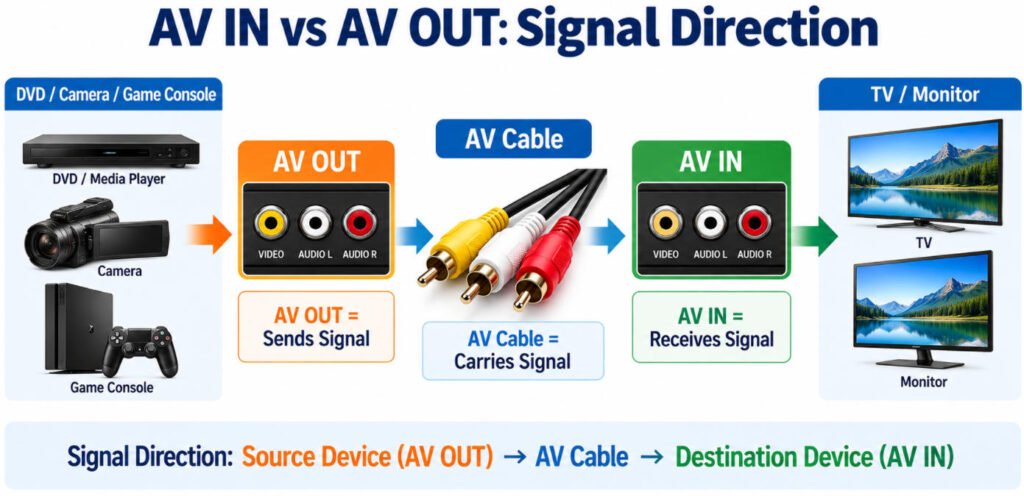
AV OUT sends audio/video signals from a source device, while AV IN receives those signals at the destination device.
A typical connection looks like this:
DVD / Camera / Game Console
AV OUT
↓
AV Cable
↓
AV IN
TV / Monitor
In simple terms, AV OUT is where the signal comes from, and AV IN is where the signal goes. Understanding this direction is important when choosing an AV out cable, connecting legacy equipment, or troubleshooting why an AV connection does not work.
What Is AV OUT?
AV OUT means AV output. It is used on source devices that send audio and/or video signals to another device.
Common examples include:
- DVD players
- Cameras
- Game consoles
- Media players
- Decoders or set-top boxes
An AV output cable carries the signal from the source device to a receiving device. In most cases, the cable only transfers the signal; it does not convert the signal format.
What Is AV IN?
AV IN means AV input. It is used on destination devices that receive audio and/or video signals from an external source.
Common examples include:
- TVs
- Monitors
- Recorders
- AV receivers
- Capture devices
An AV input allows the destination device to display or process the incoming audio/video signal.
Can AV OUT Connect to AV OUT?
Usually, no. A standard AV connection is:
OUT → IN
not:
OUT → OUT
If both sides are AV OUT, both devices are trying to send a signal rather than receive one. For a normal setup, the source device should use AV out, and the receiving device should use AV in. This is why checking port labels is one of the first steps when connecting an AV out to TV system.
For custom AV assemblies, Yihetai verifies signal direction, connector type, pin assignment, and the mating equipment before production.
This is especially important for proprietary AV ports and breakout cables, where a connector may physically fit but still be wired incorrectly for the required AV input or output function.
What Are the Main Types of AV Cables?
There are several AV cable types, ranging from traditional analog composite video cables to modern digital HDMI connections. The correct cable depends on the signal format, connector interface, device compatibility, required resolution, and whether audio and video must travel through the same connection.
The table below compares the most common 8 types of AV cables and their typical applications.
| AV Cable Type | Signal | Audio | Video | Typical Use |
|---|---|---|---|---|
| Composite RCA | Analog | Yes | Yes | TVs, DVD players, game consoles, legacy equipment |
| Component Video | Analog | Separate audio usually required | Yes | Legacy HD video equipment |
| S-Video | Analog | Separate audio required | Yes | Legacy TVs and video equipment |
| 3.5 mm AV Breakout | Depends on device | Yes | Often composite video | Cameras, portable devices, automotive displays |
| Coax / BNC | Analog video or RF depending on system | Usually separate | Yes / RF | CCTV, professional video, RF systems |
| VGA | Analog | Separate audio required | Yes | PCs, monitors, legacy displays |
| DVI | Digital and/or analog depending on DVI type | Usually no | Yes | PCs and displays |
| HDMI | Digital | Yes | Yes | TVs, monitors, media players, modern AV equipment |
For a custom AV cable, connector appearance alone should never be used to define the electrical design.
Yihetai recommends confirming the signal type, connector interface, pinout, shielding requirements, cable impedance where applicable, cable length, and mating equipment before production.
This is particularly important for 3.5 mm breakout cables, BNC/coax assemblies, and proprietary AV interfaces, where physically compatible connectors may still use different signal assignments.
What Are the Most Common Audio Video Connectors?
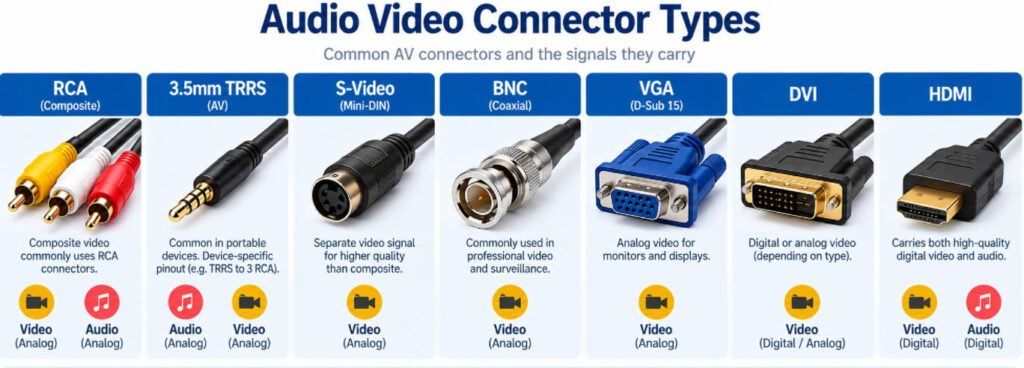
Common audio video connectors include RCA, 3.5 mm TRRS, Mini-DIN, BNC, VGA, DVI, and HDMI. Each AV connector supports different signal types, so connector shape alone should not be used to determine compatibility.
RCA Connectors
An RCA connector may carry composite video, analog audio, or component video depending on the application. RCA is a connector type not a synonym for every AV cable.
3.5 mm TRRS AV Connectors
A 3.5 mm TRRS AV plug is often used for compact audio/video breakout cables. Pinouts are not universal, so the device specification must be checked.
Mini-DIN / S-Video
Mini-DIN connectors are commonly associated with legacy S-Video systems, where analog video is carried separately from audio.
BNC Connectors
BNC video connectors are widely used with coaxial cables in cameras, CCTV, professional video, test equipment, and RF systems.
VGA and DVI
VGA is primarily a legacy analog video interface. DVI can carry digital and/or analog video depending on the DVI type.
HDMI
HDMI is a modern digital AV interface that can carry both digital video and audio through one connection.
In our experience, selecting AV connector types should always include the signal format, pinout, mating interface, cable construction, and application not only the physical AV jack or plug.
RCA Cable vs AV Cable: Are They the Same?
Not always. RCA describes a connector type, while AV describes an audio/video function.
An RCA connector can be used for several different signals, including:
- Analog audio
- Composite video
- Component video
- Other low-frequency electrical signals in specialized equipment
So, an RCA connector does not automatically mean composite AV.
That said, the traditional red, white, and yellow RCA AV cable does use RCA connectors: yellow for composite video, white for left or mono audio, and red for right audio.
This is why the terms are often used interchangeably in consumer electronics, even though they are not technically identical.
A useful way to think about it is:
RCA = Connector Type
AV = Signal / Application Function
For OEM cable design, we always confirm both the connector and the signal assignment. Two cables may use the same RCA plugs but carry different functions depending on the equipment.
This distinction is especially important when specifying a RCA audio video cable, composite RCA cable, or custom AV cable RCA assembly.
What Is the Difference Between Composite and Component AV Cable?
The main difference between composite and component AV cable is how the video signal is transmitted. Composite video combines the video information into one channel, while component video separates it into three channels for better analog video quality.
| Feature | Composite AV | Component Video |
|---|---|---|
| Video Channels | One | Three |
| Typical Colors | Yellow | Red, Green, Blue |
| Audio | Red + White separately | Red + White separately |
| Signal Type | Analog | Analog |
| Video Quality | Lower | Higher than composite |
| Typical Equipment | Legacy TVs, DVD players, consoles | Older HD equipment |
A composite AV cable normally uses one yellow RCA connector for video, plus red and white RCA connectors for stereo audio.
A component video cable typically uses three RCA connectors for video: green, blue, and red. Audio is carried separately, usually through another red and white pair.
The most common source of confusion is the red connector. Composite red is normally right-channel audio, while component red is one of the video channels.
So although both systems may use RCA connectors and similar colors, the signals are not interchangeable. When comparing composite vs component cable, always check the port labels and signal type rather than relying on color alone.
Are All 3.5 mm AV Cables Wired the Same?
No. Two 3.5 mm AV cables can use the same physical TRRS connector but have different internal pin assignments.
A typical 3.5 mm TRRS plug has four contact positions:
Tip → Ring 1 → Ring 2 → Sleeve
These positions describe the physical contacts—not what signal each contact must carry. Depending on the camera, display, media device, or other equipment, the four contacts may be assigned to composite video, left audio, right audio, and ground in different orders.
This means two 3.5 mm-to-RCA cables can look identical and fit the same AV jack, yet still be electrically incompatible.
For example, one device might assign video to the Tip, while another may use that position for audio. Using the wrong AV cable pinout can result in no video, missing audio, incorrect channel mapping, or other connection problems.
What Should Be Confirmed for a 3.5 mm AV Cable?
For an OEM or custom 3.5 mm AV cable, we normally confirm:
- Pin-to-pin mapping: Tip, Ring 1, Ring 2, and Sleeve assignments
- Signal function: video, left audio, right audio, and ground
- Mating device specification: the actual electrical definition of the equipment port
- Connector drawing: plug dimensions, contact arrangement, and mechanical requirements
- Cable construction: conductor count, shielding, finished OD, and jacket requirements
- Physical sample: particularly useful when reproducing a legacy or proprietary cable
For production, the approved AV cable wiring diagram should clearly define the connection from each TRRS contact to the corresponding RCA connector or other termination.
In our factory, we do not approve a 3.5 mm AV cable pinout simply because the plug fits the mating device. We verify the pin-to-pin mapping because physical compatibility does not guarantee electrical compatibility.
During first-article inspection, the finished cable can be checked against the approved wiring table for example:
Tip → specified signal/contact
Ring 1 → specified signal/contact
Ring 2 → specified signal/contact
Sleeve → specified signal/contact
The production electrical test then verifies continuity and channel mapping against that approved AV cable wiring rather than assuming a universal TRRS configuration.
What Is an AV Adapter?
What Is an AV Adapter?
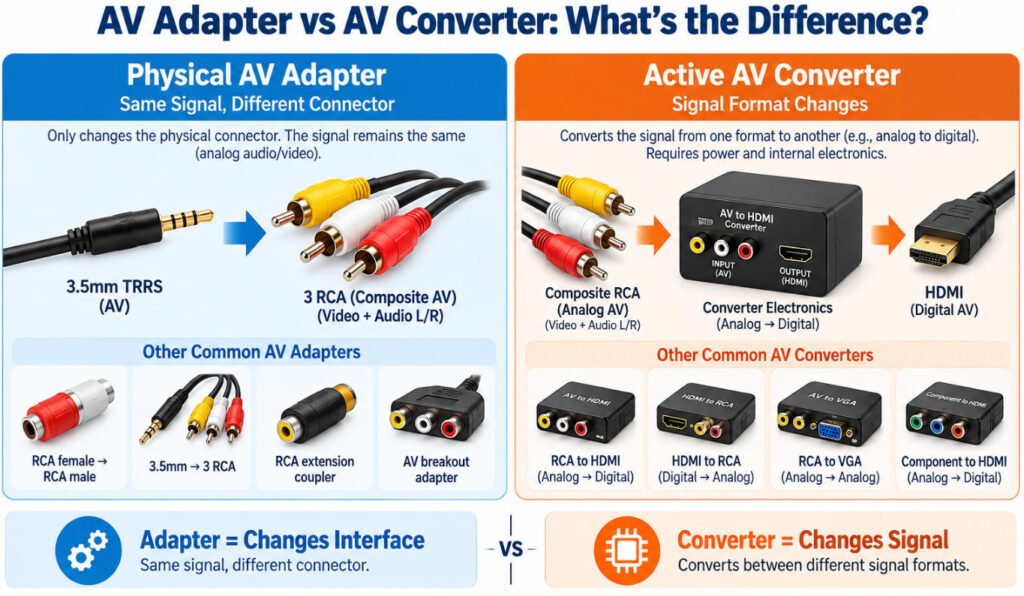
An AV adapter is used to connect audio/video interfaces that have different connector types or configurations. However, not every product sold as an “AV adapter” works in the same way. Some simply change the physical connector, while others must actively convert the signal.
Physical AV Adapter
A physical AV cable adapter changes the connector format or pin routing when the electrical signals on both sides are already compatible.
Common examples include:
- RCA female to RCA male adapters
- 3.5mm AV to RCA breakout adapters
- RCA couplers or extension adapters
- Device-specific AV breakout adapters
For example, a 3.5mm AV adapter may separate audio and composite video signals from one TRRS plug into three RCA connectors.
A passive adapter does not normally change analog video into digital video or convert one signal standard into another.
AV Signal Converter
An AV converter contains active electronics that change one signal format into another.
A common example is:
Composite Analog AV → Active Converter → Digital HDMI
Because traditional composite AV is analog while HDMI is digital, a simple passive RCA adapter cannot normally perform this conversion.
This is the key difference:
AV Adapter = Changes the physical interface or pin routing
AV Converter = Changes the signal format
Some products are marketed broadly as audio video adapters, so it is important to check whether the device is actually a passive adapter, a breakout cable, or an active converter before purchasing or designing the connection.
Can You Connect an AV Cable to HDMI?
A passive AV-to-HDMI cable normally cannot convert composite analog AV into HDMI because the two interfaces use different signal formats. An active converter is typically required.
Traditional composite AV carries an analog audio/video signal, while HDMI carries a digital audio/video signal. Because of this difference, simply wiring RCA plugs to an HDMI connector does not normally perform the required signal conversion.
A typical connection looks like this:
AV Source → AV-to-HDMI Converter → HDMI Cable → TV / Monitor
For example, if a DVD player, camera, or game console has AV OUT using red, white, and yellow RCA connectors, an active RCA-to-HDMI or AV-to-HDMI converter is normally needed before the signal can be connected to an HDMI display.
Does Conversion Direction Matter?
Yes. AV → HDMI and HDMI → AV are different conversion directions.
An AV-to-HDMI converter takes an analog AV input and creates a digital HDMI output.
An HDMI-to-AV converter does the opposite: it accepts a digital HDMI signal and converts it into analog composite AV.
These converters are usually designed to work in one direction only, so an AV adapter to HDMI should not be assumed to work in reverse.
How Do You Connect an AV Cable to a TV?
To connect an AV cable to a TV, you need to connect the source device’s AV OUT ports to the TV’s AV IN ports and then select the correct input source.
Step 1: Find AV OUT on the Source Device
Locate the AV output on the DVD player, game console, camera, media player, or other source device.
Step 2: Find AV IN on the TV
Look for the AV input on the TV. On older TVs, this is often a group of red, white, and yellow RCA sockets.
Step 3: Match the Cable Colors
For a standard composite TV AV cable:
- Yellow → Video
- White → Left / Mono Audio
- Red → Right Audio
Connect each plug to the matching AV port.
Step 4: Turn On Both Devices
Power on the source device and the TV.
Step 5: Select the AV / Composite Input
Use the TV remote or input menu to select AV, Composite, or the corresponding input source.
What If the TV Has No RCA AV Ports?
Some modern TVs do not include full-size RCA AV inputs.
Depending on the TV, you may need:
- A 3.5 mm AV input
- A manufacturer-specific breakout cable
- An active AV-to-HDMI converter
Before buying an AV cable for TV, check the TV manual or input specification because 3.5 mm AV pinouts and breakout cables are not always interchangeable.
AV Cable vs HDMI: What Is the Difference?
The main difference between a traditional composite AV cable and HDMI is the signal format. Composite AV uses analog video and separate analog audio connections, while HDMI carries digital video and audio through a single interface.
| Feature | Composite AV Cable | HDMI |
|---|---|---|
| Signal | Analog | Digital |
| Video | Separate composite video channel | Digital video |
| Audio | Separate left/right audio channels | Integrated digital audio |
| Connector | RCA | HDMI |
| Typical Use | Legacy TVs, DVD players, game consoles | Modern TVs, monitors, media players |
| Conversion | Requires active conversion to HDMI | — |
In an AV cable vs HDMI comparison, HDMI generally supports newer digital equipment and higher video formats, while composite AV is mainly associated with legacy analog devices.
A simple RCA vs HDMI cable cannot normally convert between the two signal types. For composite vs HDMI connections, an active converter is usually required.
How Is an AV Cable Constructed?
How Is an AV Cable Constructed?
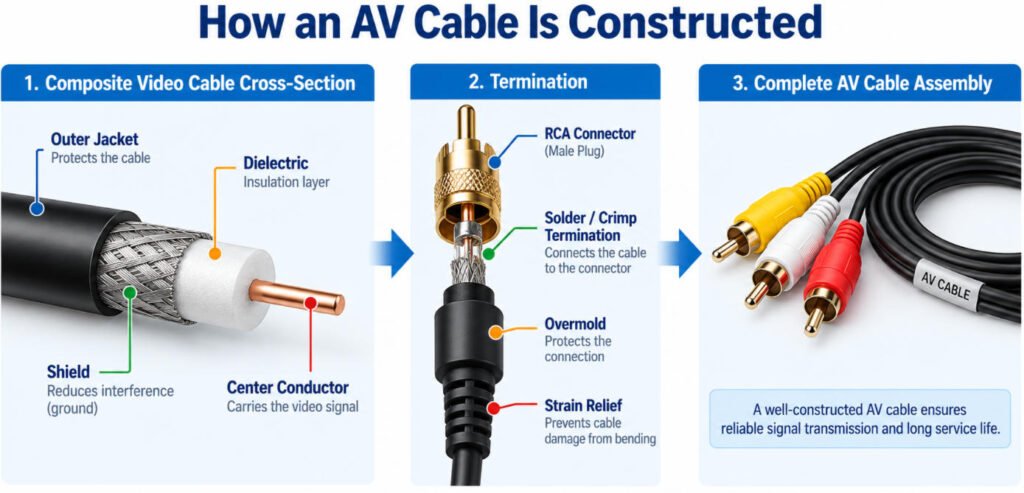
A typical AV cable construction depends on the signal type, but a composite video channel commonly uses a coaxial structure:
Center Conductor → Insulation / Dielectric → Shield → Outer Jacket
The center conductor carries the video signal, while the shield helps reduce external interference and provides the signal return path.
Audio channels may use:
- Individually shielded conductors
- Multicore cable
- A shared overall shield, depending on the design
A complete AV cable assembly may also include:
- RCA plugs
- 3.5 mm AV plugs
- Soldered or crimped terminations
- Overmolding
- Strain relief
- Labels
In our production line, we review conductor size, insulation, shield coverage, cable OD, termination method, and connector exit together. For a shielded AV cable, shielding performance depends not only on the cable itself but also on how the shield is terminated at the connector.
What Should OEMs Specify for a Custom AV Cable?
For a custom AV cable, the more complete the technical information, the easier it is for the manufacturer to confirm compatibility, manufacturability, tooling, and testing before production.
Ideally, OEM engineers should provide:
- Drawing
- Existing sample, if available
- Connector manufacturer
- Connector part number
- Pinout
- Cable length and tolerance
- Conductor size
- Cable construction
- Shielding requirement
- Signal type
- Overmold requirement
- Strain relief requirement
- Operating temperature
- Bending or flexing conditions
- Annual volume
- Electrical test requirements
In our engineering reviews, the pinout is often one of the first things we check. A 3.5 mm-to-RCA custom AV cable assembly may look straightforward, but one incorrect Tip/Ring/Sleeve assignment can result in no video, reversed audio channels, or a completely incompatible cable.
For higher-volume OEM AV cable projects, we also review production details such as finished length tolerance, strip dimensions, shield cutback, overmold position, strain-relief geometry, pull-force requirement, and electrical test limits.
If your design is still being finalized, you can send Yihetai a drawing, sample, connector P/N, pinout, or equipment interface for engineering review. See our Custom AV Cable solutions for OEM configurations, or our Custom RCA Cable Assembly page for RCA-based audio/video assemblies.
Conclusion
An AV cable can broadly mean any audio video cable, although the term commonly refers to the traditional red, white, and yellow composite connection. Choosing the right cable requires more than matching connector shapes: signal type, AV IN/OUT direction, 3.5 mm pinout, and whether an adapter or active converter is required must all be confirmed. For a reliable AV cable assembly, cable construction, shielding, termination, strain relief, and testing also matter.
If you are developing a custom AV cable or custom RCA cable, send Yihetai your drawing, connector information, pinout, cable length, signal requirements, or existing sample for an engineering review and quotation from an experienced AV cable manufacturer.
2.What do the red, white, and yellow AV cables do?
In a traditional composite AV cable, yellow carries composite video, white carries left or mono audio, and red carries right audio. The colors help users connect each signal to the correct AV port.
3.Can I connect an AV cable directly to HDMI?
Usually not with a passive cable. Composite AV is analog, while HDMI is digital, so an active AV-to-HDMI converter is typically required to convert the signal.
4.Are all 3.5 mm AV cables compatible?
No. Two 3.5 mm TRRS cables may look identical but use different internal pinouts for video, left audio, right audio, and ground. The device specification or pinout should always be confirmed.
5.Can an AV cables be customized?
Yes. A custom AV cable assembly can be designed with specific connectors, pinouts, cable lengths, shielding, overmolding, strain relief, labels, and testing requirements. OEM customers should provide a drawing, connector part numbers, pinout, cable specification, or approved sample where possible.
6.Does AV cable quality affect video and audio performance?
Yes. Cable construction, conductor quality, shielding, connector termination, cable length, and impedance where applicable can all affect performance. For OEM assemblies, electrical testing and correct shield termination are especially important.
7.Does AV cable length affect signal quality?
It can. Cable length, conductor construction, shielding, impedance, connector termination, and installation environment can all influence signal performance. Longer or electrically sensitive AV connections should be designed according to the actual signal and application requirements.
8.Why does my AV cable have sound but no picture?
Possible causes include an incorrect video connection, the wrong TV input setting, an incompatible 3.5 mm pinout, a damaged video conductor, or a signal-format mismatch. Check the yellow video connection, AV input selection, pinout, and device compatibility first.
Related Wire Harness Articles:
- Coaxial Cable Types: A Complete Guide to Impedance, Connectors, RF Performance and Cable Assemblies
- Wire Strain Relief Methods: Types, Design, Testing and How to Choose the Right Solution
- What Is Overmolding Cable Assemblies and How to Know When to Use It Effectively?
- Top 5 Things to Know About Coaxial Cables for OEM and Harness Design
- What Is a Coaxial Cable? Everything You Need to Know