
What does an Ethernet cable’s color actually tell you? The answer depends on whether you’re looking at the wires inside the cable or the color of its outer jacket. Internal wire colors follow established termination standards, while outer jacket colors are primarily used to organize and identify cables. A blue, yellow, red, or black Ethernet cable does not automatically indicate a particular cable category, speed, shielding type, or Power over Ethernet (PoE) capability.
This distinction matters when selecting cables, managing network installations, or specifying custom Ethernet cable assemblies. While T568A and T568B define how internal conductors are arranged at the connector, jacket colors have no universal meaning across manufacturers and installations. To identify an Ethernet cable correctly, look beyond its color and verify its markings, technical specifications, and suitability for the intended application.
What Does an Ethernet Cable Color Code Actually Mean?
An Ethernet cable color code may refer either to the standardized colors of the internal twisted pairs or to a site-specific color system used for the outer cable jacket. These two color systems should not be confused.
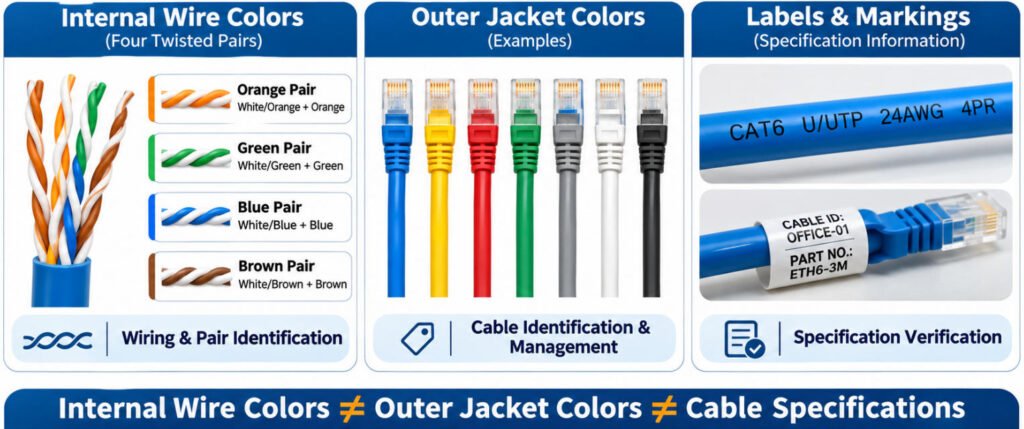
Ethernet cable identification involves three different types of information:
| Color System | What It Identifies | Examples / Details |
|---|---|---|
| Internal Conductor Colors | Twisted pairs used for Ethernet termination | Orange Pair; Green Pair; Blue Pair; Brown Pair |
| Outer Jacket Color | Cable identification, organization, or project-specific classification | Blue; Red; Yellow; Green; Gray; White; Black; Other colors |
| Labels / Markings | Cable category, part number, applicable ratings, manufacturer, and other specified information | CAT6; Part Number; Cable ID; Manufacturer; Applicable Ratings |
Internal Ethernet Wire Colors
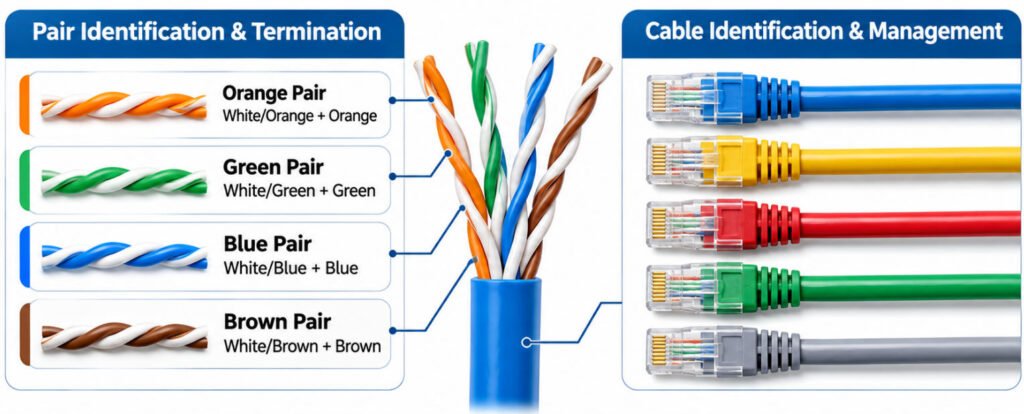
A typical four-pair Ethernet cable contains eight conductors organized into four color-identified twisted pairs:
- Orange pair: White/Orange and Orange
- Green pair: White/Green and Green
- Blue pair: White/Blue and Blue
- Brown pair: White/Brown and Brown
These conductor colors help technicians identify the correct pairs when following the T568A or T568B termination scheme.
Outer Ethernet Cable Jacket Colors
The outer jacket may be blue, red, yellow, green, gray, white, black, or another color.
Unlike internal conductor colors, these jacket colors do not have one universal meaning across all Ethernet installations. Network operators and OEM manufacturers may use different colors to identify equipment groups, network segments, or project-specific cable assemblies.
In our cable assembly engineering work at Yihetai, we treat jacket color as an identification requirement that must be checked against the approved drawing or customer specification not as proof of electrical performance.
Internal Wire Colors vs Outer Jacket Colors-What Is the Difference?
An Ethernet cable has two distinct layers of color identification: the internal twisted-pair conductors and the outer cable jacket. Although both use colors, they serve different purposes in cable termination, identification, and network management.
Internal Wire Colors: Identifying Twisted Pairs
When the outer jacket is removed, a typical four-pair Ethernet cable reveals eight insulated conductors arranged into four twisted pairs: orange, green, blue, and brown.
These Ethernet wire colors help technicians identify individual conductors and maintain the correct pair relationships during termination. Each pair contains two conductors designed to work together for balanced signal transmission.
The T568A and T568B wiring schemes determine how these color identified pairs are assigned to connector pins. Incorrect pair assignments, including split pairs, can increase crosstalk and reduce transmission performance even when basic continuity testing passes.
Outer Jacket Colors: Identifying the Cable
The Ethernet cable jacket color serves a different function. Blue, yellow, red, green, gray, white, black, and other jacket colors may be selected for visual identification, network organization, or project-specific requirements.
However, the jacket color does not determine:
- Whether the cable uses T568A or T568B termination
- The RJ45 connector pinout
- The cable category, such as Cat5e, Cat6, or Cat6A
- The supported Ethernet transmission speed
- The cable’s PoE capability
These characteristics must be confirmed through the cable specifications, connector requirements, approved drawings, and appropriate testing.
Internal Wire Colors vs Outer Jacket Colors
| Feature | Internal Wire Color | Outer Jacket Color |
|---|---|---|
| Main Purpose | Pair / conductor identification | Cable identification |
| Related to T568A/T568B | Yes | No |
| Defines Category | No | No |
| Defines Speed | No | No |
| May Be Project-Specific | Usually not for standard pair colors | Yes |
At Yihetai, a customer’s specified jacket color should be treated separately from conductor arrangement, connector pinout, and electrical performance requirements. A blue cable jacket, for example, does not confirm that the assembly meets a particular Ethernet category or wiring configuration.
Is There a Standard Ethernet Cable Color Code?
There is no universal color code that assigns a fixed technical meaning to the outer jacket of copper Ethernet cables. However, the internal twisted-pair conductor colors follow standardized wiring conventions.
The Ethernet cable color code involves two different systems. Internal twisted-pair colors are standardized for common four-pair Ethernet cabling. They identify individual conductors and support correct T568A/T568B termination. Outer jacket colors, by contrast, are primarily used for visual identification and cable management. They have no universal technical meaning.
Organizations may establish their own Ethernet cable color coding policies. For example, blue cables might identify general network connections, yellow cables might indicate designated PoE devices, and red cables might mark critical connections. These assignments are examples, not universal Ethernet standards.
A network cable color code is useful only when its meanings are documented and consistently applied. Without clear documentation, jacket color alone cannot reliably indicate cable category, speed, shielding, PoE capability, or intended application.
What Does a Blue Ethernet Cable Mean?
A blue Ethernet cable does not have one universal technical meaning. Blue is commonly used as a jacket color for identification, but it does not by itself indicate the cable category, Ethernet speed, PoE capability, or shielding type.
A blue jacket may simply reflect:
- A manufacturer color option
- General LAN identification
- An office network convention
- Patch-panel organization
- A customer-selected cable color
This means a blue Ethernet cable could be:
- Cat5e
- Cat6
- Cat6A
The color alone does not tell you which one it is.
To identify the cable correctly, follow:
Jacket Printing → Part Number → Category Marking → Documentation
For example, the printed legend on the cable may identify the category, conductor size, shielding construction, jacket rating, manufacturer, or other specification details. In our cable assembly work at Yihetai, we verify the specified jacket color separately from the cable construction and electrical requirements. This prevents a visual identification preference from being mistaken for a performance specification.
What Do Red, Yellow, Green, White, Gray and Black Ethernet Cables Mean?
Red, yellow, green, white, gray, and black Ethernet cables do not have universally assigned technical meanings. Their outer jacket colors are often used to identify network connections, equipment groups, or installation areas according to an organization’s own cable management system.
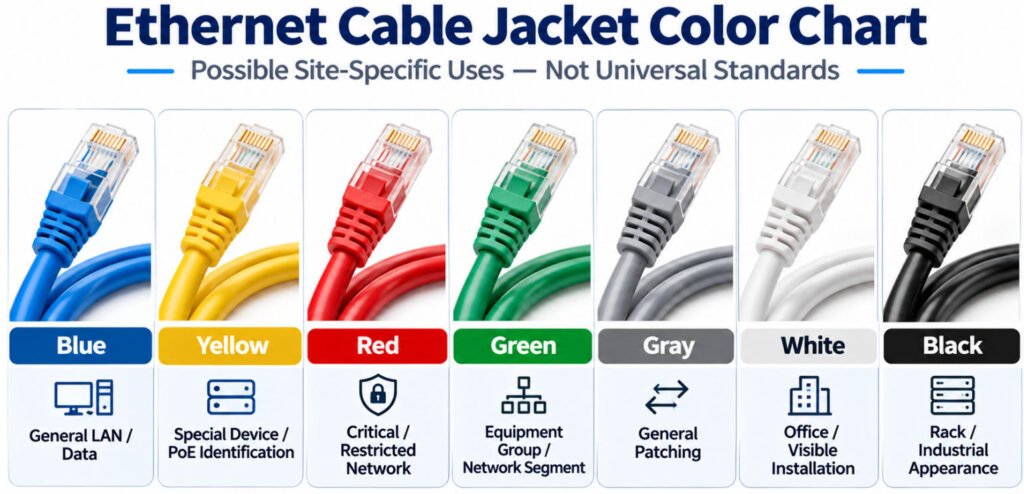
Ethernet Jacket Color Chart: Possible Site-Specific Uses — Not Universal Standards
| Jacket Color | Possible Site-Specific Use |
|---|---|
| Blue | General LAN or data connection |
| Yellow | Special device group or PoE identification |
| Red | Critical or restricted system |
| Green | Equipment group or network segment |
| Gray | General patching |
| White | Office or visible installation |
| Black | Equipment, rack, or industrial appearance |
These are examples of how an organization may use color coding. They are not universal Ethernet wiring standards.
What Do These Ethernet Cable Colors Mean in Practice?
- A yellow Ethernet cable may identify a designated equipment group or PoE connection in a particular facility. However, yellow does not automatically mean that the cable supports PoE. Power delivery suitability depends on the cable and connector specifications, applicable requirements, and installation conditions.
- A red Ethernet cable might identify a restricted or business-critical network segment. Its color alone does not establish emergency-system approval, special electrical protection, or any particular performance rating.
- A green Ethernet cable may help technicians distinguish an equipment group, production area, or network segment. The meaning must be defined in the site’s cable identification documentation.
- White and gray Ethernet cables are often selected for general patching, office environments, or installations where appearance matters. Neither color establishes the cable category or transmission speed.
- A black Ethernet cable may be chosen for equipment racks, machinery, or industrial installations. However, a black jacket does not automatically indicate UV resistance, outdoor suitability, oil resistance, or a particular fire rating.
Does Ethernet Cable Color Indicate Cat5, Cat5e, Cat6 or Cat6A?
No. Outer jacket color does not reliably identify whether an Ethernet cable is Cat5, Cat5e, Cat6, or Cat6A. There is no universal Ethernet cable category color code that assigns a specific jacket color to each category.
For example, a blue Ethernet cable could be Cat5e, Cat6, or Cat6A. Likewise, a yellow, gray, white, or black cable may belong to different categories depending on its actual construction and specifications.
How Can You Identify the Ethernet Cable Category?
Instead of relying on jacket color, check the following information:
Jacket Marking → Category Designation → Part Number → Manufacturer Documentation
- Jacket marking: Look for printed information on the cable sheath, including a category designation where provided.
- Category designation: Check whether the cable is identified as Cat5, Cat5e, Cat6, or Cat6A.
- Part number: Match the cable identification to the manufacturer’s product information.
- Manufacturer documentation: Verify the stated category and relevant performance specifications against the datasheet.
At Yihetai, we recommend verifying the cable specification against the approved engineering drawing and bill of materials (BOM), particularly when similar-looking cables are used across different assemblies. Jacket color alone is not sufficient evidence of category compliance.
Is There a Separate Cat5 Cable Color Code?
No. Cat5 does not use a unique set of conductor colors that is separate from other standard four-pair Ethernet cabling.
Cat5, Cat5e, Cat6, and other common four-pair twisted-pair cables use the familiar internal pair colors:
- Orange
- Green
- Blue
- Brown
What changes is not the basic color set, but the cable category, construction, performance requirements, and the selected termination scheme.
The conductor-to-pin order is determined by T568A or T568B, not by whether the cable is Cat5, Cat5e, or Cat6.
So:
Cable Category ≠ Different Wire Color Set
Cable Category ≠ Jacket Color
In our experience, this distinction helps avoid confusion when users see the same internal colors in cables with different category markings.
Cat5 describes a cable category; it does not create a separate Ethernet wire-color system.
For the exact conductor-to-pin sequence, see our RJ45 Color Code guide.
What Does “Ethernet Cable Color Order” Refer To?
“Ethernet cable color order” usually refers to the sequence of the internal twisted-pair conductors when they are terminated to an 8P8C/RJ45 connector using T568A or T568B.
It should not be confused with the color of the cable’s outer jacket.
Internal Color Order → T568A / T568B Termination
Outer Cable Color → Jacket Identification
The internal wire order determines how the orange, green, blue, and brown pairs are assigned during connector termination. The outer jacket may be blue, yellow, red, black, or another color, but that jacket color does not determine the RJ45 wiring order.
In our experience, separating these two meanings is important because users often search for an Ethernet connector color code when they are actually looking for the internal conductor sequence.
Ethernet cable color order refers to internal conductor termination not the outer jacket color.
Does Ethernet Cable Color Affect Speed or Performance?
No. The outer jacket color does not inherently change Ethernet speed or electrical performance.
Key factors include:
- Cable category: The specified transmission performance requirements.
- Cable construction: Conductor size, materials, insulation, and twisted-pair design.
- Pair integrity: Maintaining the intended twisted-pair structure and electrical balance.
- Connector performance: Using connectors suitable for the required cable category and application.
- Termination quality: Consistent connections and controlled termination workmanship.
- Cable length: Staying within the applicable channel or link requirements.
- Installation conditions: Managing bending, pulling tension, temperature, and electromagnetic interference.
- Shielding where required: Selecting and correctly implementing an appropriate shielding system.
- System specifications: Meeting the requirements of the intended Ethernet application.
For example, if a blue Cat6 cable and a red Cat6 cable use the same conductor construction, category specification, connector system, and termination quality, the jacket color does not make one cable faster than the other.
In our experience, color is useful for visual identification and network organization, but performance issues should be investigated through the cable specification and complete link not by jacket color.
Does Cable Color Tell You Whether Ethernet Supports PoE?
No. Outer cable color does not prove that an Ethernet cable supports a specific Power over Ethernet (PoE) application. A yellow, blue, red, or black Ethernet cable is not automatically PoE-compatible or incompatible because of its jacket color.
Some organizations may use yellow Ethernet cables to identify connections to PoE-powered devices, such as IP cameras, wireless access points, or network equipment. However, this is a local identification convention not a PoE electrical standard.
To determine whether an Ethernet cable is suitable for a particular PoE application, verify the following:
- Cable Specification: Confirm that the cable meets the relevant electrical and installation requirements.
- Conductor Construction: Check conductor material, size, and construction.
- Cable Category: Verify the specified cable category.
- Application Requirements: Consider cable length, installation environment, and operating conditions.
- PoE/System Requirements: Confirm compatibility with the applicable power delivery standard and equipment specifications.
A yellow Ethernet cable should never be assumed to support PoE solely because of its color.
Can You Identify Shielded vs Unshielded Ethernet Cable by Color?
No. Jacket color alone cannot reliably tell you whether an Ethernet cable is shielded or unshielded.
A blue cable is not automatically UTP, and a black cable is not automatically shielded. To identify the actual construction, check:
- Jacket markings
- Product designation
- Connector construction
- Shield, foil, or braid structure
- Manufacturer documentation
In our experience, color is useful for visual organization, but it should never be used as proof of shielding construction.
For example, two cables with the same blue jacket may use completely different internal designs one may be unshielded, while another may include foil or braided shielding.
How Do You Identify an Ethernet Cable Correctly?
Identify an Ethernet cable by its printed markings, construction, connectors, and documentation not by jacket color alone.
You can follow below 5 steps to identify:
Step1. Read the Jacket Printing
Check for information such as:
- Cable category
- Manufacturer
- Part or model number
- Rating
- Other applicable markings
Step2. Confirm the Connector
Identify whether the cable uses a standard modular Ethernet connector or an application-specific industrial connector.
Step3. Check the Cable Construction
Verify whether the cable is shielded or unshielded, the pair configuration, and any application-specific construction requirements.
Step4. Confirm the Wiring Where Required
If the cable uses RJ45 termination, verify the conductor order and pin assignment. For the full sequence, see our RJ45 Color Code: T568A vs T568B guide.
Step5. Verify the Documentation
For OEM, industrial, or custom cable assemblies, confirm the drawing, part number, specification, and required test criteria.
In our experience, this process is much more reliable than identifying a cable by color alone.
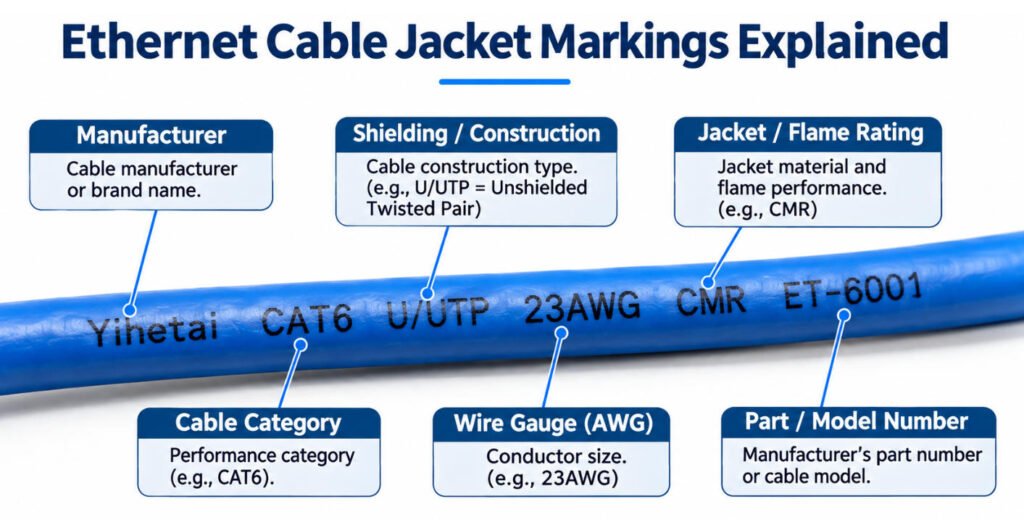
What Information Is Printed on an Ethernet Cable Jacket?
Ethernet cable jacket markings provide information about the cable’s identity, construction, ratings, and specifications. Unlike jacket color, the printed cable legend can help identify the actual cable type and verify its suitability for an application.
Common Ethernet cable markings may include:
- Cable Category: Identifies the specified category, such as Cat5e, Cat6, or Cat6A.
- Wire Gauge (AWG): Indicates the nominal conductor size.
- Shielding Type or Construction: May identify the cable’s shielding arrangement or construction.
- Jacket or Flame Rating: Indicates applicable jacket material classifications or flame-performance ratings.
- Temperature Rating: Specifies a rated operating temperature or temperature range where provided.
- Manufacturer Identification: Identifies the cable manufacturer or brand.
- Certification Markings: May display applicable third-party certification or compliance marks.
- Production or Lot Information: May support manufacturing traceability and product identification.
The exact Ethernet cable jacket marking format varies by manufacturer, product design, and target market. Not every cable includes all these details, so the manufacturer’s datasheet remains important.
Why Do Server Rooms and Data Centers Use Different Ethernet Cable Colors?
Server rooms and data centers use different Ethernet cable colors to organize network connections, simplify maintenance, and make cable identification faster. Color coding helps technicians visually distinguish cable groups in racks, patch panels, and high-density network installations.
A well-documented server room cable color code can provide several practical benefits:
- Quick Visual Grouping: Identify related connections without tracing every cable.
- Easier Maintenance: Locate specific cable groups during equipment upgrades or replacements.
- Faster Troubleshooting: Narrow down the connections that may require inspection.
- Service Segmentation: Visually separate cables assigned to different network services.
- Better Rack Management: Keep patching arrangements organized and easier to maintain.
For example, a data center may assign different jacket colors to general data connections, management networks, voice systems, security cameras, PoE devices, critical infrastructure, or laboratory and test networks.
How Should a Company Create an Ethernet Cable Color Scheme?
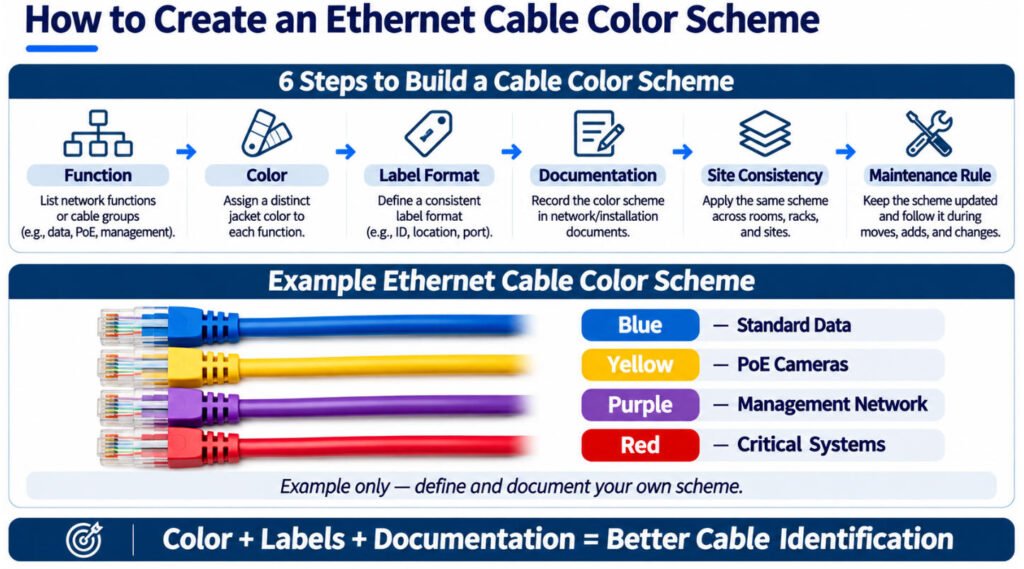
Ccompany should create an Ethernet cable color scheme by assigning colors to specific functions, combining them with clear labels, and documenting the rules for consistent use. The goal is to make network identification easier without relying on jacket color alone.
A practical Ethernet cable color management workflow is:
Function → Color → Label Format → Documentation → Site Consistency → Maintenance Rule
Start by identifying the network functions that need visual separation. Then assign a distinct color to each group and establish a consistent cable labeling format.
Example only — define and document your own scheme.
| Network Function | Example Jacket Color |
|---|---|
| Standard Data | Blue |
| PoE Cameras | Yellow |
| Management Network | Purple |
| Critical Systems | Red |
These assignments are illustrative, not universal Ethernet color standards.
For effective network cable color coding, follow these best practices:
- Keep It Simple: Use a manageable number of colors to avoid confusion.
- Maintain Site Consistency: Apply the same color definitions throughout each facility.
- Combine Colors With Labels: Use unique cable IDs and endpoint labels for precise identification.
- Document the Scheme: Include the approved color legend in network drawings and maintenance records.
Is Ethernet Connector Color Coding the Same as Cable Jacket Color?
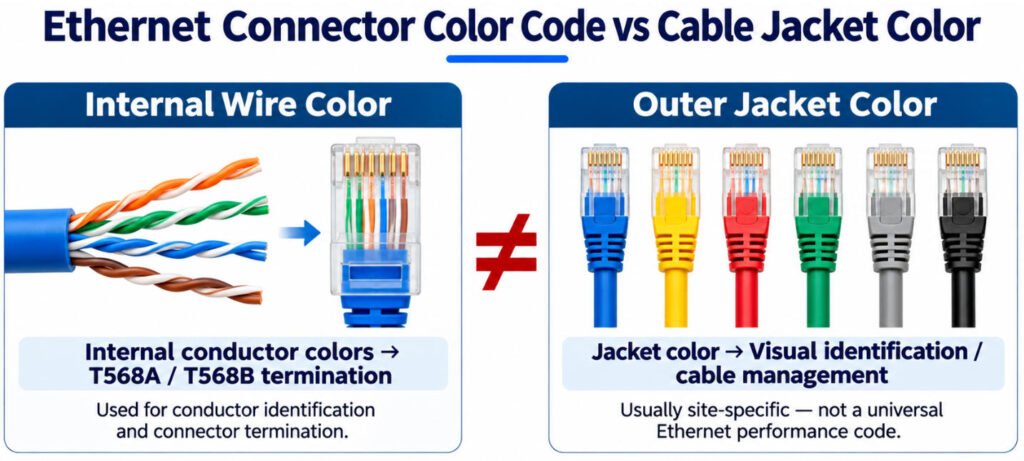
No. Ethernet connector color coding usually refers to the internal conductor termination sequence, while cable jacket color refers to the outer sheath.
These are two different identification systems:
- T568A / T568B → internal wire order and pair-to-pin assignment
- Blue / yellow / red / other jacket colors → visual identification or site-specific cable management
The outer jacket color does not determine the RJ45 pinout, and the T568A/T568B conductor sequence does not depend on whether the cable jacket is blue, black, yellow, or another color.
In our experience, these two meanings are often mixed together when people search for an Ethernet connector color code.
Connector color coding is about conductor termination; jacket color is about identifying the cable as a whole.
For the complete Pin 1–8 conductor order, see our RJ45 Color Code: T568A vs T568B guide
What Does “Ethernet Cable Color Order” Mean?
“Ethernet cable color order” usually refers to the sequence of colored conductors inside an Ethernet cable, but it can also describe how different jacket colors are organized in a network. The distinction depends on what you are trying to identify.
1. Internal Wire Color Order
If you are looking for the Pin 1–8 color order of an RJ45 connector, the relevant standards are T568A and T568B. These define how the eight colored conductors are arranged during termination.
2. Outer Jacket Color Scheme
If you are asking what blue, yellow, or red Ethernet cables mean, you are referring to jacket color identification. Companies may assign these colors to different network functions, but there is no universal jacket color sequence.
Frequently Asked Questions About Ethernet Cable Colors
1.Does Ethernet cable color matter?
Yes, but mainly for identification and cable management. Jacket color can help technicians group or recognize cables, but it does not by itself define Ethernet category, speed, shielding, or PoE capability.
2.What does a blue Ethernet cable mean?
A blue Ethernet cable does not have one universal technical meaning. Blue is commonly used for general LAN or data connections, but its actual meaning depends on the manufacturer, project, or site color scheme.
3.Is a blue Ethernet cable Cat5 or Cat6?
It could be either. A blue jacket does not tell you whether the cable is Cat5e, Cat6, Cat6A, or another category. Check the jacket marking, part number, and manufacturer documentation.
4.Does a yellow Ethernet cable mean PoE?
Not necessarily. Some organizations use yellow cables to identify PoE devices, but this is a local identification convention rather than a PoE electrical standard.
5.Does a red Ethernet cable mean a critical network?
Not universally. A company may use red for critical, restricted, security, or other special-purpose connections, but red has no fixed Ethernet meaning unless the site documentation defines it.
6.Is a black Ethernet cable always outdoor rated?
No. Black is only a jacket color and does not automatically prove UV resistance, outdoor suitability, water resistance, or another environmental rating. Check the printed specification and product documentation.
7.What color is Cat6 cable?
Cat6 does not have one required jacket color. Cat6 cables may be blue, gray, yellow, red, black, white, or other colors depending on the manufacturer or project requirements.
8.Does Cat5 have a specific color?
No. Cat5 and Cat5e do not require a specific outer jacket color. Their internal twisted pairs use the familiar orange, green, blue, and brown conductor color families, while the outer jacket color is separate from the cable category.
9.Can cable color tell you Ethernet speed?
No. Ethernet speed depends on the cable specification, construction, connectors, termination quality, length, and the complete network system not on jacket color.
10.Should I trust cable color or jacket markings?
Trust the jacket markings and technical documentation. Color is useful for quick visual identification, but the printed legend, part number, category marking, and specification provide the information needed to identify the cable correctly.
11.Is Ethernet cable color order the same as T568A/T568B?
When “color order” refers to the internal conductor sequence, yes the relevant termination scheme is T568A or T568B. Outer jacket colors such as blue, yellow, or red do not follow a universal order.
Conclusion
Do not identify an Ethernet cable by jacket color alone. Color helps with organization and quick visual identification, but the cable specification defines what the cable actually is.
For reliable Ethernet cable identification, follow a simple process: Color → Marking → Specification → Documentation → Verification. Check the printed cable legend, confirm the required construction and performance, and verify the assembly against approved documentation.
If you are developing a custom RJ45 Ethernet cable assembly, send Yihetai your cable category, connector requirements, pinout, shielding requirements, finished length, jacket requirements, application environment, drawing, or existing sample for engineering review and quotation.
Explore our Custom RJ45 Ethernet Cable Assembly solutions.
Related Wire Harness Articles:
- Top 25 Global Ethernet & RJ45 Cable Manufacturers
- Shielded Cable Guide: Types, Foil vs Braid, Grounding, EMI Protection & How to Choose
- Computer Cable Types: A Complete Guide to PC Cables, Connectors, Ports and Uses
- Wire Gauge Guide: AWG Sizes, Diameter, Amperage & How to Choose the Right Wire
- How to Ensure Waterproofing in Cable Assemblies?