Yihetai manufactures custom USB Y cable assemblies for OEM applications. Explore connector configurations, power and data options, USB 2.0/3.0 designs, and custom manufacturing support.
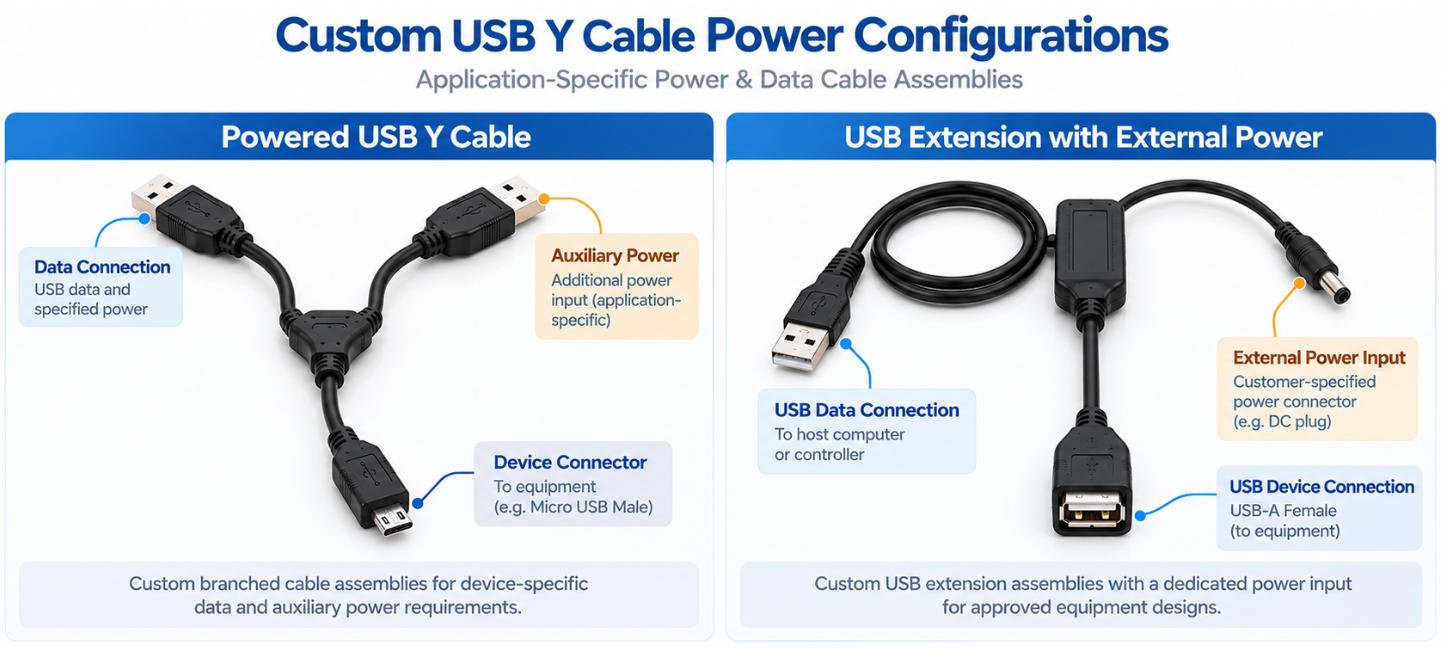
A USB Y Cable is a specialized cable assembly featuring three connector ends arranged in a Y-shaped configuration. Depending on its design, it may provide a data connection, an auxiliary power connection, or a device-specific interface. USB Y cables are used in selected external storage, legacy USB equipment, and custom OEM applications.
Unlike a conventional USB cable with two connector ends, a USB Y cable has three ends connected through a branched cable structure.
Common configurations include dual USB-A connectors, Micro USB connectors, and other application-specific combinations. A USB Y cable splitter or USB Y adapter may be designed for a particular power or connection requirement, but its functionality depends on the internal wiring and connected devices.
In a typical design, one branch carries the main USB data connection between the host and the device, while another branch may provide auxiliary power or a secondary connection path. The device-side connector may be USB-A, Micro USB, Mini USB, or another specified connector depending on the equipment. The internal wiring must be designed according to the approved electrical function, not only the connector shape.
A standard USB cable usually connects one host port to one device port through a single cable path. A USB Y cable adds an extra branch for a defined function, such as auxiliary power or a special interface requirement. Because different Y cable products may be wired differently, the application and connector specification should always be confirmed before use.
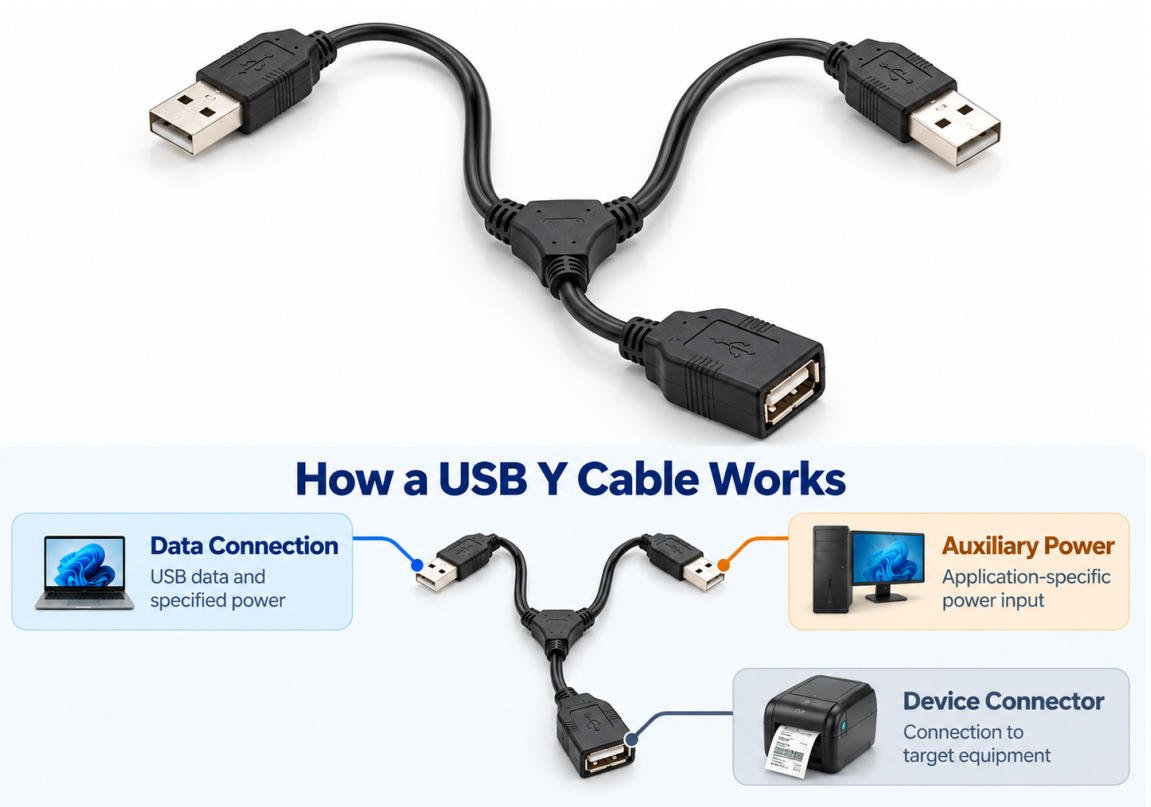
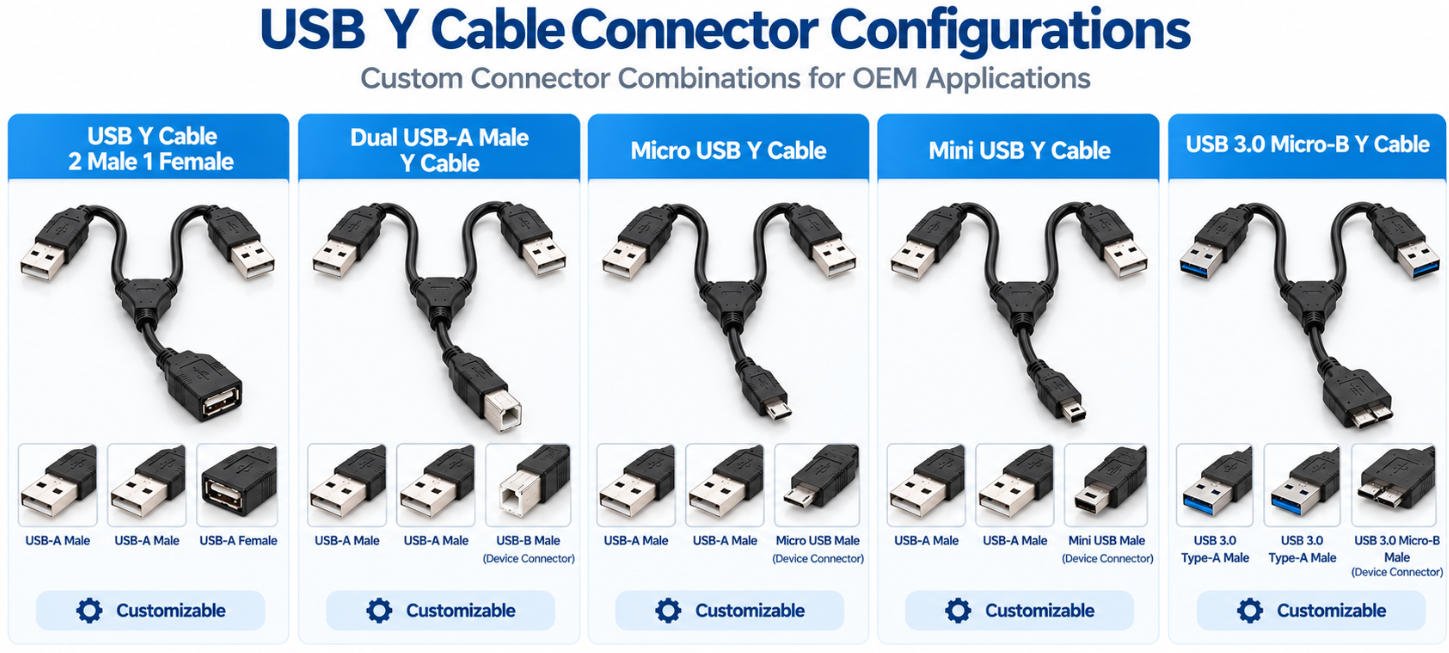
USB Y cables are available with different connector combinations to meet specific equipment connection and cable routing requirements. Depending on the design, each branch may serve a defined data, power, or device connection function.
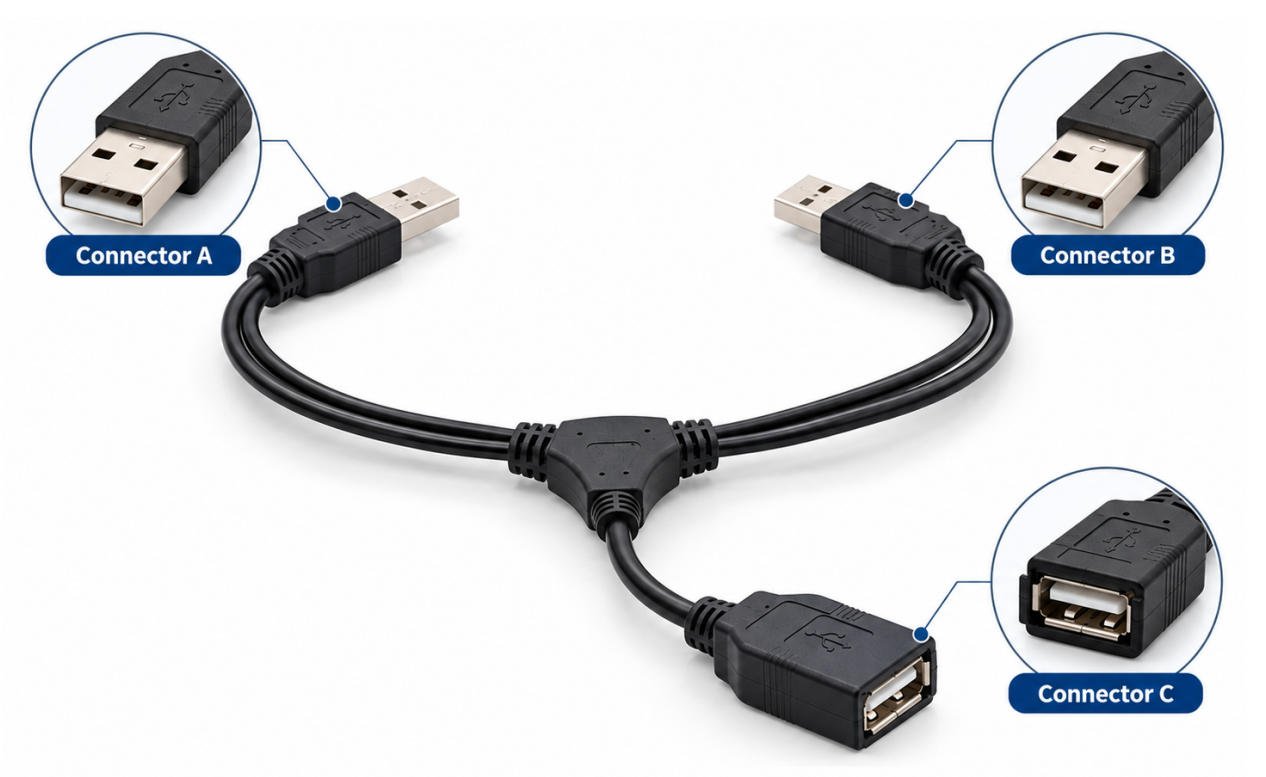
A USB Y cable 2 male 1 female configuration typically features two male connectors and one female connector. One example uses two USB-A male plugs and one USB-A female socket.
Depending on the approved design, the branches may serve different connection functions. The second male connector should not automatically be treated as an additional power input.
A dual USB-A male Y cable features two USB-A male connectors and a third connector selected for the intended equipment interface.
For example, certain legacy peripheral cable designs use two USB-A plugs with a USB Type-B device connector. However, the electrical function of each branch depends on the approved wiring configuration.
A Micro USB Y cable commonly refers to a Y-shaped assembly with a USB 2.0 Micro-B device connector and two additional connectors, often USB-A plugs in legacy peripheral designs.
Micro-B connections are found on certain external hard drive enclosures, portable storage devices, and older electronic equipment.
A Mini USB Y cable uses a Mini USB device connector, typically Mini-B, together with two additional connectors in a customer-specified Y-shaped configuration.
Mini-B interfaces are commonly associated with older portable hard drives, cameras, data acquisition devices, and other legacy peripherals.
A USB 3.0 Micro-B Y cable uses a SuperSpeed Micro-B device connector, typically combined with a USB 3.x Type-A male connection and an additional specified branch.
This connector type is found on certain USB 3.0 external hard drives and storage enclosures.
Compared with USB 2.0 designs, SuperSpeed cable assemblies require additional differential signal paths and appropriate shielding.
Yihetai can manufacture custom cable assemblies according to approved drawings, with cable length, impedance-related construction, signal integrity, and power configuration evaluated for the intended application.
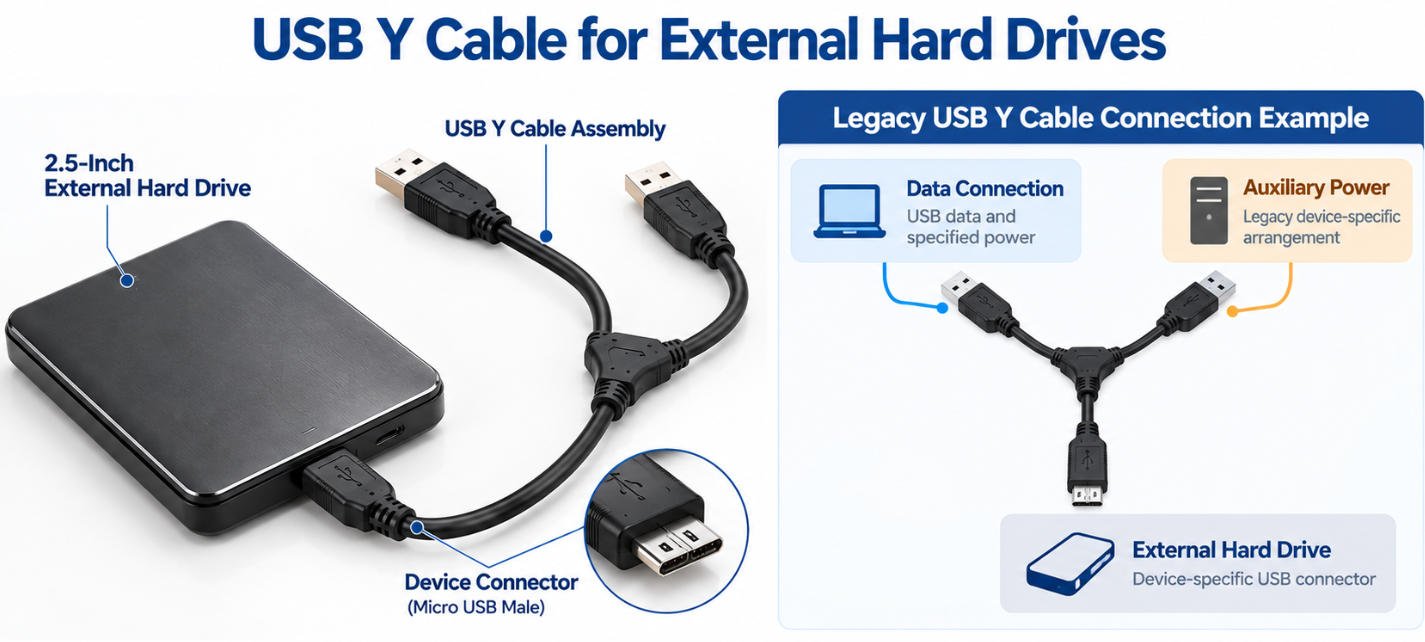
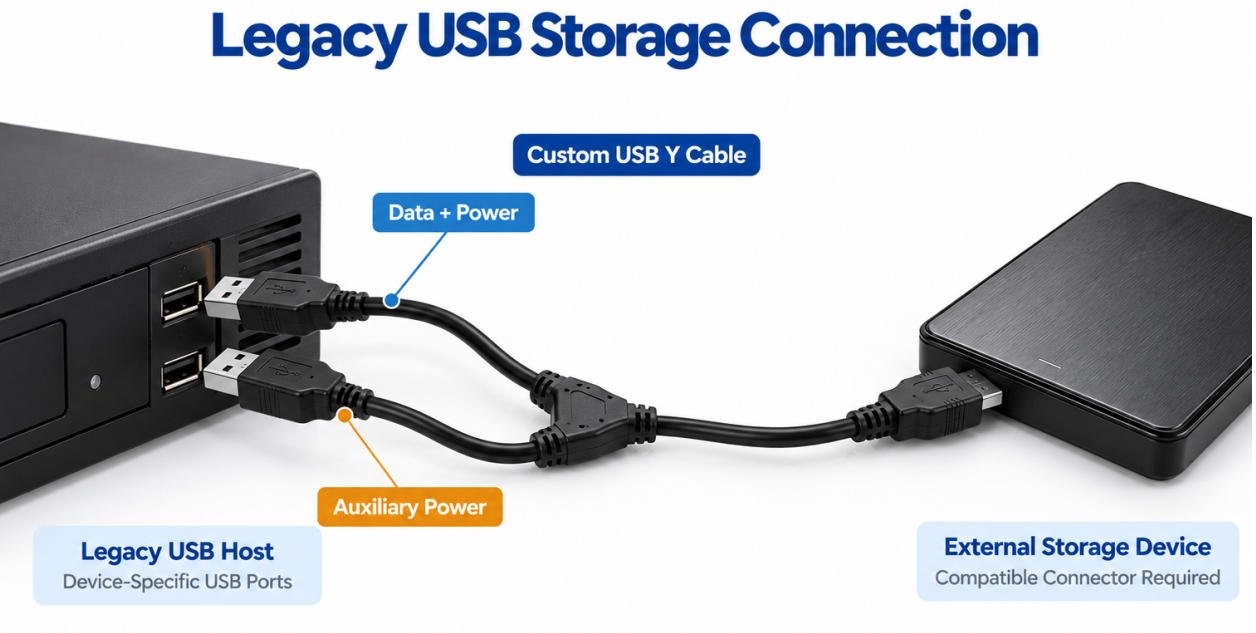
A USB Y cable for an external hard drive is commonly associated with certain older portable storage devices that used a USB data connection and an auxiliary power branch. Its suitability depends on the equipment design and electrical requirements.
In some legacy Y cable designs, one USB-A plug carried data and power, while a second plug was intended to draw auxiliary power.
This arrangement was used with certain older hard-drive enclosures, but it is not a general-purpose USB-compliant power solution.
USB-IF prohibits dual USB-A-plug Y cables for peripheral power. Equipment requiring additional power should use an appropriate self-powered design.
Some older 2.5-inch portable hard drives were powered directly through USB and could have startup power demands exceeding their host ports’ capabilities.
Before specifying a Y cable hard drive assembly, buyers should verify the drive enclosure, host-port specifications, power requirements, and manufacturer-recommended power supply.
Yihetai can review customer-approved cable designs and connector configurations for specialized OEM storage equipment.
The device connector must match the enclosure. Mini-B has a larger trapezoidal profile, Micro-B is slimmer, while USB 3.0 SuperSpeed Micro-B has a wider, two-section design.
A powered USB Y cable typically has one branch responsible for USB data communication and another branch used to provide or route auxiliary power.
The power branch should not be assumed to safely increase available current in every application. Source capability, device requirements and the complete power architecture must be evaluated before the cable is designed.
A USB Y power cable can be configured in different ways according to the equipment design, such as:
Voltage, current, conductor size, cable length and return-path design should be specified for each project.
A USB extension with power may incorporate an additional power input when a standard extension cable does not meet the equipment’s power architecture.
However, the external power source must be electrically compatible with the connected device and USB interface. Improper voltage, grounding or current paths can cause unreliable operation or equipment damage.
| Branch Type | Data | Power | Key Design Considerations |
|---|---|---|---|
| Data + Power Branch | Yes | Yes | USB pinout, signal integrity, voltage and current |
| Power-Only Branch | No | Yes | Voltage, current, polarity and return path |
| Auxiliary Power Input | Application-Specific | Yes | Source compatibility and grounding |
| Custom Branch | Customer-Defined | Customer-Defined | Approved drawing and pinout required |
The difference between a USB 2.0 Y cable and a USB 3.0 Y cable goes beyond data transfer speed. Each requires suitable signal conductors, shielding, termination, and electrical verification to meet the intended USB operating mode.
USB 2.0 vs USB 3.0 Y Cable Specification Comparison
| Item | USB 2.0 Y Cable | USB 3.0 Y Cable |
|---|---|---|
| Nominal Maximum Signaling Rate | 480 Mbps (High-Speed) | 5 Gbps (SuperSpeed) |
| Data Signal Structure | One D+ / D− differential pair | USB 2.0 pair plus SuperSpeed TX/RX differential pairs |
| Cable Construction | USB 2.0 conductors and customer-defined branches | Additional SuperSpeed signal conductors and specified branches |
| Shielding | According to applicable USB 2.0 requirements | Shielding and pair construction suitable for SuperSpeed operation |
| Signal Integrity | USB 2.0 electrical requirements | Differential impedance, insertion loss, and specified SuperSpeed requirements |
| Cable Length | According to approved design and USB 2.0 performance | Requires verification against SuperSpeed performance limits |
| Electrical Testing | Pinout, continuity, shorts/opens, specified USB 2.0 tests | Pinout, continuity, shorts/opens, and specified SuperSpeed signal integrity tests |
| Auxiliary Power Branch | Customer-approved power configuration | Customer-approved power configuration |
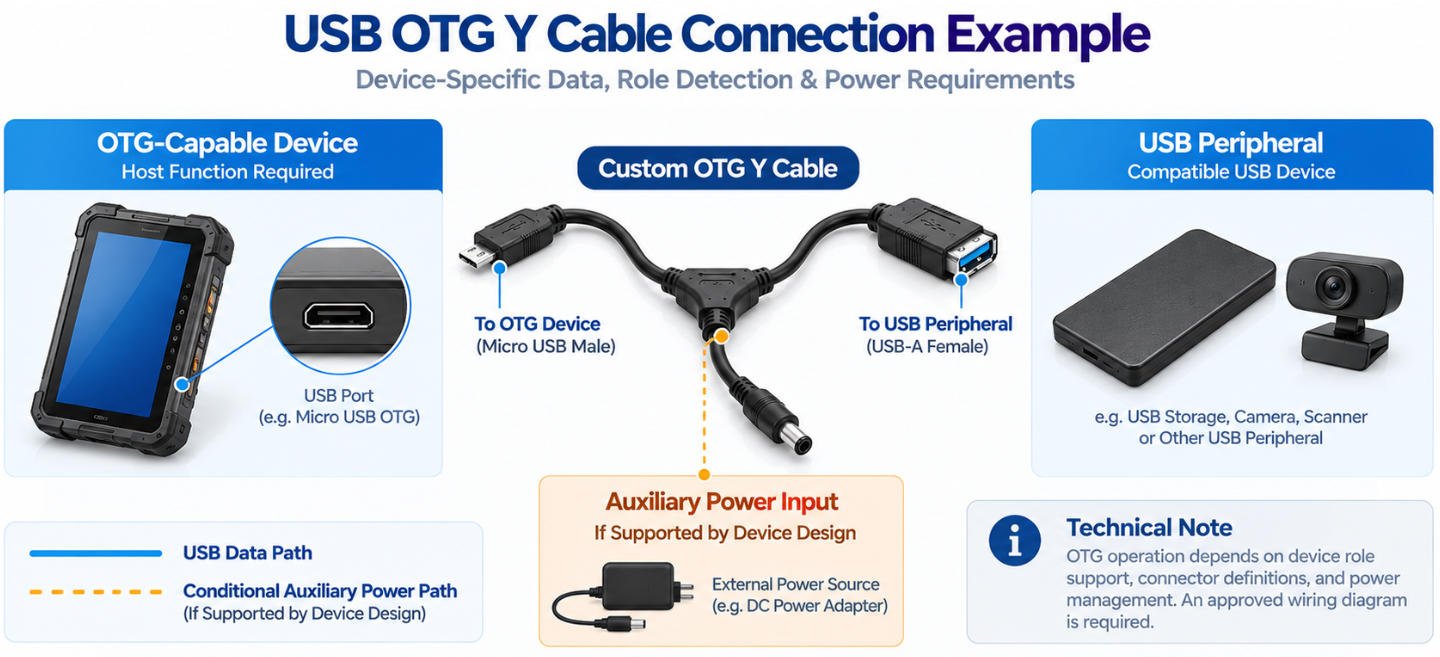
A USB OTG Y cable is designed for applications where USB host/device roles, peripheral communication and power delivery need to be coordinated within a specific connection scheme.
An OTG USB Y cable may combine an OTG data connection with an additional branch for power input or another defined function. The exact configuration depends on the host device, peripheral interface and USB connector type. OTG functionality cannot be created simply by connecting three USB plugs together.
OTG applications require correct device-role identification and power management.
Important design factors include:
Yihetai can manufacture custom OTG cable assemblies according to customer-approved drawings and equipment requirements.
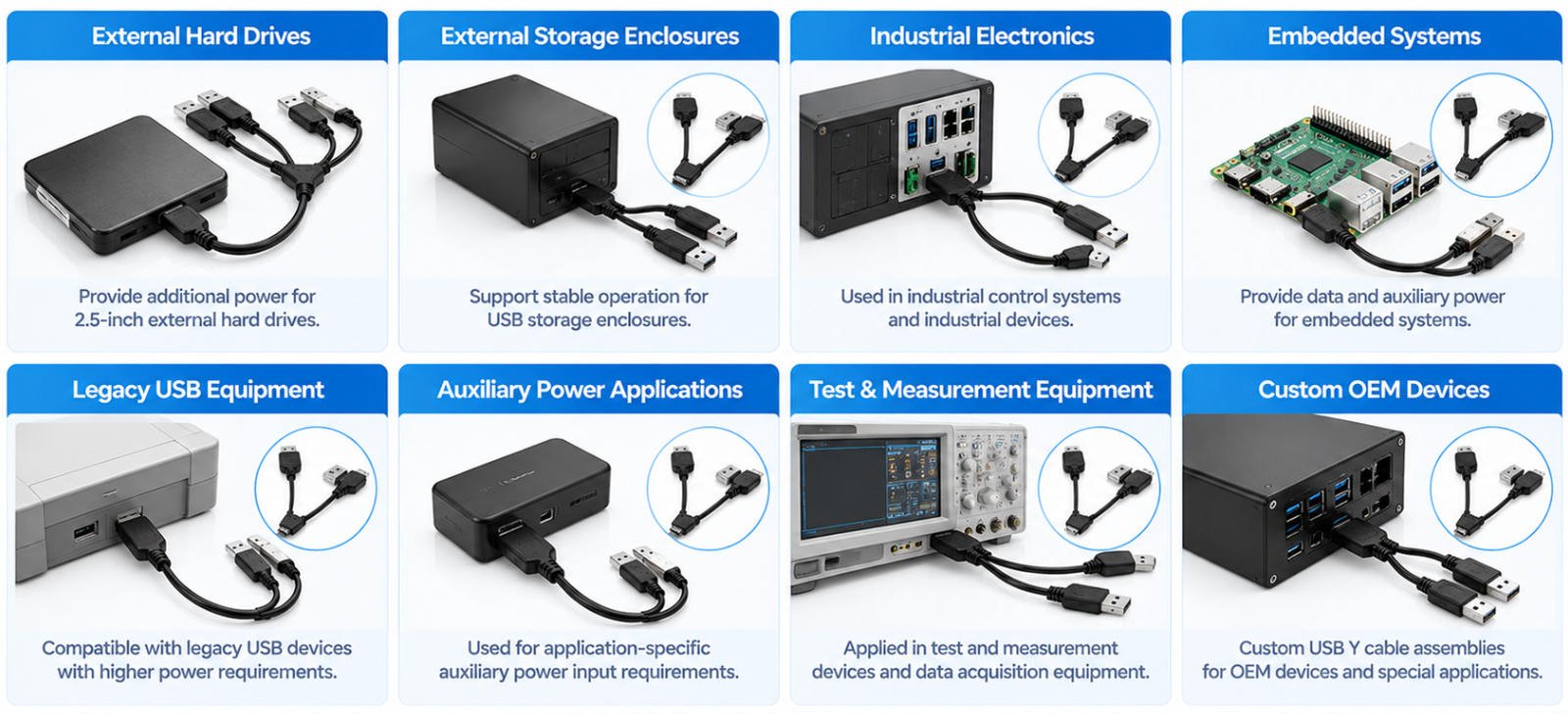
Yihetai manufactures custom USB Y cable assemblies for a wide range of storage, industrial, embedded and auxiliary-power applications, with connector combinations, branch functions, cable lengths and electrical configurations tailored to each device requirement.
Some legacy USB equipment and external storage accessories may use a Y-shaped cable to separate the main data connection from an auxiliary power input. These configurations are application-specific and should always be matched to the actual device, storage enclosure, and approved wiring requirements.
A usb y cable wii u configuration may be used in certain legacy external-storage setups where additional power is required by the connected device. The exact cable arrangement depends on the storage hardware, USB interface, and power requirements.
Older external hard drives and storage enclosures may use USB Y cables with one branch carrying data + power and another branch providing auxiliary power. Connector type, cable length, and internal wiring should be confirmed before production.
Not every console, external drive, enclosure, or usb y cable for legacy devices combination is interchangeable.
USB-A, Micro USB, Mini USB and specified connector combinations.
Customer-defined branch layout, breakout position and cable dimensions.
Custom lengths, conductor gauges, insulation and jacket materials.
Specified foil, braid and other approved cable constructions.
Molded connectors, Y-junctions, sleeves and strain relief options.
Prototype samples, flexible quantities, labeling and custom packaging.
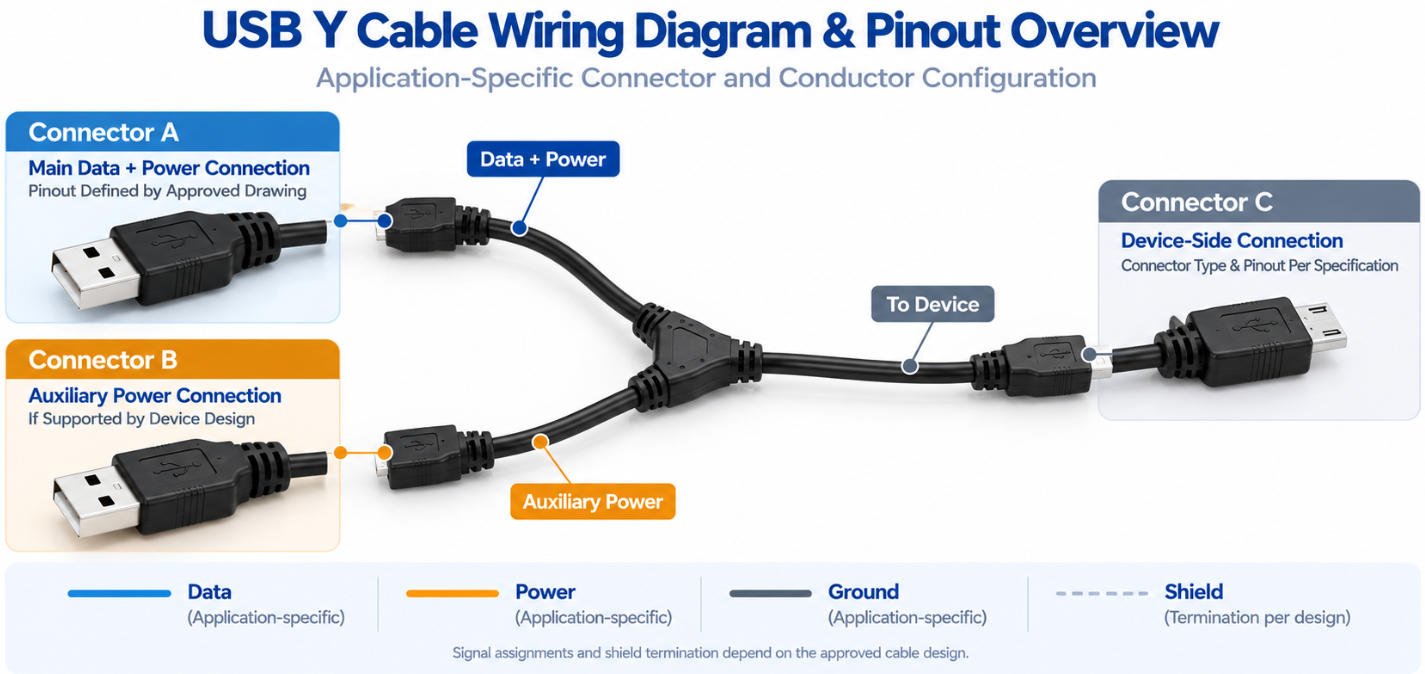
A USB Y cable wiring diagram defines the electrical function of each connector and branch before manufacturing begins. Because Y cable assemblies can be designed for different data, power, and device requirements, connector shape alone does not determine the internal wiring.
For OEM projects, Connector A, Connector B, and Connector C should each be identified by their actual electrical function.
Understanding USB Y Cable Wiring Diagrams
| Branch Type | Data | Power | Ground | Typical Definition |
|---|---|---|---|---|
| Data + Power Branch | Yes | Yes | Yes | Main USB connection |
| Power-Only Branch | No | Yes | Yes / As Specified | Auxiliary power input |
| Device Branch | As Specified | As Specified | As Specified | Connection to target equipment |
| Custom Branch | Customer-Defined | Customer-Defined | Customer-Defined | Approved OEM application |
Not every branch in a USB Y cable pinout carries the same signals.
Although USB Y cables, USB splitter cables, and USB hubs may appear similar, they serve different connection purposes. Understanding these differences helps you select the correct solution for their equipment.
A USB Y cable splitter usually describes a cable with one main section and two branches. Depending on the design, the branches may carry data, power or a customer-defined combination.
The word “splitter” describes the physical branching arrangement and does not guarantee that both branches provide independent USB data connections.
A passive USB Y cable should not be treated as a way to connect two independent USB devices to one host port.
USB data communication requires proper device addressing and topology. If one host must communicate with multiple USB peripherals, a USB hub or another suitable controller-based solution is normally required.
A powered USB hub is appropriate when multiple USB devices need independent data connections and additional power distribution.
| Solution | Typical Function | Multiple Independent USB Data Devices |
|---|---|---|
| USB Y Cable | Data + auxiliary power or custom branching | No, not by passive splitting |
| USB Splitter Cable | Broad term for branched cable designs | Depends on actual circuit design |
| Powered USB Hub | Data expansion + managed power distribution | Yes |
Choose the cable or hub architecture according to the required data, power and device functions rather than connector shape alone.
A USB Y cable is used when one cable assembly needs three connection points or branches. Depending on the design, one branch may carry data and power, while another provides auxiliary power or another customer-defined function. Common applications include external storage, legacy USB equipment, industrial electronics and custom OEM devices. The actual wiring and function should always be confirmed by the approved pinout.
Some USB Y cable designs include an auxiliary power branch, but this does not mean every Y cable can safely increase available power. The usable power depends on the USB source, device requirements, conductor size, cable length, connector ratings and electrical design. For OEM projects, voltage, current, polarity and return paths should be defined before the cable is manufactured.
A passive USB Y cable should not be used as a substitute for a USB hub when one host needs to communicate with two independent USB devices. USB data communication requires proper device addressing and topology. A Y cable may split power or provide a customer-defined branch, but two USB data paths should not simply be passively combined or divided.
A USB Y cable is a passive cable assembly with multiple branches whose functions may include data, power or auxiliary power. A USB hub is an active electronic device designed to expand one USB host connection into multiple managed USB data ports. If several independent USB peripherals must communicate with one host, a USB hub is generally the appropriate solution.
A USB Y cable for an external hard drive is commonly associated with certain older portable drives and storage enclosures. In these applications, one USB connection may carry data and power while another branch provides auxiliary power. This should be treated as a device-specific or legacy configuration. Always verify the hard drive interface, power requirement and approved connection method before selecting a cable.
Some legacy Wii U external-storage setups have used Y cables with certain bus-powered hard drives. However, compatibility depends on the storage device, cable configuration and power requirements. A USB Y cable should not be assumed to work with every Wii U, hard drive or enclosure. The specific storage device and its approved power method should be checked before use.
A powered USB Y cable is a cable assembly that includes a separate or auxiliary power branch in addition to the main USB connection. Depending on the design, the main branch may carry data and power while the auxiliary branch carries power only. The voltage, current, grounding and connector functions must be defined according to the connected equipment.
The main difference is the device-side connector. A Micro USB Y cable uses a Micro USB connector, while a Mini USB Y cable uses the larger legacy Mini USB connector. Both can be designed with different data and power branch functions. Connector appearance alone does not determine the internal wiring, so the device port and approved pinout should always be confirmed.
Only if the device, USB interface and power architecture are specifically designed to support that function. An OTG Y cable cannot automatically provide simultaneous charging and peripheral communication simply by adding another power branch. Host/device roles, power roles, connector configuration and USB requirements must all be compatible. USB-C OTG and charging designs require especially careful configuration and validation.
Yes. Yihetai can manufacture custom USB Y cable assemblies according to customer drawings, approved pinouts, connector specifications or existing samples. Custom options can include connector combinations, branch functions, cable length, wire gauge, shielding, jacket materials, overmolding, strain relief, labels and OEM packaging. We can support sample development, low-volume production and volume manufacturing based on project requirements.
Send us your drawing, connector layout, approved pinout, cable length requirements or existing sample. Yihetai can support custom USB Y cable development from prototype quantities to volume production.
We will contact you within 24 hours, please pay attention to the email with the suffix “info@yihetai-cable.com”.