
I work with a lot of customers who quietly assume RS232 is “old” or “obsolete” — yet every day I still see it at the heart of industrial control systems, legacy production lines, lab and medical equipment, POS terminals, and even networking gear. The problem isn’t that serial is gone. It’s that the world around it has moved on.
You buy a new laptop and it only has USB-C. Your critical device is still RS232 on a chunky D-Sub connector. Now you’re stuck wondering: Can I just use any adapter? Will it be reliable? Am I going to damage something?
In this blog, I’ll walk you through exactly what you need to know: when a classic D-Sub connection is still the best choice, when USB-C makes more sense, and how to bridge the gap safely so your serial devices keep working without nasty surprises.
What RS232 Actually Is?
Before I compare D-Sub and USB-C in detail, I want to clear up one big point of confusion I hear all the time: what RS232 actually is. People often say “serial port” as if it’s one single thing, but under the hood there’s a real standard, real signal levels, and very specific use cases. If I don’t define that clearly, it’s hard to decide which connector or cable makes sense for your device.
RS232 vs “serial”: what people really mean by a “serial port
When most people say “serial port”, they usually mean: The old-style COM port on a PC (often a DB9 connector), or Any connector that talks using a simple TX/RX serial stream.
But strictly speaking RS232 is a standard that defines:
- Electrical voltage levels (typically ±3 V to ±12 V, not 0–5 V logic).
- Signal directions and names (TXD, RXD, RTS, CTS, etc.).
- Connector conventions (often DB9 or DB25, especially on older equipment).
“Serial” on its own is much broader:
- It could mean TTL/UART serial at 3.3 V or 5 V on a microcontroller.
- It could mean RS232, RS485, RS422, or other serial standards.
- It could even be used casually for “anything that sends bits in a row.”
So when I talk about RS232 in this blog, I’m specifically talking about the classic PC-style serial interface with RS232 voltage levels, not just any two wires labeled TX and RX.
Typical RS232 signals: TX, RX, GND and handshakes
At its simplest, an RS232 link only needs three signals:
- TX (TXD) – Transmit data from your device.
- RX (RXD) – Receive data into your device.
- GND – Common reference ground between both sides.
But RS232 also defines a whole set of handshake and control lines that many industrial and legacy devices still use:
RTS (Request To Send) and CTS (Clear To Send)
Used for hardware flow control. One side says “I’m ready to send,” the other responds when it’s ready to receive, helping prevent buffer overflows.
DTR (Data Terminal Ready) and DSR (Data Set Ready)
Used to signal that each end is powered up and ready to communicate.
DCD (Data Carrier Detect) and RI (Ring Indicator)
Historically used with modems to indicate a carrier or an incoming call.
Not every device uses all of these, but when I design or specify a cable, I have to know which signals are actually required, especially if I’m moving from a full DB9 to a minimal USB-C–to–RS232 adapter or a custom harness.
Where RS232 still shows up: real-world use cases
Despite its age, RS232 is far from dead. I still see it all the time in:
PLCs and industrial control
Many PLCs, drives, and controllers have RS232 ports for:
- Programming and firmware updates
- Configuration and diagnostics
- Simple point-to-point device communication
CNC machines and motion control
Older and even some newer CNC equipment rely on RS232 links to:
- Transfer G-code
- Log status data
- Interface with legacy PCs or operator stations
Barcode scanners and POS devices
A lot of POS peripherals (barcode scanners, receipt printers, scales) support RS232 because:
- It’s reliable over reasonable distances
- It’s simple to implement
- It integrates well with existing POS systems
Modems and telecom gear
Classic dial-up and specialized modems, along with some telecom gear, still expose RS232 for:
- Configuration
- Monitoring
- Remote management
Test and lab instruments
Oscilloscopes, power supplies, spectrum analyzers, data loggers, and other bench instruments often keep RS232 as:
- A simple, low-level control interface
- A backup to Ethernet or USB
- A way to script tests from older PCs and embedded controllers
In all of these cases, the protocol is still RS232, but the physical access might now be through a traditional DB9 or via a USB-C–to–RS232 converter cable. That’s exactly why choosing between D-Sub and USB-C (and understanding what’s happening in the middle) matters so much because we’re often bridging decades of technology in one connection.
What Is “D-Sub” in RS232 Systems?
Now that I have cleared up what RS232 actually is, I want to zoom in on the connector that most people still picture when they hear “serial port”: the D-Sub. Even though modern laptops have moved to USB-C, D-Sub connectors (especially DB9) are still everywhere in real RS232 systems, from PLCs and CNC machines to barcode scanners and lab instruments. Understanding what D-Sub really is, and why it is designed the way it is, helps me decide when it is still the better choice over a sleek USB-C port.
DB9 (DE-9) vs DB25: what is common today and why
When I say “D-Sub” in the RS232 context, I am usually talking about two classic connector sizes:
DB25 (25-pin D-Sub)
- Common on older PCs and equipment
- Provides many pins for all RS232 signals plus extra lines
- Physically large, robust, but takes significant panel space
DB9 (technically DE-9, 9-pin D-Sub)
- What most people now call the standard serial port
- Supports the most commonly used RS232 signals in a smaller footprint
- Compact but still rugged, so it has become the dominant RS232 connector on modern devices
Today, when I talk about a “D-Sub serial port”, I almost always mean DB9 or DE-9, unless I am dealing with older legacy gear that still uses DB25.
Screw-lock retention: why it matters in industrial environments
One of the biggest practical advantages of D-Sub connectors in RS232 systems is the screw-lock retention:
Each plug has jack screws that thread into the mating connector on the device or panel.
Once tightened, the connector is:
- Much less likely to work loose due to vibration, movement, or cable strain
- Protected against accidental disconnection if someone tugs on the cable
In industrial and field environments, this is a big deal. I see:
- Machines with constant vibration such as motors, presses, conveyors
- Panels that get opened, closed, and bumped during maintenance
- Cables routed through tight spaces where they get nudged or dragged
In those situations, a friction fit connector alone can be a weak point. A D-Sub with proper screw-locks gives me mechanical security, consistent electrical contact over time, and fewer random “it stops working when someone touches the cable” problems.
Shielding, EMI performance, and longer cable runs
Another reason D-Sub remains popular in RS232 systems is real world robustness over longer runs, especially in noisy environments.
With a well designed D-Sub RS232 cable, I get:
- Metal shell and 360 degree shielding
- The D-Sub housing can be metal and tied to the cable shield, which helps protect RS232 signals from electromagnetic interference from motors, inverters, welding equipment, and other noisy sources.
- Strain relief and robust cable jackets
- RS232 D-Sub cables are often built with industrial grade jackets and molded strain relief, so they handle repeated flexing and rough handling much better than thin, unshielded patch leads.
- Longer cable runs
- RS232 is commonly used over several meters and even tens of meters, depending on baud rate and cable quality. A properly shielded D-Sub cable with decent copper conductors maintains signal integrity and helps avoid data errors on these longer runs.
So when I need true RS232 performance over real distances, in real electrical noise, a D-Sub based cable system still gives me a very predictable and proven result. USB-C can provide access to RS232 through adapters and converters, but the classic D-Sub harness, especially when it is custom built with the right shielding, grounding, and screw-locks, remains the benchmark for rugged serial connectivity.
What USB-C Means for Serial Devices? (And What It Does Not Mean)
Now that I have looked at what RS232 really is and how D-Sub connectors support it in the real world, it is time to talk about the modern side of the story: USB-C. I often get asked things like, “My laptop only has USB-C, so does that mean it has a built-in serial port?” or “Can I just use a USB-C cable instead of RS232?” These questions are very understandable, but they mix up the physical connector with the actual communication standard. To choose the right solution for your serial device, I need to be clear about what USB-C really gives you, and what it does not.
USB-C is a connector and standard family, not RS232
First, USB-C is a connector type and part of the broader USB standard family.
It defines the shape and pinout of the port.
It supports multiple protocols: USB 2.0, USB 3.x, DisplayPort, power delivery, sometimes PCIe, and so on.
What it does not define is a native RS232 electrical interface.
So when I plug into a USB-C port on a laptop:
- The port speaks USB protocol, not RS232.
- There are no RS232 voltage levels, TX, RX, RTS, CTS lines directly on those pins.
- This is why a simple passive cable from USB-C to a DB9 socket is not enough. There has to be some kind of electronic brain in the middle that translates USB into RS232.
USB-C to RS232 always needs an adapter or bridge chipset
To connect a true RS232 device (for example a DB9 serial port on a PLC or instrument) to a USB-C only laptop, I always need a USB to RS232 bridge. This comes in two common forms:
- A USB-C to RS232 adapter with a DB9 on one end and USB-C on the other.
- A custom cable or harness that embeds a USB to serial chipset inside one of the connectors.
Inside these products you will usually find:
- A bridge IC (for example from FTDI, Prolific, Silicon Labs, CH340 and others).
- RS232 line drivers and receivers that generate the correct voltage levels.
On the USB-C side, the laptop sees a USB device that exposes one or more virtual COM ports. On the RS232 side, your equipment sees proper TX, RX, GND and possibly RTS, CTS and other handshakes at RS232 voltage levels.
This is the key point: USB-C is just the door. The actual RS232 function comes from the adapter electronics and their configuration.
Why drivers matter and common pain points
Because USB-C to RS232 connections use a bridge chipset, drivers become very important. Different chipsets behave differently on Windows, macOS and Linux.
Typical driver related issues I see are:
- No COM port appears
- The adapter is plugged in, but the operating system does not load the correct driver, so there is no serial port to select in your software.
- Wrong or unstable driver
- On some systems, generic drivers may be used that are not ideal, leading to random disconnects or strange behavior.
- Driver conflicts and naming
- On Windows, the COM number can change each time you plug into a different USB port. On macOS and Linux, the device path can also vary, which confuses scripts or older software.
- Legacy software expectations
- Some older programs only look for COM1 to COM4, while your USB-C adapter may show up as COM7 or higher, which leads to confusion.
To avoid these pain points, I always recommend:
- Choosing adapters that use well supported chipsets with stable drivers.
- Installing the official driver package from the chipset or adapter vendor when needed.
- Fixing or documenting the COM port assignment in your system setup.
Once the driver layer is solid, USB-C becomes a very convenient way to access RS232 devices from modern hosts. You get the best of both worlds: rugged, real RS232 at the device side, and a single compact USB-C connector on your laptop or tablet.
Understanding that USB-C is not RS232 by itself, but a path for conversion, helps you choose the right adapters, cables and even custom harnesses for your serial projects
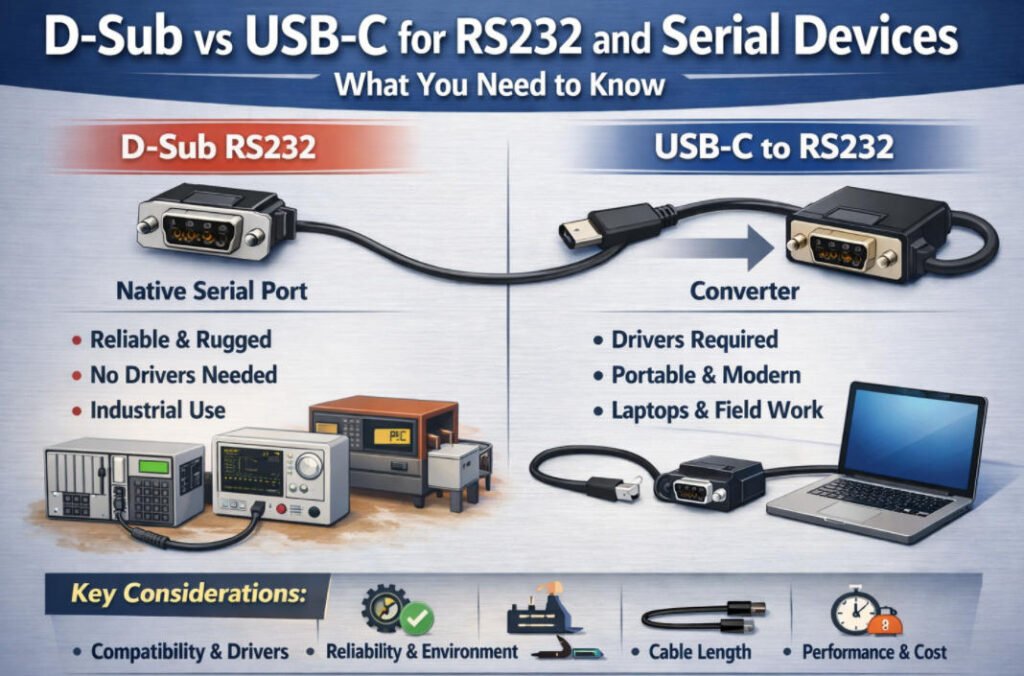
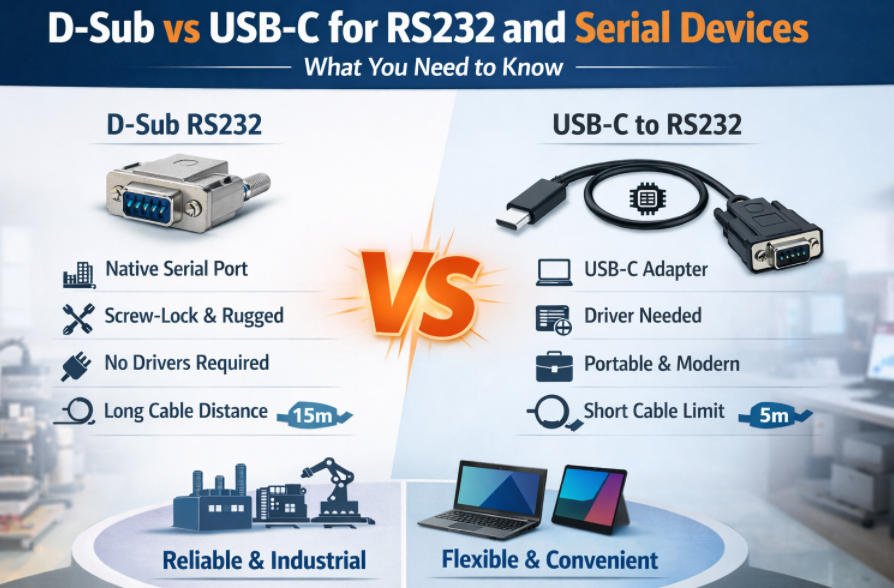
What’s Difference Between D-Sub RS232 And USB-C to RS232?
If you’re working with serial devices, you’ve probably come across both traditional D-Sub (DB9) RS232 ports and modern USB-C to RS232 adapters. At first glance, they seem to serve the same purpose: sending serial data between devices. But the way they work under the hood is quite different. One is a direct, hardware-level RS232 interface. The other relies on USB conversion and driver support. These differences can affect reliability, latency, and compatibility. Below is a clear side-by-side comparison to help you understand which one is right for your setup.
| Feature | D-Sub RS232 (Native Port) | USB-C to RS232 (Adapter-Based) |
| Connection Type | DB9 or DB25 serial port | USB-C port with a built-in RS232 converter |
| Signal Type | True RS232 voltage levels (±5V to ±12V) | RS232 signals emulated through a USB-to-serial bridge |
| Driver Required | No driver needed, hardware-controlled | Yes, depends on the USB chipset and operating system |
| Typical Use Case | Industrial PCs, embedded systems, legacy equipment | Modern laptops, tablets, or USB-only systems |
| Latency and Timing | Low and consistent | Slightly higher, may vary based on system load |
| Handshake Signal Support | Full RS232 (RTS, CTS, DTR, DSR, etc.) supported | Varies by adapter, some support only basic signals |
| Reliability | Very high with fewer points of failure | Depends on adapter quality, chipset, and drivers |
| Cable Length Support | Up to 15 meters with proper shielding | Limited by USB specs, typically under 5 meters |
| Power Source | Powered by the device or port directly | Powered through USB connection |
| Mechanical Stability | Screw-lock connectors for secure connection | Typically no locking, unless custom hardware is used |
| EMI and Shielding | Excellent with shielded D-Sub cables | Varies, often minimal shielding in low-cost adapters |
| Troubleshooting | Simple, no software layer involved | May require driver updates, chipset configuration, or OS tweaks |
If your priority is long-term reliability, stable communication, and robust hardware, native D-Sub RS232 is still the better choice. If you just need temporary access to a serial device from a modern laptop, USB-C to RS232 can work well, as long as you use a trusted adapter with proper driver support.
The Biggest Confusion: “USB-C to Serial” Is Not Just a Cable
A lot of people assume that a USB-C to serial cable is just a simple wire, like a USB-C to HDMI or USB-C to USB-A cable. But that’s where the confusion begins. RS232 is not a native USB protocol, and it uses completely different voltage levels and signaling. So when you’re connecting a serial device over USB-C, it’s not just a cable you’re using. It’s actually a converter, and the quality of that converter is critical. Let’s break down the real difference between passive and active serial cables, and why the internal chipset matters more than most people realize.
USB-C to Serial: It’s Not Just a Cable
1.Passive Cable (Not for RS232)
Passive serial cables do exist, but they are not suitable for RS232 communication. These are typically USB-to-TTL cables designed for connecting directly to UART pins on microcontrollers or development boards.
No logic level conversion
No line driver
No RS232 voltage levels (±5V to ±12V)
High risk of damaging RS232 devices if used incorrectly
These are meant for low-voltage serial communication, such as with Raspberry Pi, Arduino, or TTL debug ports, not for industrial RS232 devices with DB9 connectors.
2.Active Converter Cable (USB to UART with RS232 Line Driver)
A proper USB-C to RS232 cable includes an active conversion circuit. Inside the cable housing, there is a chipset that performs two main functions:
Converts USB signals into UART serial data
Shifts UART voltage levels to full RS232 standards
This is what makes it possible to use a USB-C-only laptop to communicate with equipment like barcode scanners, PLCs, CNC machines, or test instruments that rely on RS232 ports.
3.Why the Converter Chipset Matters
Not all USB-to-RS232 converters are created equal. The internal chipset plays a key role in how reliable and compatible the adapter is. Here is why it matters:
| Factor | Why It Matters |
| Driver support | Chipsets like FTDI are well supported on Windows, macOS, and Linux. Others like Prolific often cause issues or require manual driver updates. |
| Stability | High-quality chipsets ensure stable and consistent data transfer. Low-end or counterfeit chips can cause random disconnections or device errors. |
| Latency and performance | Better chipsets manage data buffering and flow control more effectively, which is important for industrial or time-sensitive applications. |
| Operating system compatibility | FTDI and CP210x work reliably across most systems. Some adapters fail completely after OS updates if the chipset is not supported. |
At Yihetai, we only recommend and use converters with trusted chipsets like FTDI or CP210x. This ensures that every custom serial harness or cable we build delivers reliable, long-term performance across platforms.
Head-to-Head Comparison for RS232 Use
At this point in the blog, I do not just want to list pros and cons. I want to look at how D-Sub and USB-C to RS232 behave in real life, side by side, when I am trying to get actual work done. The connector shape is only the surface. Underneath, there are differences in drivers, reliability, signal integrity, power, and even long term maintenance that really decide which approach makes sense in my project or factory.
1.Compatibility and Driver Support
With a native D-Sub RS232 port, the story is simple:
- On many industrial PCs and legacy systems, the port is exposed as a hardware COM port with minimal driver complexity.
- Old software that expects COM1 or COM2 usually works without any drama.
With USB-C to RS232 adapters, things are more complicated:
- I depend on the USB to serial chipset driver on Windows, macOS, or Linux.
- Enterprise IT environments may restrict unsigned or third party drivers, or block auto install from the internet.
- COM port numbers can change when I move USB ports, which can confuse older applications and scripts.
In practice, I often end up opening Device Manager on Windows to:
- Check which COM port the adapter is using.
- Confirm that the driver is installed correctly and has no warning symbol.
- Manually reassign COM numbers if needed for legacy software.
My recommendation: when I rely on USB-C to RS232, I always choose converters with a strong driver history and clear support on all operating systems I care about. Chipsets from well known vendors, with signed and actively maintained drivers, save me many hours of frustration.
2.Reliability in Industrial Environments
In tough environments, mechanics really matter.
With D-Sub RS232:
- I have screw lock retention, so connectors stay put under vibration, cable pull, and repeated access.
- Metal backshells and solid jackets give excellent strain relief and physical protection.
With USB-C to RS232:
- The USB-C side is usually friction fit only, unless I deliberately choose a locking USB-C variant or clamp the
- An accidental bump or tug can disconnect the link, which is not acceptable for many control systems.
For EMI and EMC:
- D-Sub cables are often fully shielded, with the shield tied to a metal shell and proper grounding.
- I can also add ferrite beads and choose metal backshells to improve noise immunity.
With USB-C based converters, shielding quality varies a lot. Cheap adapters may have minimal shielding and less effective grounding.
For ESD, exposed connectors on panels are always a risk. A solid D-Sub with metal shell and correct grounding tends to survive ESD hits better than a small, fragile USB-C receptacle on a laptop or thin client.
3.Cable Length and Signal Integrity
RS232 and USB behave very differently when it comes to distance.
RS232 over D-Sub is commonly used over several meters and, with good cable and lower baud rates, even tens of meters.
USB (including USB-C) is typically limited to a few meters before signal quality becomes an issue, unless I use active repeaters or special extenders.
On a noisy factory floor:
- Long USB runs are more sensitive, especially when routed near motors, drives, or welders.
- RS232 with a proper shielded cable and careful grounding often handles long distances better.
Best practice I follow,I keep the USB segment short (laptop or panel PC to the converter) and extend the RS232 side using a proper shielded cable if I need reach. If I must go very far or through extreme noise, I may look at RS485, fiber, or dedicated serial extenders instead.
4.Power Considerations
It is easy to mix up data and power when USB-C enters the picture.
RS232 itself is not a power rail. It is designed for signaling, not for powering devices.
There are edge cases where devices “steal” a small amount of power from handshake lines like RTS or DTR, but this is not standard and must be treated carefully.
On the USB-C side,USB-C can deliver significant power (especially with USB Power Delivery), which is great for powering laptops, hubs, or some peripherals.
However, power from USB-C does not mean RS232 compatibility. The RS232 side still needs the correct voltage levels and line drivers.
One risk I always think about is ground loops:
If a device is powered from one source (for example, industrial 24 V) and the RS232 side is referenced differently, then adding a USB powered converter from a laptop can create ground potential differences.
This can lead to noise, communication errors, or even damage, if not handled with proper grounding and sometimes isolation.
So I treat USB-C power and RS232 data as two separate design questions. I never assume that just because the converter powers up from USB, all grounding and potential issues are automatically safe.
5.Data Performance and Latency
For most RS232 applications, throughput is not the main bottleneck, but timing can still matter.
RS232 baud rates are often in the 9.6 kbit/s to 115.2 kbit/s range, sometimes higher, but still modest compared to USB speeds.
The important part is latency and buffering.
With a native D-Sub RS232 port, I usually have:
Very predictable timing from the UART.
Minimal extra buffering between the application and the line.
With a USB-C to RS232 converter,Data flows through USB packets, internal buffers, and driver layers.
This introduces extra latency, which might be small but is not zero.
For normal logging or configuration, this is fine, but for tight real time control or protocols with strict timeouts, a poor converter can cause problems.
That is why I care about the converter chipset again. A good one handles buffering efficiently and keeps latency stable. A cheap one might add jitter or delay that shows up as mysterious timeout errors in older or more demanding protocols.
6.Cost and Maintenance
Finally, I think about the total cost beyond the first purchase.
With D-Sub RS232:
- The connectors and cables are simple, durable, and field repairable.
- If a cable fails, a technician can often re-terminate or replace it with standard parts.
There are no drivers to update on the device side, and PC side serial cards usually have stable, long term support.
With USB-C to RS232 converters:
- I add another component that can fail, get lost, or be incompatible with a future OS update.
- I have to manage driver versions, port enumeration quirks, and adapter inventory.
For factories and service teams, this means:
- Training staff on which adapter to use.
- Keeping spare units and tracking which chipsets and drivers are approved.
- Dealing with “it works on my laptop but not on his” type issues.
When I factor in total cost of ownership, D-Sub still wins for fixed installations and long term industrial systems. USB-C converters are fantastic tools for field service and temporary connections, but they add ongoing maintenance overhead if I rely on them everywhere.
In the end, this head to head comparison reminds me to use each approach where it fits best: D-Sub for permanent, rugged RS232 infrastructure, and USB-C with good converters for bridging modern laptops into that world when and where I need them.
How To Chosse D-Sub RS232 Or USB-C to RS232?
Application environment, your hardware setup, and how often reliability or portability matters. I often get asked, “Which one should I use?” and the answer is: it depends. If you’re in a stable, industrial setup with fixed wiring, D-Sub is usually the better long-term option. If you’re using a modern laptop for temporary access, USB-C to RS232 might be more convenient. To help you decide quickly, here’s a practical comparison based on key factors.
How to Choose: D-Sub RS232 or USB-C to RS232
| Scenario | Choose D-Sub RS232 if… | Choose USB-C to RS232 if… |
| Device type | Your device has a native DB9/DB25 serial port | Your laptop or tablet only has USB-C ports |
| Usage | Fixed installation, continuous operation | Occasional access, diagnostics, or testing |
| Environment | Industrial, noisy, high vibration | Office, lab, or clean environments |
| Mechanical stability | You need a secure, locked connection | You can tolerate a loose-fit connector (or use locking USB-C) |
| Cable length | You need long serial cables (up to 15m) | You can keep the cable short (under 5m) |
| Driver concerns | You want plug-and-play with no software needed | You’re okay installing drivers and verifying chipset support |
| Maintenance | You need something durable and field-repairable | You prefer something lightweight and portable |
| Power risk | You want to avoid USB power noise or ground loops | Your device is low-power and isolated from industrial circuits |
| Budget | You want low cost over time with fewer failure points | You’re okay paying a bit more for convenience and flexibility |
| Long-term reliability | Critical systems or 24/7 uptime | Temporary or mobile use with some flexibility |
If you’re building or maintaining industrial equipment, automation systems, or anything mission-critical, go with D-Sub RS232 for its ruggedness and stability. If you’re working on-site, traveling, or just need quick access to serial ports from a USB-C laptop, a USB-C to RS232 adapter is a smart and flexible tool—just make sure it’s a good one with a reliable chipset.
At Yihetai, we build both custom DB9 wiring harnesses and USB-to-serial cable assemblies, so feel free to send us your application details. We’ll help you choose or design the right solution for your setup.
Buying Checklist: What to Specify in a Custom Cable/Assembly
Once I have decided whether I am using a D-Sub port or a USB-C to RS232 converter, the next big step is getting the cable or harness specified correctly. This is where small details make the difference between a cable that just works for years and one that becomes a constant source of intermittent faults. When I talk to a custom manufacturer like Yihetai, I try to treat it like a checklist so nothing important is left to guesswork.
1.Connector type: DB9 details that actually matter
First I specify exactly what is on each end:
- Gender
- DB9 male: has pins. Often used on the PC side or device outputs.
- DB9 female: has sockets. Often used on equipment panels and some instruments.
I always match this to the mating connector on the device, not just what I think “looks standard”.
- Orientation
- Straight connectors are fine where I have space and direct access.
Right angled connectors are better in tight panels, behind doors, or where a straight plug would be stressed or bent.
- Backshell material
- Plastic backshells: lighter and more economical, OK for office or light use.
- Metal backshells: better for EMI shielding, mechanical robustness, and strain relief in industrial environments.
If I share photos or datasheets of the device port along with this information, it helps the manufacturer choose the exact matching part.
2.Cable: shielding, jacket, flex life, and temperature
Next I think about the cable itself, not just the connectors.
Shielded or unshielded
For RS232 in a noisy environment, I normally specify a shielded cable, with the shield connected to the backshell and ground as appropriate. This improves noise immunity and protects against interference.
Jacket type
PVC jackets: cost effective and fine for most indoor applications.
PUR, TPE or similar: better for oil, chemical, or outdoor exposure, and more flexible for moving applications.
I tell the supplier if the cable will sit in a cabinet, run across a machine, or be dragged in the field.
Flex life
If the cable will move often, for example on a robot arm or sliding door, I ask for a high flex or drag chain rated cable. If it is fixed once and never touched, standard industrial cable is usually enough.
Temperature rating
I ask myself: will this cable see elevated temperatures near drives, heaters, or engine compartments
If yes, I specify the required temperature range, for example 80 °C or 105 °C continuous rating.
If no, standard temperature ratings are acceptable.
Giving real world context like “inside control cabinet” or “near servo motors” helps the manufacturer pick the right construction.
3.Termination: crimp, solder, or overmolded
How the wires are terminated inside the connector is critical for long term reliability.
Crimp contacts
- Often my first choice for professional harnesses.
- Provide consistent, gas tight connections when done with the right tooling.
- Better for vibration and repeated thermal cycling.
Soldered contacts
- Suitable for low volume or special one off builds.
- More dependent on the skill of the person soldering.
- I use this when change is frequent and I might rework connectors myself.
- The connector and cable are encapsulated in molded plastic or rubber.
- Excellent for strain relief, sealing, and mechanical strength.
- Harder to repair in the field, so I use this when I want a robust, sealed assembly, not something I will modify later.
When I talk to Yihetai, I usually state whether I prioritise field repairability or maximum robustness and sealing, and that guides the termination choice.
4.Electrical testing: what I want guaranteed
For RS232 cables in real systems, I do not rely on “we built it, so it is fine”. I specify the electrical tests I expect:
Continuity testing
Every conductor must be present and correctly wired pin to pin. No opens, no miswires.
I often provide a pinout table, and ask the manufacturer to design a matching test fixture.
Insulation resistance / insulation test
There should be no unwanted connections between different conductors or between conductors and shield.
For critical or regulated environments, this may include specific voltage levels and limits.
100 percent testing with traceability
I prefer that every single assembly is tested, not just a sample.
I ask the manufacturer to keep test results tied to a batch or serial number, so if there is ever a problem in the field, we can trace it back to a specific lot and learn what happened.
Yihetai already does 100 percent testing with full traceability, so specifying this up front aligns my expectations with their process.
5.Labeling: making life easier in the field
Finally, I think about labels. Good labeling saves hours of guesswork later.
Part number and revision
I include a clear part number and, ideally, a revision code on the label. That way, if I change the pinout or jacket later, I can still tell old from new.
Directionality and function
If the cable is not symmetrical, I mark ends like “Device side” and “PC side”, or label specific branches like “Port 1”, “Scanner”, “PLC”. This avoids reversed connections and confusion.
Serial or lot tracking
For production and maintenance, I often ask for:
Batch or lot codes so I can trace any issue to a production run.
In some cases, unique serial numbers for high value systems, so I know exactly which cable is installed where.
When I order a custom cable or harness, providing a simple labeling scheme up front helps Yihetai build assemblies that are not only electrically correct, but also easy to install, document, and support over the full life of the equipment.
FAQ
Q1:Is USB-C the same as RS232?
A:No, USB-C is not the same as RS232. USB-C is a connector shape plus the USB protocol family, while RS232 is an old but still very important serial communication standard with its own voltage levels and signal pins. My laptop’s USB-C port speaks USB, not RS232, so I cannot just rewire a USB-C plug to a DB9 and expect it to work. To talk to an RS232 device from USB-C, I always need an active converter that understands USB on one side and generates real RS232 signals on the other side.
Q2:Do I need drivers for USB-C to RS232?
A:In almost all cases, yes. A USB-C to RS232 adapter contains a USB to serial chipset that presents itself to the operating system as a virtual COM port, and that requires a driver. Some chipsets are supported natively by Windows, macOS, or Linux, while others need vendor specific drivers. For stable use, especially in industrial or enterprise environments, I always check that the chipset has good, signed, long term driver support before I standardize on a particular adapter.
Q3:What is the difference between DB9 and DB25?
A:DB9 and DB25 are both D-Sub connector types used for RS232, but they differ in size and pin count. DB25 is the older, larger 25 pin connector that was common on early PCs and could carry a full set of modem and control signals, and sometimes extra functions. DB9, more correctly called DE 9, is the compact 9 pin version that still supports the key RS232 pins like TX, RX, GND, RTS, CTS, DTR, and DSR. In modern equipment, DB9 is far more common because it saves panel space while still providing the signals most devices actually use.
Q4:Why does my device require RTS/CTS or DTR/DSR?
A:If my device insists on RTS CTS or DTR DSR, it is using hardware handshaking, not just TX, RX, and GND. RTS CTS is usually used for flow control, so each side can signal when it is ready to send or receive data, which prevents buffer overflows at higher baud rates. DTR DSR is used to indicate that each side is powered up and ready, and in some legacy or modem style designs it is part of the protocol logic. This means I must choose a cable or USB to RS232 adapter that actually wires and supports those handshake lines, otherwise the device may not talk at all or may behave in strange ways.
Q5:What is better: a USB-C adapter or RS232 to Ethernet?
For me, the better choice depends on how I plan to use the connection. A USB-C to RS232 adapter is ideal when I want direct, local access from a laptop or tablet, for example for configuration, diagnostics, or field service. It is simple, portable, and follows me to the machine. An RS232 to Ethernet converter makes more sense when I want to integrate serial devices into a network, reach them from multiple PCs, or manage them remotely from a control room or server. In other words, USB-C adapters are great as personal tools for one engineer at one port, while RS232 to Ethernet is better as a shared infrastructure solution in bigger systems.
Conclusion
In the end, I keep it simple in my own mind: D-Sub is “true serial + rugged,” and USB-C is “modern access via conversion.” When I need reliability, shielding, and secure connections on industrial or legacy serial equipment, I still rely on DB9 and DB25. When I need to connect those same devices to a modern laptop or tablet, USB-C with proper conversion gives me the convenient bridge into today’s world.
If you are planning a real project and need help on the cable side, Yihetai is ready to support you.
Need a custom DB9 or serial wiring harness with shielding and locking hardware?
Send your pinout, device model, and cable length, and we will recommend the right build for your application so your RS232 or serial link is not only compatible but stable and production ready.